– 14 –
Downdraft Vent Installation
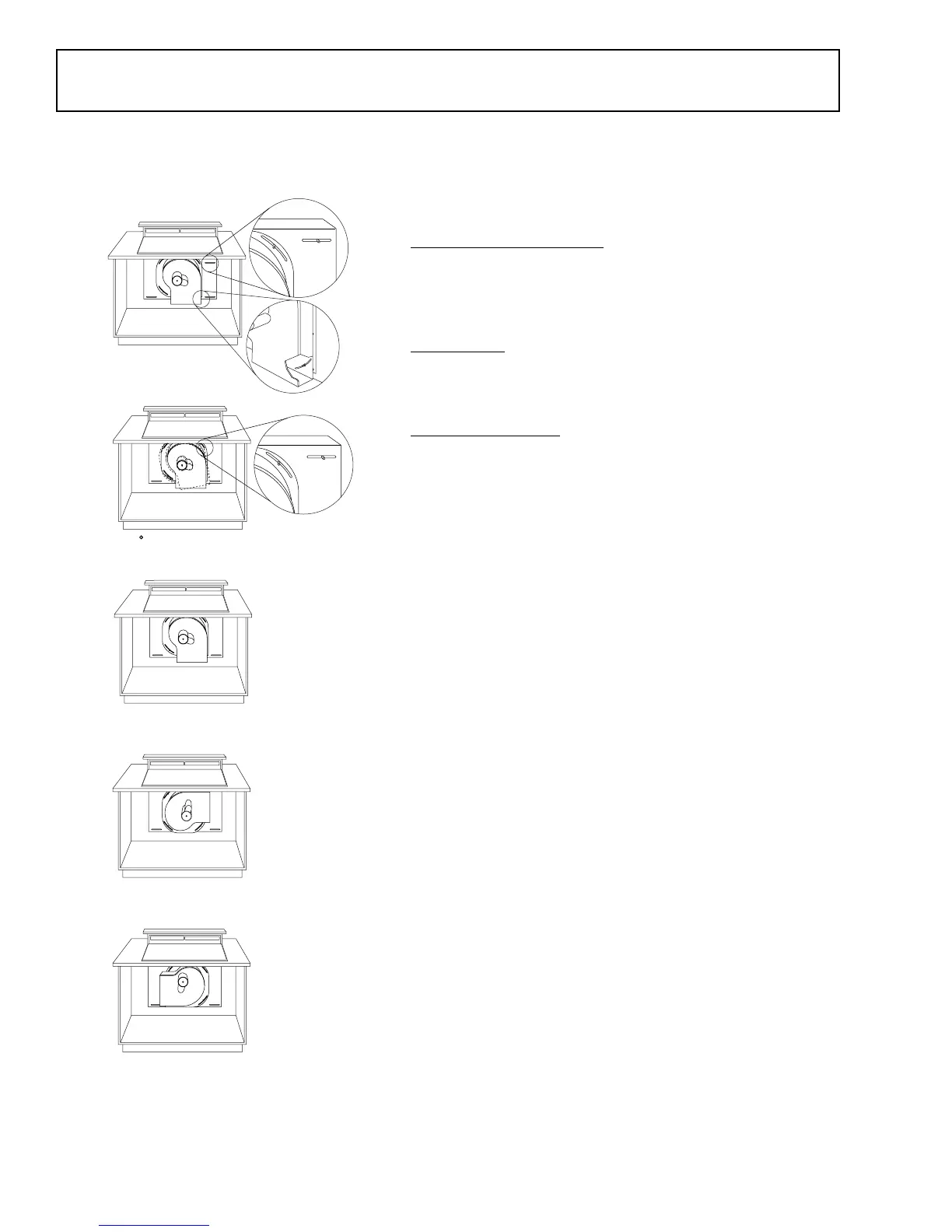
Venting Options
The downdraft vent is shipped with the discharge outlet
pointing straight down. The outlet can be changed to left-
or right-side discharge.
Side-to-Side Adjustments
The blower mounting plate can be adjusted 3-1/2 in. to
the left or right. This will help to align vent discharge to
house ductwork.
30° Rotation
For even more flexibility, the entire blower can be rotated
up to 30° left or 30° right.
Discharge Direction
Note: A left or right 90° direction adjustment should be
performed before dropping into countertop opening.
The blower assembly may be removed and turned 90°
for a left- or right-side discharge (see illustration).
1. Flatten the shipping box to use as a pad.
2. Lay the vent on its back onto the pad.
3. Remove 4 nuts holding the blower to the mounting
plate (see illustration). One nut is just inside the
blower discharge.
4. Remove and turn the blower 90° to the right or left.
5. Reinstall 4 nuts.
Cut Holes for Ductwork
1. Temporarily place the vent into the countertop
opening.
2. Push the vent all the way to the back of the opening.
3. If you are transitioning to 6 in. round, place the
transition piece over the discharge outlet.
a. Mark the location and remove the assembly.
b. Cut holes and install the ductwork connections.
Note: For installation of the blower and motor below the
floor, order Kit JXRB57. See
Accessories
.
• For installation of the blower and motor outdoors,
order Kit JXBC57. See
Accessories
.
Loosen screws to adjust
blower left to right
Nut location inside the
blower discharge
30 rotation left or right
Discharge down (as supplied)
Discharge right
Discharge left
GEA00238


 To Next Page
 Loading...