46
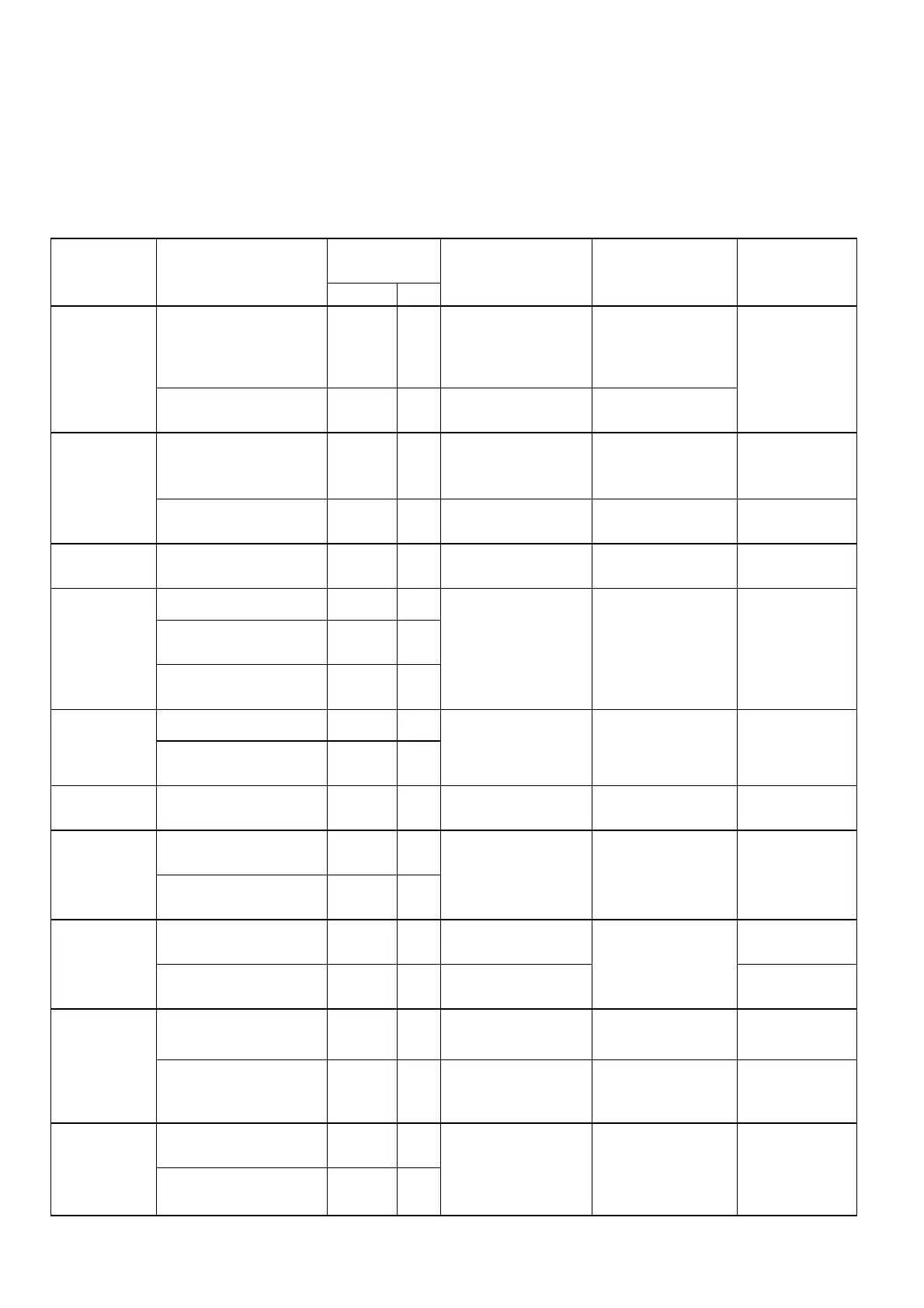
Routine examination and periodical examination
Inverter requires routine and periodical examination and maintenance for a more stable and safer operation.
Refer to following table for required examination item for a more stable and safer operation.
Carry out examination after the “ Power LED ” indicator goes off for 5 minutes to prevent the maintenance
personnel injury caused by the remaining charges in the capacitor of inverter.
Examination
period
Maintenance
item
Maintenance
description
Routine 1 Year
Examination
method
Criterion
Countermeasure
Reconfirm environment
temperature and humidity
°
Refer to installation
instructions and measure
with thermometer and
hygrometer
Temperature: -10~40
OC Humidity: under 95%
without condensing
Installation site
environment
Check and remove any
flammable material nearby
°
Visual inspection No foreign object
Improve installation
site environment
Is there any abnormal
vibration on the installation
site?
°
Visual and audio
inspection
No foreign object Tighten loose
screw
Inverter
Installation anf
grounding
Is the grounding resistance
within acceptable range?
°
Measure resistance by
multi-meter
200V class under 100
ohm
Improve grounding
Input power
source voltage
Is the voltage of the primary
circuitry normal?
°
Measure voltage by
multi-meter
Voltage level conforming
specification
Improve input
power source
Is the tighten parts secured?
°
Is there any sign of breakage
on the terminal panel?
°
Inverter
external
terminal
mounting
screw
Is there any obvious rusty
condition?
°
Visual inspection. Use
screwdriver to verify
screw tightness
No abnormality
Tighten loose screw
or return for repair
Is it deformed or skewed?
°
Internal wiring
of inverter
Is the insulation of wire
broken?
°
Visual inspection
No abnormality
Replace or return
for repair
Heat-sink Is it accumulating dust or
dirt?
°
Visual inspection No abnormality Clean up dust or dirt
Is it accumulating conductive
metal or oil stain?
°
PCB
Is there any over-heated or
burnt component?
°
Visual inspection
No abnormality
Clean up or replace
PCB
Is there any abnormal
vibration or noise?
°
Visual and audio
inspection
Replace cooling fan Cooling fan
Is it accumulating dust or
dirt?
°
Visual inspection
No abnormality
Clean up
Is it accumulating dust or
dirt?
°
Visual inspection No abnormality
Clean up Power
component
Examine resistance between
each terminal
°
Measure by multi-meter No short-circuit or
open-circuit on the
three-phase output
Replace power
component or
inverter
Is there any sign of strange
odor or leakage?
°
Capacitor
Is there any sign of swelling
or bulging?
°
Visual inspection
No abnormality
Replace capacitor
or inverter


 To Next Page