Need help?
Do you have a question about the Gecko in.k330 and is the answer not in the manual?
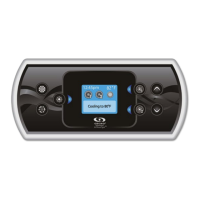
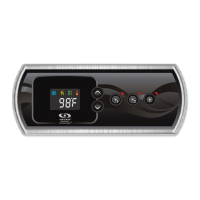
The Gecko in.k330 TechBook describes an affordable and luxurious keypad designed to enhance the spa experience. This keypad is built to be ergonomic, featuring a large LCD screen with excellent contrasts and brightness, static colors, and five keys for easy operation. Its design, with larger dimensions and a backlit outer rim, aims to elevate the aesthetic of any spa.
The in.k330 keypad serves as the primary interface for controlling various functions of a spa system, including pumps, blowers, lighting, and temperature settings. It supports Gecko's in.lu.me LED system and the in.temp heat pump, integrating essential features into a single, user-friendly device.
Starting or Stopping Accessories: To activate or deactivate an accessory, users simply press the corresponding button. An indicator light will illuminate when the accessory is active. For accessories with multiple states (e.g., dual-speed pumps), pressing the button repeatedly cycles through the available states. Indicator lights flash for low-speed operation and remain solid for high-speed. If a blower is present, it is controlled by the Pump 2 key, cycling through pump 2 on, pump 2 high speed (if applicable), blower on, pump 2 off, and blower off.
Water Temperature Adjustment: The current water temperature is displayed on the screen. Users can adjust the desired temperature using the Up and Down buttons. A set point icon appears at the top of the screen during adjustment. After three seconds of inactivity, the keypad reverts to the normal display.
Off Mode: Pressing Pump 1 for five seconds activates Off mode, which temporarily stops all outputs, including automatic functions like filter cycles, heat requests, and Smart Winter Mode, for 30 minutes. This mode is useful for quick spa maintenance. While active, the display alternates between "OFF," the clock, and the water temperature. Pressing Pump 1 or Pump 2 (if available) will restart the system before the 30-minute delay expires. Upon resuming normal operation, "On" is displayed for three seconds.
Keypad Lock: This feature, if enabled in the spa controller configuration, allows users to lock the keypad at two security levels: Partial or Full.
Custom Key (1-Pump Systems Only): This key, available only if the spa controller configuration utilizes a Custom key-related functionality, offers several modes:
The program menu is accessed by holding the Program key (or Light key if no Program key is present) for five seconds. Within this menu, users can set the clock, filter/purge cycles, economy mode, heat pump mode, and temperature units. The Up or Down keys adjust parameters, and the Program key moves to the next parameter. Changes are saved only after confirming the last parameter. If no action is taken for 15 seconds, the system exits the menu, and all changes are saved.
Setting the Clock: Upon entering the program menu, the current clock setting is displayed with the hour flashing. Users adjust the hour and then minutes using the arrow keys, pressing Program to move between them. The system supports 24-hour or 12-hour time, with a dot indicating AM in 12-hour mode.
Programming Filter/Purge Cycles: Depending on the spa configuration, either a filter or purge cycle can be set.
Setting Economy Mode (EP): "EPx" is displayed, with "x" indicating the state (0 = disabled, 1 = enabled). Arrow keys enable or disable the mode. Program moves to economy start time (ES). When ON, the display toggles between "Eco," time, and water temperature. This mode lowers the spa's temperature set point by 20°F (11°C) for a specified period.
Setting Economy Start Time (ES): "ESxx" is displayed, with "xx" representing the hour the economy mode becomes active. Arrow keys adjust the hour, and Program moves to economy duration (Ed).
Setting Economy Duration (Ed): "Edxx" is displayed, with "xx" representing the duration in hours (24 = continuous economy). Arrow keys adjust the hour, and Program moves to heat pump regulation mode.
Heat Pump Regulation Mode (in.temp only): If a Gecko Brand Heat Pump is connected, users can select from various regulation modes: EcoH (Eco Heat), HEAT (Smart Heat), AUTO (Eco Auto), SMRT (Smart Auto), COOL (Cool), and ELEC (Electric). The "Heater" indicator lights up when heating (flashes if suspended), and the "SWM" indicator lights up when cooling. Program moves to temperature unit.
Setting Temperature Unit: Users can choose between Fahrenheit (°F) or Celsius (°C). Arrow keys change the setting, and Program saves all parameters.
Smart Winter Mode (SWM): This feature protects the system from freezing by activating pumps multiple times daily. The "SWM" indicator lights up when freezing is detected and flashes when the purge is active.
Cooldown: After reaching the desired set point, the heater turns off, but its associated pump (Pump 1 low-speed or CP) continues to run for a predetermined period. This ensures adequate cooling of the heating element, extending its lifespan.
Water Temperature Regulation: Every 15 to 90 minutes, the pump runs to ensure accurate water temperature readings and prevent heater activation in dry conditions. After verifying pump activation and taking a temperature reading, the system automatically turns on the heater to maintain the set point. An indicator flashes during water temperature reading.
Installation: The keypad should be installed on a clean, flat surface on the outside edge of the spa. The gasket on the back prevents water infiltration; if damaged, silicone should be used to seal it. The vent hole on the back must not be blocked, and the back of the unit should not be enclosed in a way that allows water to collect.
Connection: To connect the keypad, remove the spa pack cover, insert the in.link connector into the appropriate keypad connector, and route the cable through a molded strain relief channel. Fill any remaining space with supplied foam gaskets and replace the cover and screws.
Troubleshooting: The TechBook includes a list of error messages that may appear on the screen, directing users to the troubleshooting and error codes section of their spa control's TechBook for more details.
Servicing: Users are advised not to attempt to repair the unit themselves if problems arise. Instead, it should be returned to a dealer or service station for servicing. Only specified accessory parts should be used to avoid damage or product failure.
Disposal: The appliance must be disposed of separately in accordance with local waste disposal legislation.
 General
| Model | in.k330 |
|---|---|
| Category | Spa Accessories |
| Manufacturer | Gecko |
| Type | Keypad |
| Material | Plastic |
| Usage | Spa control |

 To Next Page