EasyManua.ls Logo

Geemarc CL7400 - Tone Adjustment; Stereo;Mono Mode Selection

Geemarc CL7400
14 pages
Print Icon
To Next Page IconTo Next Page
To Previous Page IconTo Previous Page
Loading...
Tone Setting
Stereo/Mono Setting
Stereo or Mono mode can be controlled by moving S/M switch to the
desired side. This switch is found on the underside of the charging base
(using a needle or pencil is helpful).
Moving the switch to “S” side means the CL7200 will work in Stereo
mode. Moving the switch to “M” side means the CL7200 will work in Mono
mode
11111
Min
Mid
'
Max
SETTINGS
13
14 14
SETTINGS
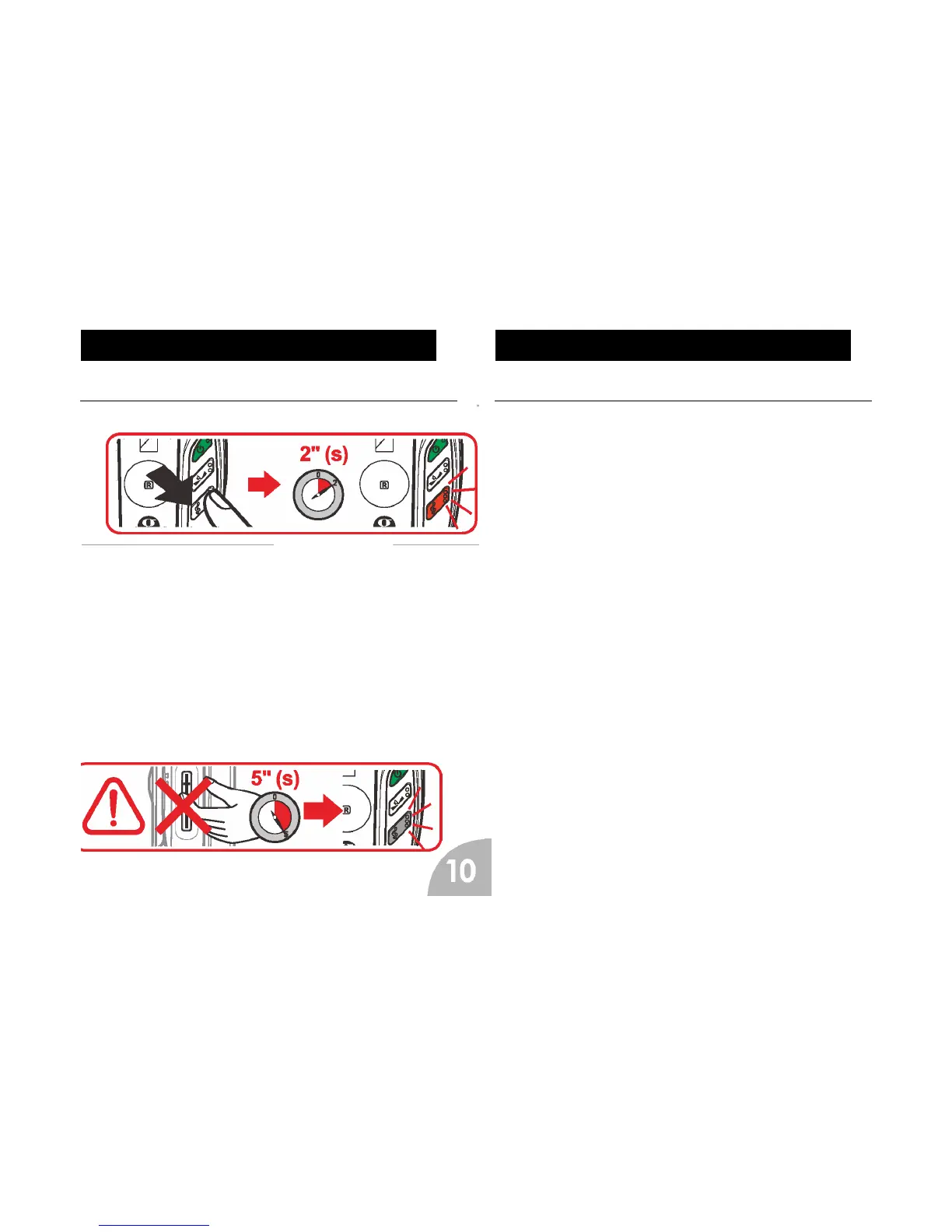
The Tone can be controlled by pressing the tone button on the headphones. Press
and hold this for 2 seconds. At this point, pushing headset ‘+’ button will increase the
high tones. Pushing the -’ button will increase the low tones. At minimum, maximum
or middle point a beep will be heard. Tone setting mode will switch off automatically
after 5 seconds.

Other manuals for Geemarc CL7400

Related product manuals