GEMORO TESTEROSSA 16 17
minutes without being used, it
will automatically turn itself OFF
and say, “POWER DOWN”.
5. When using the TESTEROSSA
for the first time, the factory
setting is designed to indicate by
default to the English-speaking
mode. While in this mode it
has the ability to identify and
say “READY,” “DIAMOND,”
“MOISSANITE,” “METAL ALERT,”
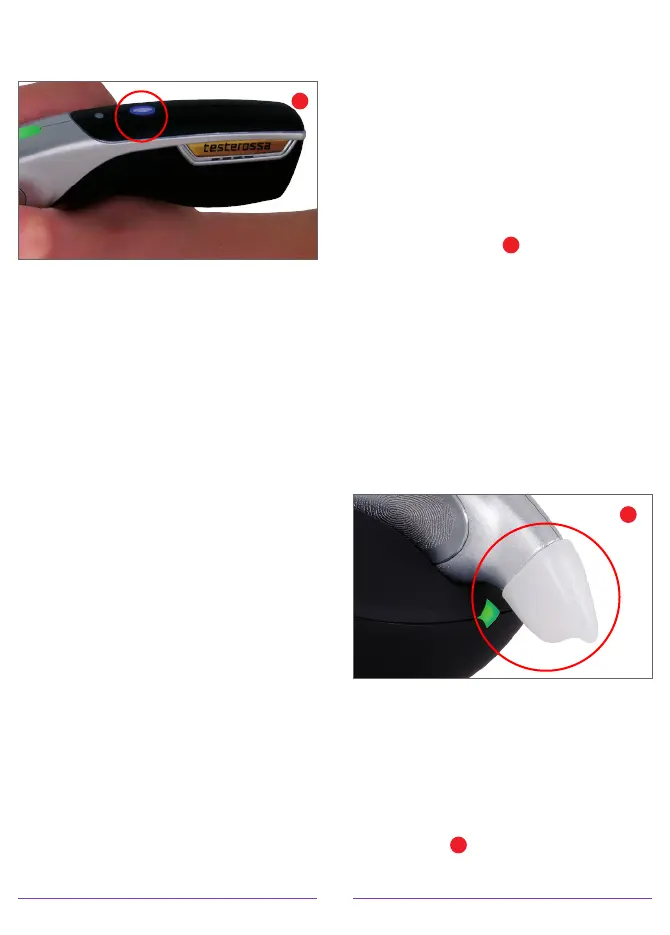
and “POWER DOWN”. To change
the indication, while the tester is
powered on and the blue power
switch is illuminated, press and
hold the power button down until
the indicator begins scrolling
through the various options. The
options include: English, Ring
Tone, Spanish, German, Italian,
French, Japanese, Mandarin
Chinese, Russian, and Arabic. Once
the desired indication has been
found, remove your finger from
the button. The TESTEROSSA’s
indicator will remain in that mode
the next time the unit is powered
up or until it is physically changed.
6. The TESTEROSSA is also equipped
with a PATENTED color-coded light
pipe and probe tip cone indicator.
This line of sight colored indicator
allows the user to easily see the
test results while keeping their
eyes on the stone being tested.
GREEN = Diamond
BLUE = Moissanite
PINK = Sapphire
RED = Metal Alert
7. Prior to using the TESTEROSSA,
be certain to REMOVE THE WHITE
PROBE TIP CAP
J
at the front end
of the tester that serves to protect
the probe tip from accidentally
being bent or broken. The cap
may be easily removed by simply
applying a minimal amount of
pressure to the top and bottom
sides of the cap, as you hold it
between your thumb and forefinger.
Then gently pull it down, out and
off. Always replace the cap when
the TESTEROSSA is not in use.
8. To properly hold the TESTEROSSA,
it is important to grasp the tester
similarly to how you’d hold a pen,
but with your thumb and forefinger
touching the PATENTED finger
pads located on either side of
the tester
K
. This will allow you
to easily manipulate the tester
PROBE TIP CAP
J
POWER BUTTON
I


 To Next Page