3
2. DRG488 installation
Option A: Placing the DRG on your desktop
To protect any surface that the DRG is standing
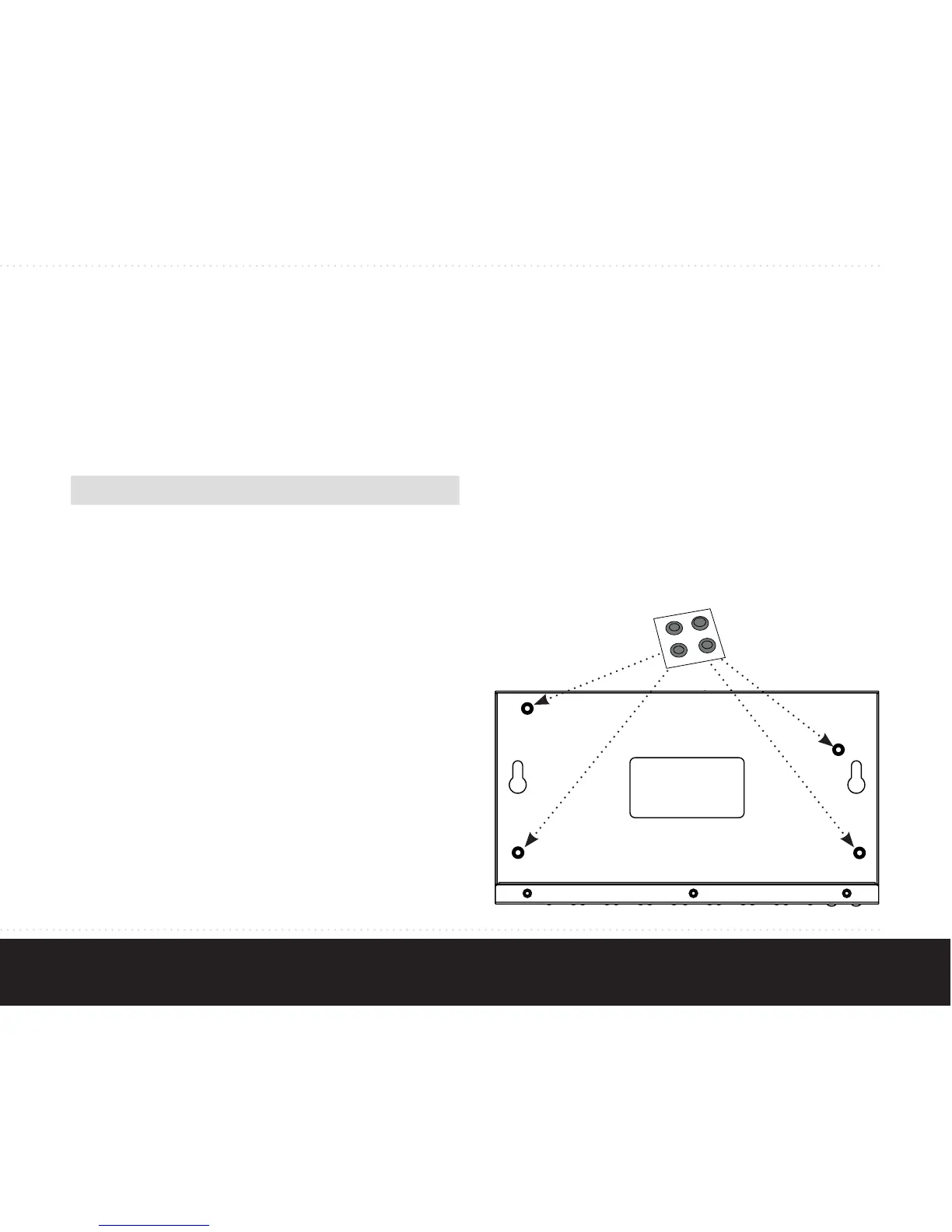
on, there are four rubber pads that need to be
attached.
1. Peel the protective paper from the rubber
pads to expose the adhesive side.
2. Press each of the pads on the bottom of the
DRG casing, as shown below.
3. Place the DRG on your desktop
Step 1: Select a suitable location for the DRG
Before installing the DRG, ensure your working
environment meets the minimum operating require-
ments of the equipment.
Characteristics Requirements
Temperature Between 0 and 45 degrees
Celcius
Operating
Humidity
Max. relative humidity of 90%,
non-condensing
Ventilation Minimum 10 centimeters on
all sides for cooling. If in a
closet, ensure there is ade-
quate airflow.
Step 2: Placement options
The DRG488 installation kit provides parts that
allow you to place the DRG in various locations.
Select the procedure best suited to your operating
environment:



 To Next Page