User’s Manual—Read before using this equipment
9
ENGLISH
WASTE DISPOSAL
Appliance, accessories and packaging should be recycled in an environmentally friendly man-
ner. Plastic parts are coded for purposes of separation when recycling.
Accumulators and battery-powered electrical appliances contain materials which are harmful
to the environment.
Do not dispose of batteries and/or electric/electronic appliances in normal household refuse.
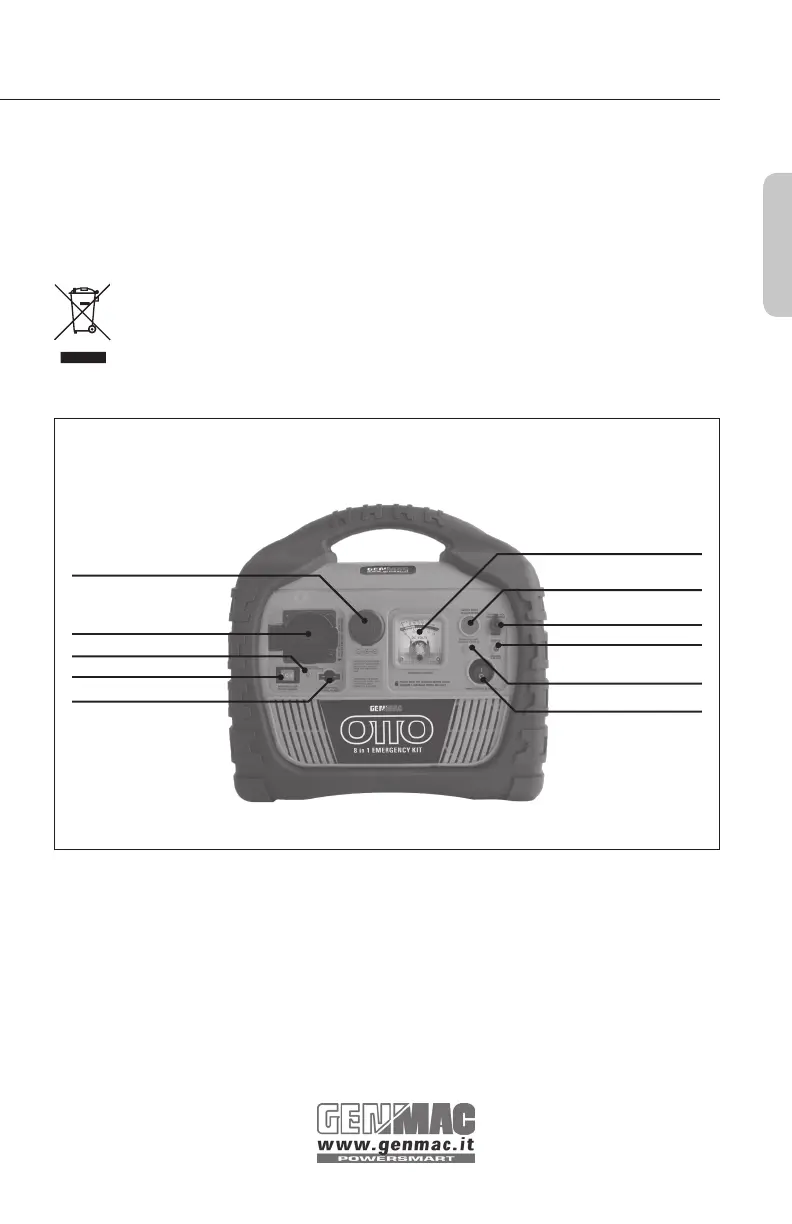
FRONT VIEW
DC Power Port
Battery Status Meter
Inverter Power Indicator
Inverter Power Switch
40 Amp Fuse
230V AC Outlet
Battery Status Button
Work Light Switch
Charging Jack
Charging Indicator
Reverse Polarity
Indicator
BATTERY STATUS
Battery Status provides the user with a current state of charge on the internal battery. It is the
user’s responsibility to periodically monitor the battery charge and to recharge the battery af-
ter each use. Recharge every three months even if the OTTO 8 in 1 Emergency Kit is not used.
1. Press and hold the Battery Status button.
2. The Battery Status meter (DC Voltmeter) will display the battery voltage.
3. Battery status (voltage) is read with charging adapters disconnected.
• 12.6V DC and above: battery is ready for use


 To Next Page