To view the different parameter readings, press
, and the LCD indicator (8) will display these readings in the
following order
:
- RPM of generator / frequency (Hz).
- Line-Neutral AC voltage of generator.
- Line-Line AC voltage of generator.
- Oil pressure.
- Coolant temperature.
- Fuel level (%).
- Engine operating hours.
- DC voltage of battery.
- AC line current.
- Total kW.
- Voltage (V).
- Phase angle (cos).
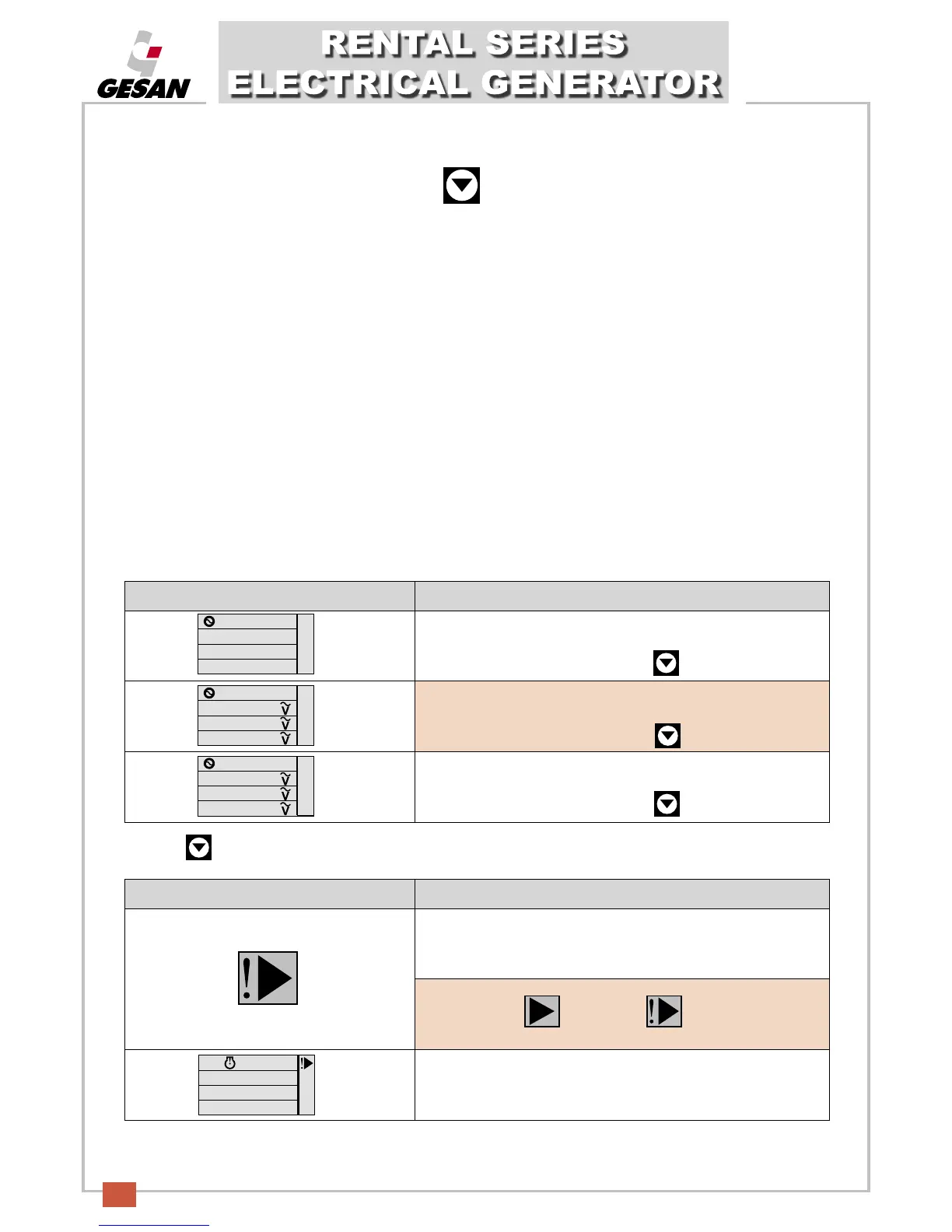
The following is an example of what the LCD screen (8) will look like when the various parameters are displayed:
Pressing afterwards, we move from one parameter to the next in the order specified on the previous page.
SCREEN SEQUENCE DESCRIPTION
Initial screen in which engine speed and generator frequency are
measured.
To measure the next parameter, press
Then the second measurement screen appears, indicating the
voltage readings between each phase and neutral.
T
o measure the next parameter, press
The third measurement screen will appear, indicating the voltage
readings between phases.
To measure the next parameter, press
L1- L2 397.0
L2- L3 401.0
L3- L1 408.3
L1- N 229.2
L2- N 231.5
L3- N 235.7
Rpm
1500
Hz
50.0
WARNING/STOPPAGE DESCRIPTION
Turns on to indicate a set alarm; displayed along with the icons
detailed on the preceding page.
Warning state = ; Stoppage =
LCD screen will appear as follows when a configurable alarm is
activated.


 To Next Page