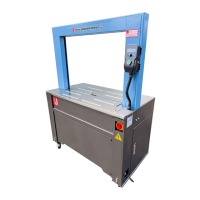
3. OPERATION DESCRIPTION
3.1 INSTALLMENT
1) Apart all the wooden package. Avoid damaging the machine.
2) Move the machine to an installment position by fork lift.
3) Lift up the tower.
4) Fix and tighten the tower by M10 screws.
5) Connect the sensor wires.
Proximity Switch: +,-,4.
Motor for Elevator: U3,V3,W3.
6) Install the motor’s cover.
7) Install the motor’s cover.
8) Use forklift to lift up the machine, and fix the M12 adjusted leg screws into
the loadcells.
9) Place the machine on the ground and adjust the height of 4 * M12
adjusted leg screws to make the turntable to be level. At the same time to
keep at least 20mm between the bottom line of the bottom unit and the
ground.
10) O n c e f i n i s h e d t h e a d j u s t m e n t o f t he level, please check again if 4 * M12
adjusted leg screws is contacted with floor surface, then tight the M12 nut
to fix.
11) C o n n e c t t h e p o w e r c a b l e w i t h t h e s o c k e t b y a 1 1 0 V / 2 2 0 V p o w e r .



 To Next Page