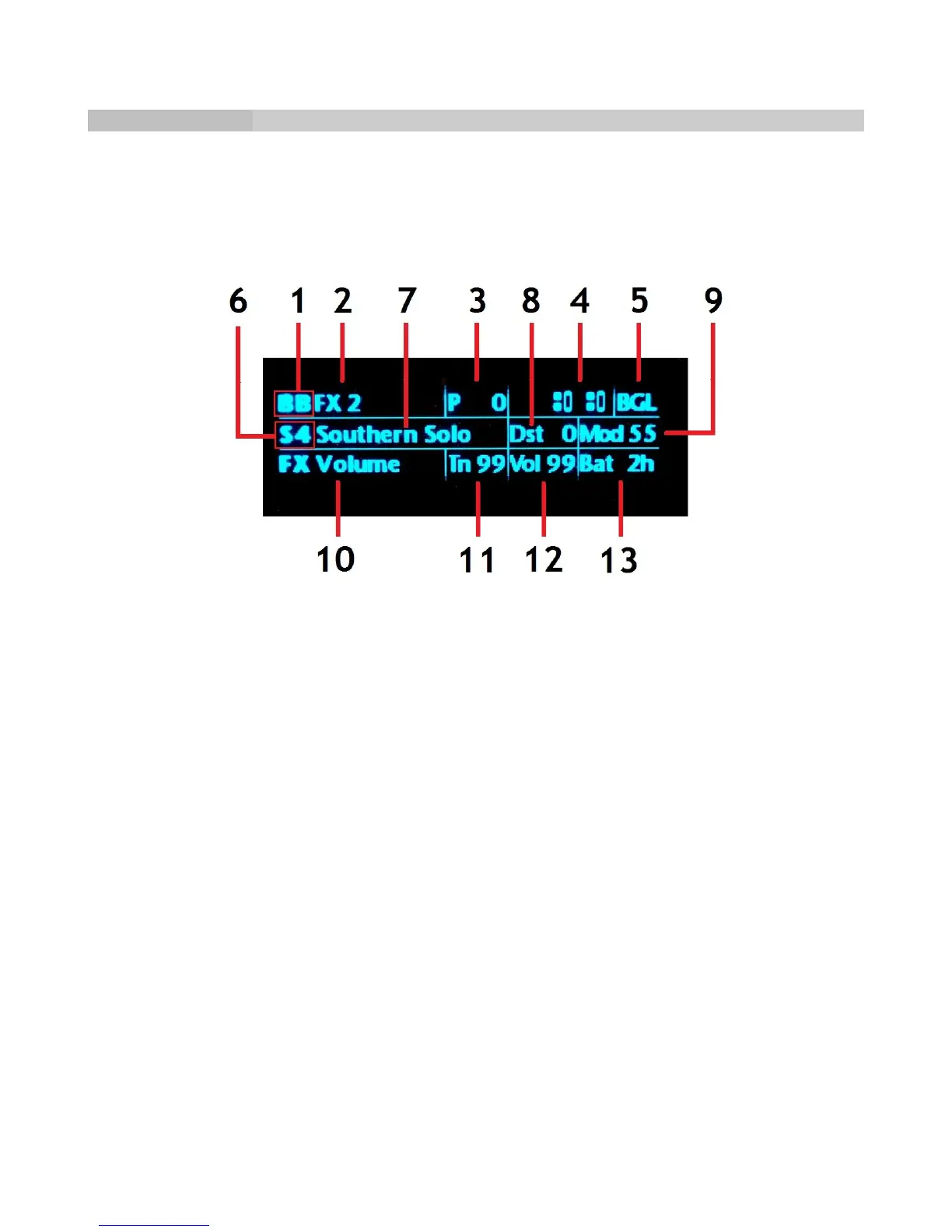
Pedalboard Display
When you rotate the Gear Shift to change Banks or the Pickup Selector/Patch Selector
switch to change patches, the display shows the Bank and Patch in large type for about two
seconds, then reverts to the default display. The default shows the following (numbers in
the descriptions are keyed to the display image).
Top Line
(1) Bank number
(2) Bank name
(3) Silver tog-pot piezo level (00-99)
(4) Pickup configuration
(5) BGL if Bluetooth (B), Guitar Link (G), and Bone Link (L) are active. If any of these are
inactive, the corresponding letter will be dimmed.
Middle Line
(6) Patch number
(7) Patch name
(8) Distortion Amount (00-99, Patch Play mode only)
(9) Reverb Amount (00-99, Patch Play mode only)
Bottom Line
(10) Pedal function (name is dim if bypassed, bright if enabled)
(11) Tone setting (00-99)
(12) Volume setting (00-99)
(13) Estimated remaining guitar battery life in hours
Page 22



 To Next Page