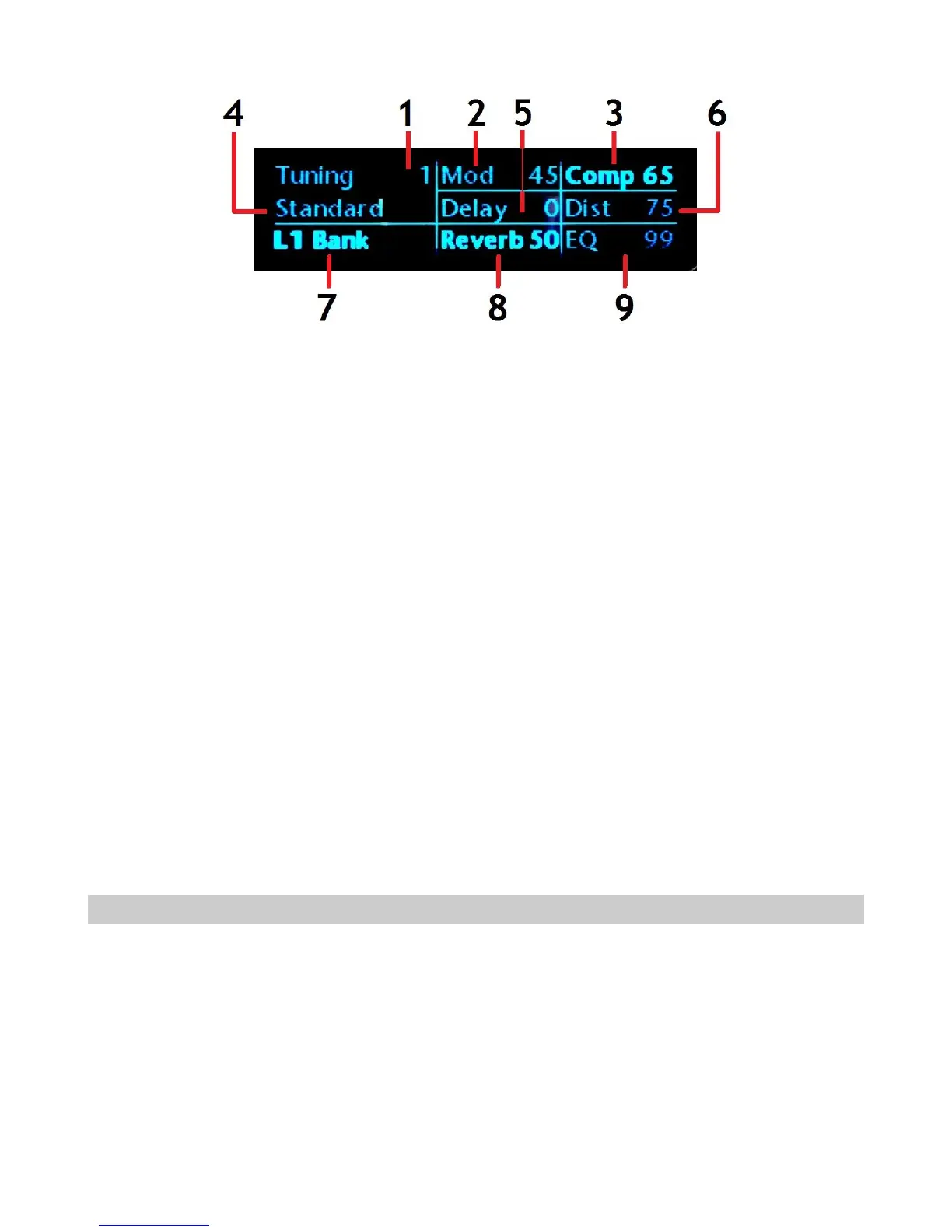
Top Line
(1) Tuning number
(2) Modulation wet/dry mix (00-99) as selected by the blue tog-pot when switched to the
Mod position
(3) Compressor wet/dry mix (00-99) as selected by the red tog-pot when switched to the
Comp position
Middle Line
(4) Tuning name
(5) Delay wet/dry mix (00-99) as selected by the blue tog-pot when switched to the Echo
position
(6) Distortion wet/dry mix (00-99) as selected by the red tog-pot when switched to the Dist
position
Bottom Line
(7) Current selected function (Tuning, Bank, Patch, Echoplex Looper, Pickup, Effect)
(8) Reverb wet/dry mix (00-99) as selected by the blue tog-pot when switched to the
Reverb position
(9) EQ wet/dry mix (00-99) as selected by the red tog-pot when switched to the EQ position
Turn Off the Pedalboard or Switchboard
Turn Off the Pedalboard or Switchboard
1. To turn off the Pedalboard or Switchboard, press and hold the Upper Middle footswitch
until the display shows Shutdown?
2. Press the Upper Right footswitch to shut down, or the Upper Left footswitch to cancel.
You can also simply disconnect the AC adapter.
Page 24



 To Next Page