- 67 -
Conguring SATA Hard Drive(s)
Chapter3 ConguringSATAHardDrive(s)
TocongureSATAharddrive(s),followthestepsbelow:
A. InstallSATAharddrive(s)inyourcomputer.
B. CongureSATAcontrollermodeinBIOSSetup.
C. CongureaRAIDarrayinRAIDBIOS.
(Note1)
D. Install the SATA RAID/AHCI driver and operating system.
(Note2)
Beforeyoubegin,pleasepreparethefollowingitems:
• AtleasttwoSATAharddrives(toensureoptimalperformance,itisrecommendedthatyouusetwoharddrives
withidenticalmodelandcapacity).IfyoudonotwanttocreateRAID,youmayprepareonlyoneharddrive.
• A Windows setup disk.
• Motherboard driver disk.
• A USB thumb drive.
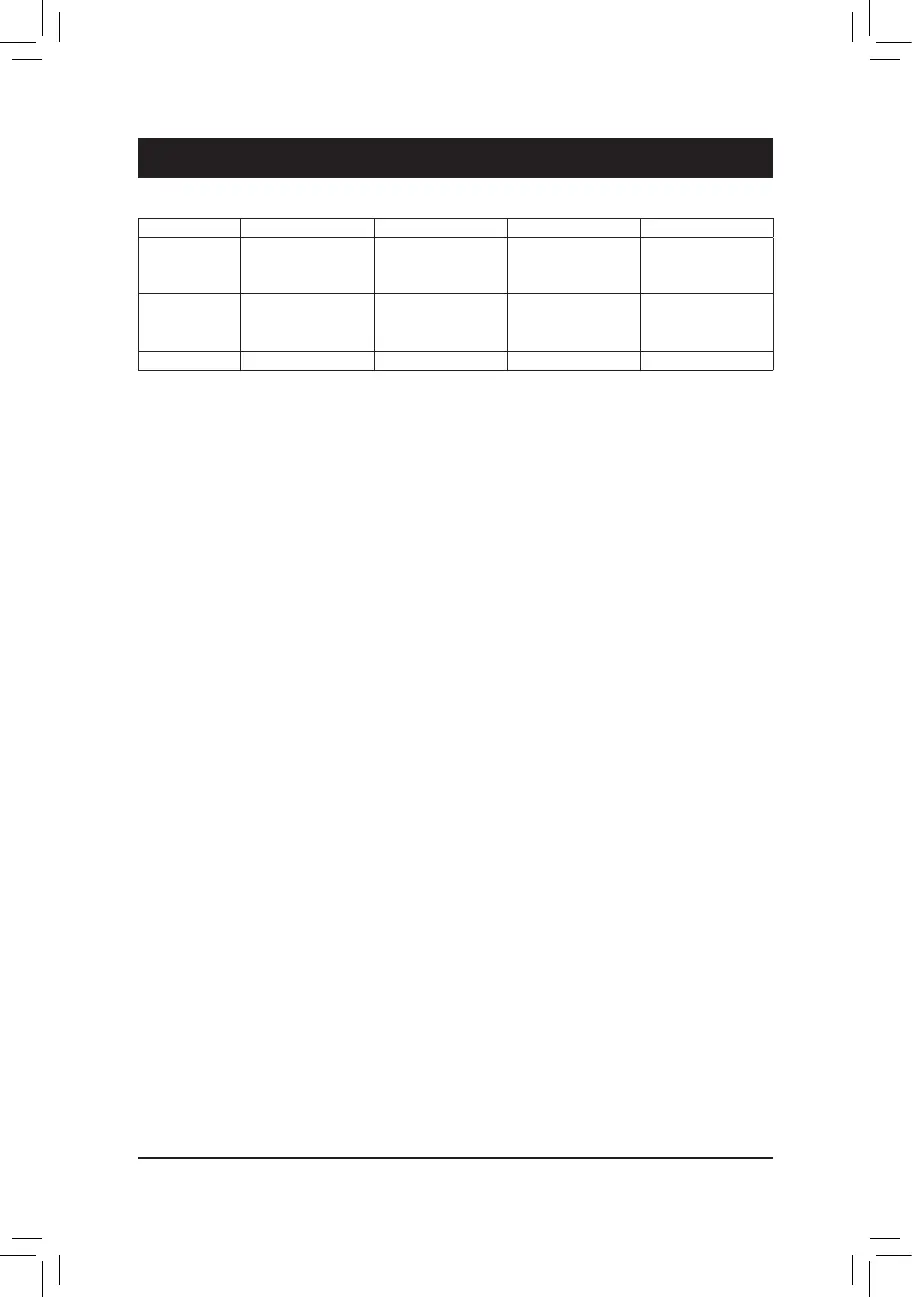
RAIDLevels
3-1 ConguringSATAControllers
A.InstallingSATAharddrive(s)inyourcomputer
Attach one end of the SATA signal cable to the rear of the SATA hard drive and the other end to available
SATAportonthemotherboard.IfyouwanttocongureaRAIDset,makesuretoconnecttheharddrivesto
the SATA 0~5 ports. Then connect the power connector from your power supply to the hard drive.
RAID 0 RAID 1 RAID 5 RAID 10
Minimum
Number of Hard
Drives
≥2 2 ≥3 ≥4
Array Capacity Number of hard
drives*Sizeofthe
smallest drive
Sizeofthesmallest
drive
(Numberofhard
drives-1)*Sizeof
the smallest drive
(Numberofhard
drives/2)*Sizeofthe
smallest drive
Fault Tolerance No Yes Yes Yes
(Note1) SkipthisstepifyoudonotwanttocreateRAIDarrayontheSATAcontroller.
(Note2) RequiredwhentheSATAcontrollerissettoAHCIorRAIDmode.


 To Next Page
 Loading...