GD-Link Adapter User Guide
5
1. Introduction
GD-Link adapter is a three-in-one multi-function development tool for GD32 series of MCUs.
It provides CMSIS-DAP debugger port with JTAG/SWD interface. User can use GD-Link
adapter for online programming or debugging code in compatible IDE such as Keil or IAR.
Another important function is offline programming.
The objective of this user guide is to describe how to use GD-Link adapter to achieve the
above function.
2. Interactive mode and hardware connection
2.1. Buttons and LED
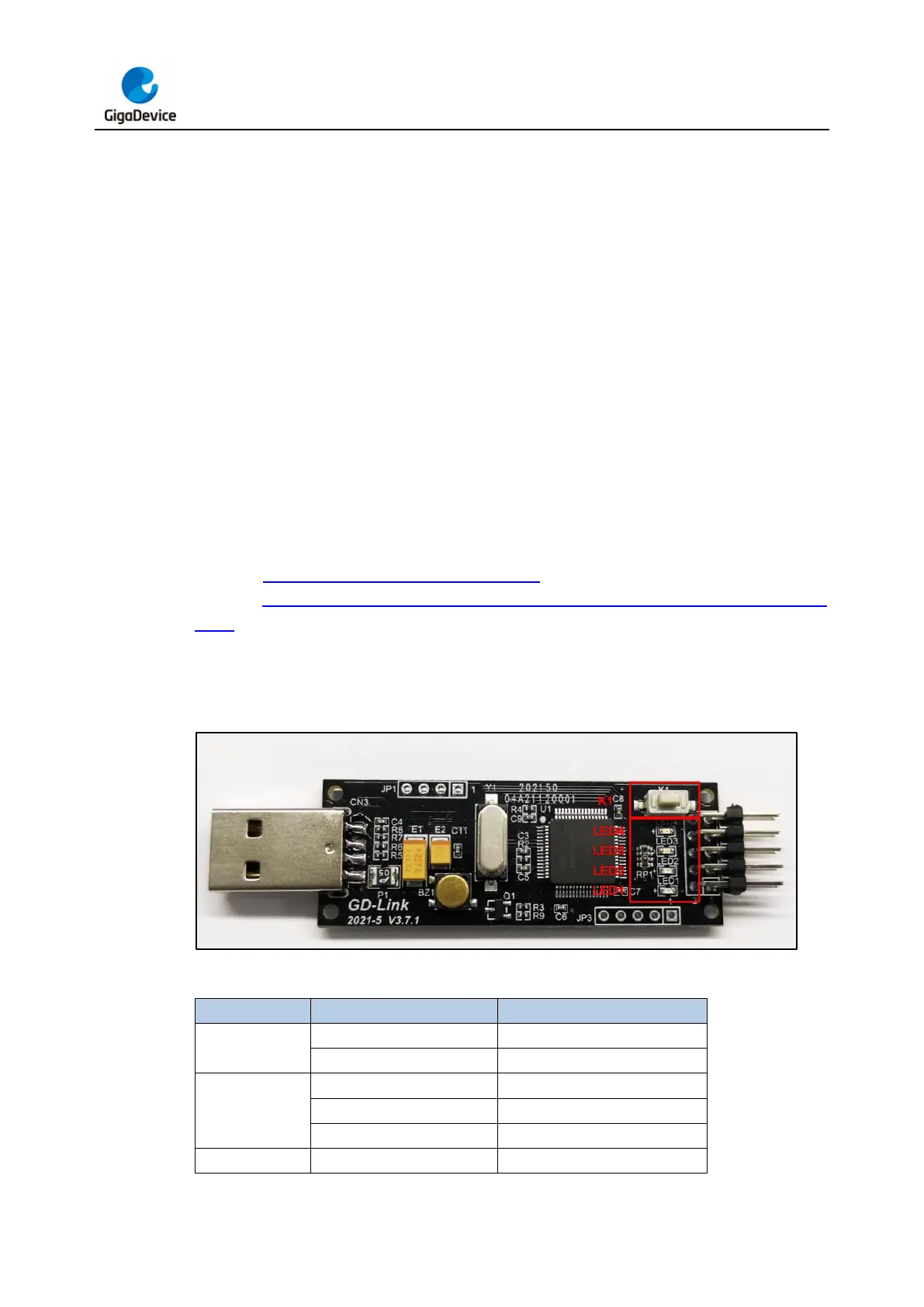
There are a button KEY1 and 4 LEDs on GD-Link. The button KEY1 is used for firmware
upgrade and offline programming. The LEDs are used to display the working status of GD-
Link. The Figure 2-1. GD-Link adapter hardware shows the position of KEY1 and LEDs on
GD-Link. Table 2-1. The working status of GD-Link adapter represented by different
LEDs briefly describes GD-Link working status indicated by each LED status. The specific
meaning of the LED status and the use of the button will be described in detail in the following
chapters.
Figure 2-1. GD-Link adapter hardware
Table 2-1. The working status of GD-Link adapter represented by different LEDs
offline programming successful
USB connection successful



 To Next Page