EasyManua.ls Logo

Gigaset A2 - Brief Overview

Gigaset A2
25 pages
Print Icon
To Next Page IconTo Next Page
To Previous Page IconTo Previous Page
Loading...
2
Brief overview
Gigaset A2 / gb / A31008-A002-B001-1-6Z19 / overview.fm / 23.07.2003
Brief overview
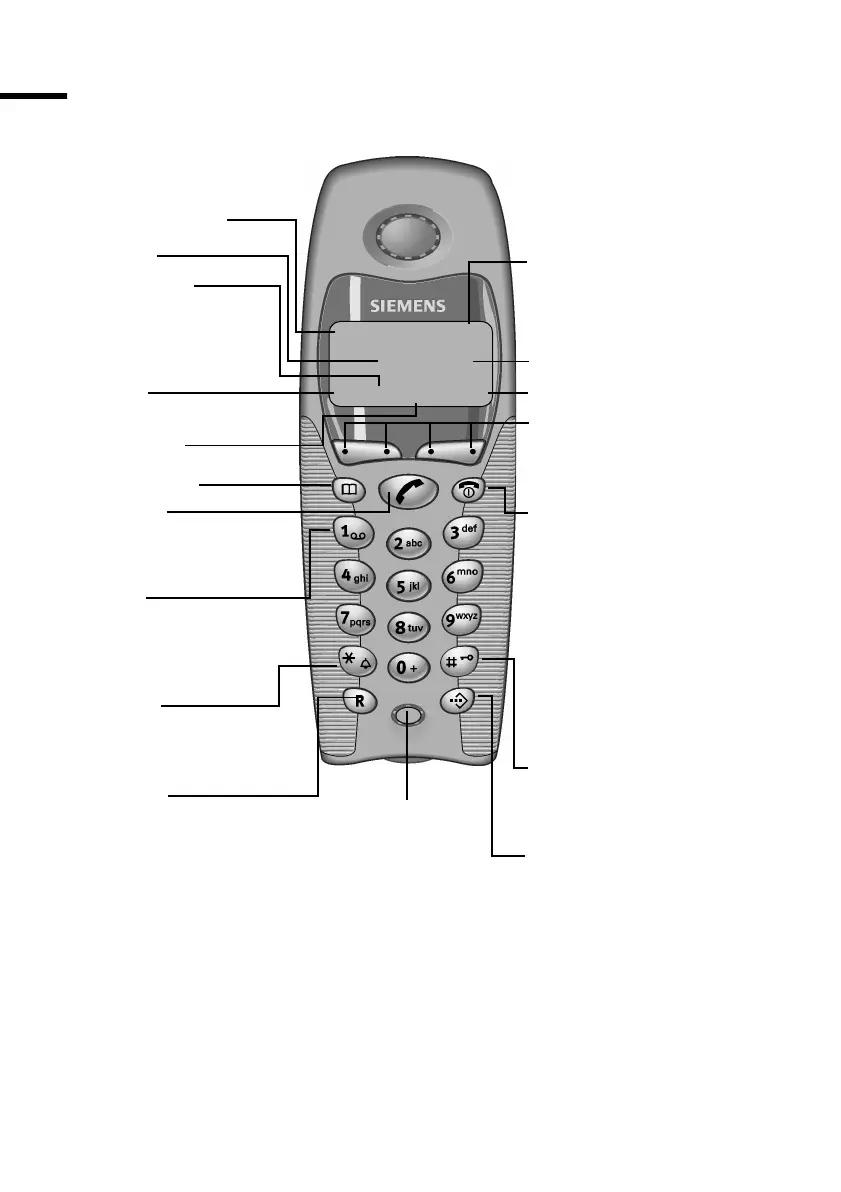
Talk key
Answer a call
Start dialling
1 V
22-35
ÞÜ INTMENU
Directory key
End call key and
On/Off key
End call
End function
Back one menu level
(press briefly)
Return to idle state
(hold down)
Handset on/off
(hold down)
Speed dial key
Open the speed dial list
Caller list
Access to
Answering machine
Caller list
Star key
Ringer on/off
(hold down)
Battery charging status
= flat U full
flashing: battery almost
empty
Internal number
of the handset
Display keys
Activate current functions
in display
Microphone
Display
Hash key
Keypad lock on/off
(hold down)
R key
Enquiry (Flash)
Insert a dialling pause
(hold down)
Time
Redial
Internal list
Menu
Key 1
Select answering machine
(hold down)

Related product manuals