Template Module, Version 2.1, 11.08.2020 / Template Basiseinstellungen: Version 3.1 - 07.07.2020
Handset
COMFORT 550 / 550A / LUG_Kombi IM-Nord en / A31008-M3001-R201-1-SM19 / starting_Kombi.fm / 4/11/22
10
Setting up the handset for use
The display is protected by a plastic film. Please remove the protective film!
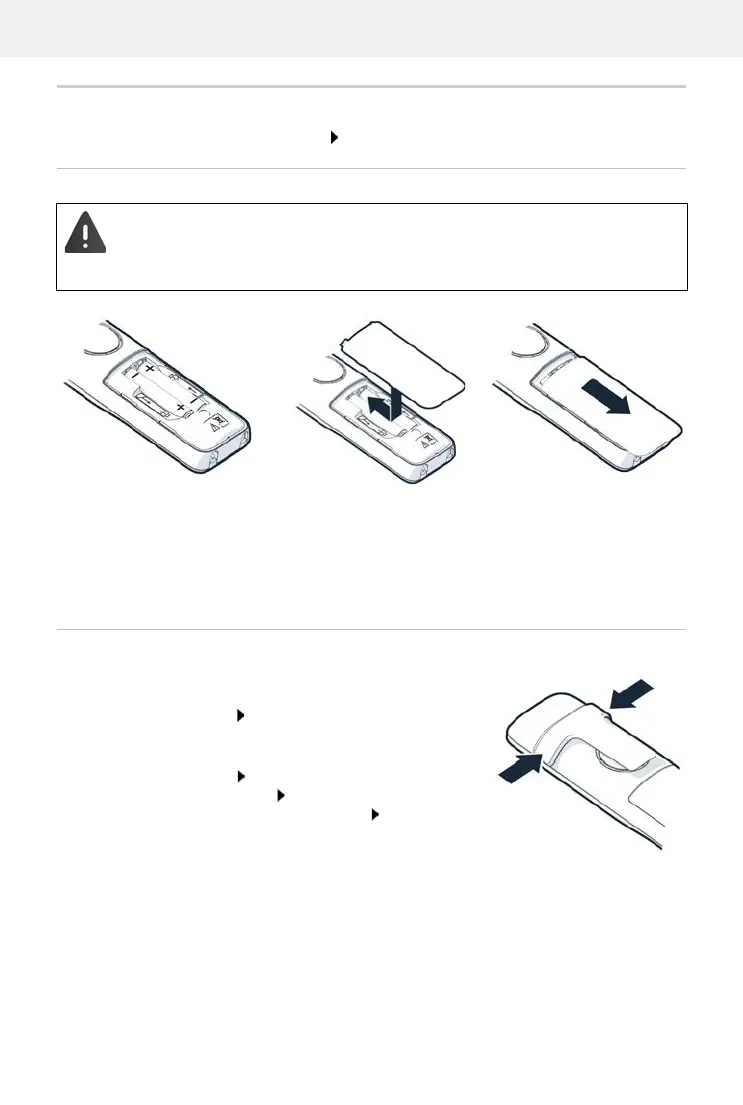
Inserting the batteries
Attaching the belt clip
The handset has notches on each side for attaching the belt
clip.
• Attaching the belt clip: Press the belt clip onto the
back of the handset so that the tabs on the belt clip click
in
to place in the notches.
• Removing the belt clip: Press the centre of the belt clip
firmly with your right thumb. Push the nail of your left
thumb up between the clip and the casing. Slide the
clip upwards to remove.
Only use rechargeable batteries since otherwise major health risks and injury may
result. For example, the outer casing of the batteries could be destroyed or the
batteries could explode. The device could also malfunction or be damaged as a result
of using batteries that are not of the recommended type.
Insert the batteries
(for correct +/- direction,
see diagram).
Fit the battery cover from
the top.
Press the cover until it
clicks into place.
To re-open the battery cover:
Insert a fingernail behind
the notch at the top of the
cover and slide it
downwards.



 To Next Page