COMFORT 550 / 550A / LUG_Kombi IM-Nord en / A31008-M3001-R201-1-SM19 / extending.fm / 4/11/22
Template Module, Version 2.1, 11.08.2020 / Template Basiseinstellungen: Version 3.1 - 07.07.2020
Repeater
57
Changing the handset name and internal number
When registering multiple handsets, they will automatically be assigned the names INT 1,
INT 2
etc. Each handset will automatically be assigned the lowest unassigned internal number.
The internal number is shown as the name of the handset on the display e.g. INT 2. Y
ou can
change the names and the numbers of handsets. The name must not exceed 10 characters in
length.
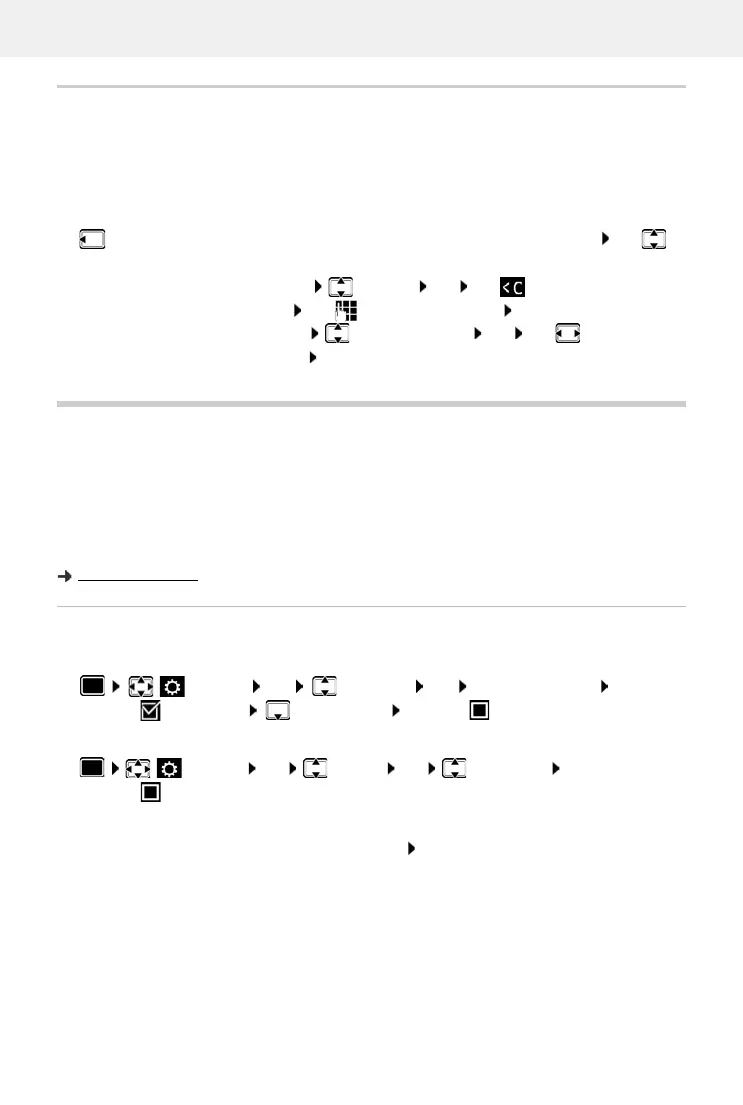
. . . the list of handsets is opened, the current handset is highlighted with < use to
select a handset . . . possible options:
Repeater
A repeater increases the receiving range between the Gigaset handset and the base station.
The registration procedure for a repeater depends on the version of the repeater being used.
• Repeater without encryption, e.g. Gigaset repeater prior to Version 2.0
• Repeater with encryption, e.g. Gigaset repeater later than Version 2.0
Further information about the Gigaset repeater can be found in the repeater user guide and at
www.gigaset.com.
Repeater without encryption
Activate Maximum Range/deactivate No Radiation
Disabling encryption
Registering a repeater
Connect the repeater to the mains power supply Press and hold the Registration/paging
key on the telephone base station (min. 3 secs) . . . the repeater is automatically registered
It is possible to register more than one Gigaset repeater.
Edit name:
Options Rename OK use to delete the current
name use to enter a new name OK
Edit number:
Options Edit Handset No. OK use to select a
number S
ave
Settings OK ECO DECT OK Maximum Range
Change ( = activated) No Radiation Change ( = deactivated)
Settings OK System OK Encryption
Change ( = deactivated)



 To Next Page