Template Module, Version 2.1, 11.08.2020 / Template Basiseinstellungen: Version 3.1 - 07.07.2020
Making calls
COMFORT 550 / 550A / LUG_Kombi IM-Nord en / A31008-M3001-R201-1-SM19 / telephony.fm / 4/11/22
18
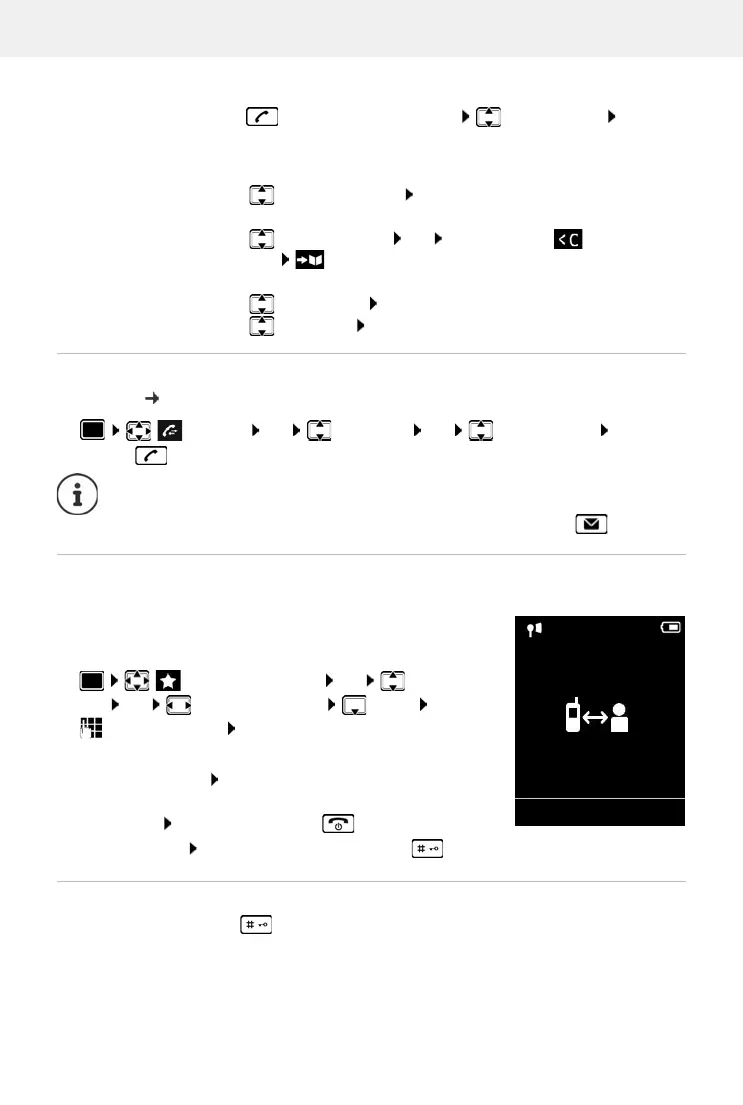
Managing entries in the redial list
Briefly press the Talk key . . . the redial list is opened select an entry Options
. . . possible options:
Dialling from the call list
The call lists ( p. 27) contain the most recent accepted, outgoing and missed calls.
One touch call
A saved number is dialled by pressing any key. This allows children
who are not yet able to enter a number to call a certain number, for
example.
Activate one touch call mode:
Make a one touch call: Press any key . . . the saved number is
dialled
Cancel dialling: Press the End call key
End one touch call: Press and hold the End call key
Enter a dial pause when dialling
Press and hold the hash key. A P is shown on the display
Copy an entry to the directory:
Copy to Directory OK
Copy the number to the display:
Display number OK Use as required to change or
add save as a new entry in the directory
Delete the selected entry:
Delete entry OK
Delete all entries:
Delete List OK
Call Lists OK select a list OK select an entry press the
Talk key
The call lists can be displayed directly by pressing the display key Calls if the relevant
function has been assigned to the display key.
The Missed calls list can also be opened by pressing the Message key .
Additional Features OK One Touch
Call OK activate A
ctivation Call to
enter the number S
ave . . . the active one touch mode is
shown in the idle display
07:15
INT 1 22 Feb
OneTouchCall active
0891234567
OFF
Example



 To Next Page