COMFORT 550 / 550A / LUG_Kombi IM-Nord en / A31008-M3001-R201-1-SM19 / call_list.fm / 4/11/22
Template Module, Version 2.1, 11.08.2020 / Template Basiseinstellungen: Version 3.1 - 07.07.2020
Message lists
29
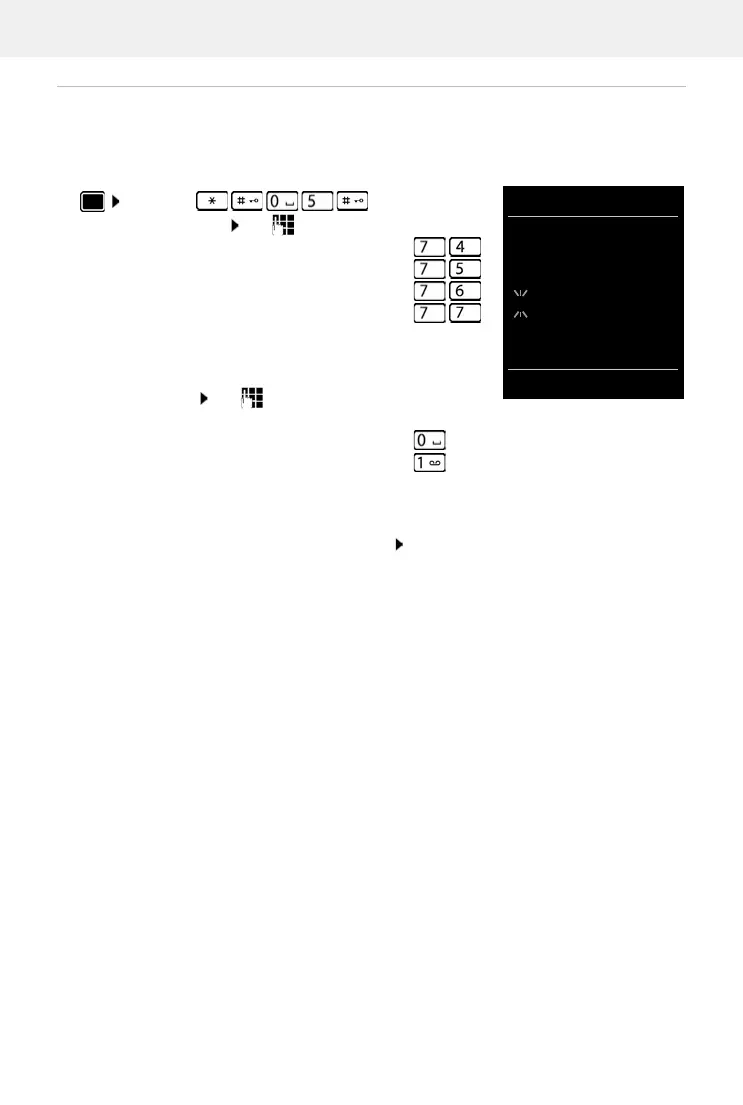
Activating/deactivating Message key flashing
Receipt of new messages is displayed by a flashing message key on the handset. This type of
alert can be activated/deactivated for each message type.
In idle status:
The number 9 followed by the entry (e.g. 975) is displayed, the
current setting for the select message type flashes in the
entry field (e.g. 0) use to set the action for the arrival of
new messages:
Confirm selected setting with OK
or
return to idle display without making changes: Back
Press keys . . . the number 9
appears in the display use to select the message type:
Messages on the network mailbox
missed calls
new SMS
Messages on the answer machine (only for
a system with a local answer machine)
The Message key flashes
The Message key does not flash



 To Next Page