Template Module, Version 1.2, 11.09.2018,
Base
Gigaset E370 / LUG_NF BE-NL en / A31008-M2815-M201-1-3F19 / starting_NF.fm / 11/23/18
8
Base
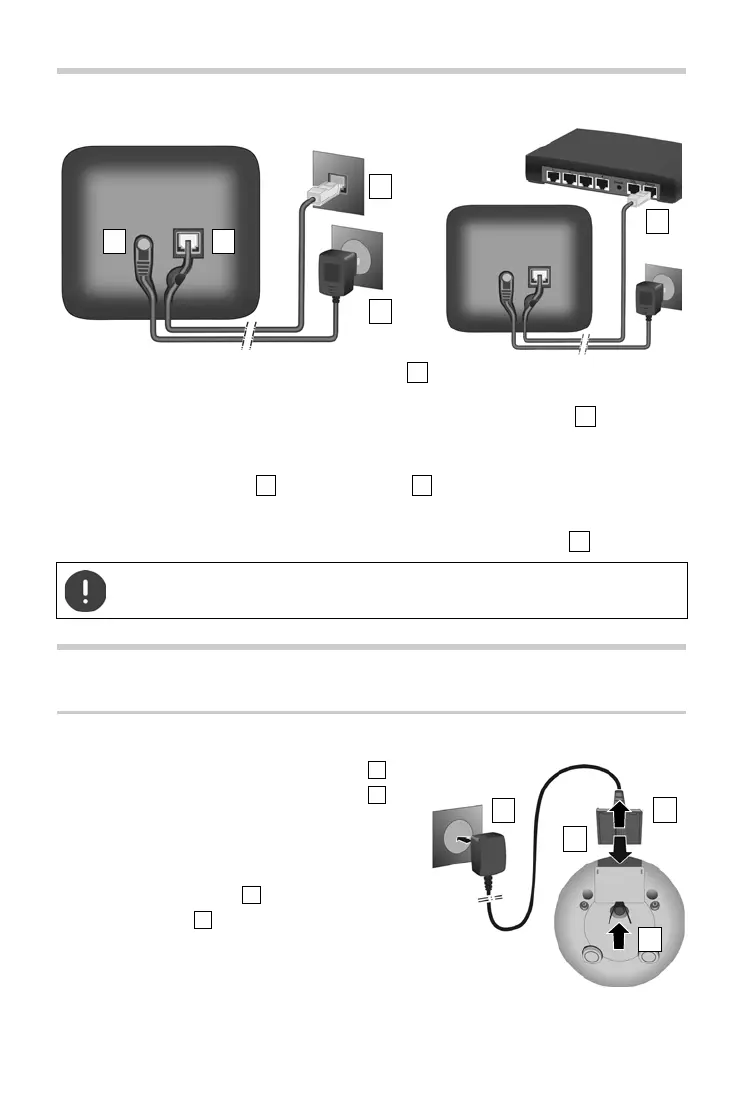
¤ Insert the phone cable into the connection socket at the rear of the base until it clicks into
place.
¤ Insert the power cable from the power adapter into the connection socket .
¤ Depending on the model, if included in the delivery: Click the cover into place in the notches
on the back of the base (not if mounting on a wall).
¤ Plug in the power adapter and the phone jack .
If connecting to a router:
¤ Plug the phone cable into the telephone connection socket on the router .
Handset
Connecting the charging cradle
¤ Connect the flat plug of the power adapter .
¤ Plug the mains unit into your power socket .
To remove the plug from the charging cradle again:
¤ Disconnect the power adapter from the mains
power supply.
¤ Press the release button .
¤ Pull out the plug .
The network cable must always be connected in order to function, as the phone will
not operate without a power supply.



 To Next Page