Template Module, Version 1.2, 11.09.2018,
Getting to know your telephone
Gigaset E560A / LUG US en / A31008-M2728-R301-1-7619 / operating.fm / 1/21/19
14
en fr es
Changing the function of the direct dialling keys
¤ Menu Settings OK Direct Dial Keys OK Select direct dialling key
(A to D)
The current labelling is displayed after the key number, e.g.,
You can now change the labelling.
Select a new function using Menu Not all functions may be available, depending on the
current assignment. An entry that is already present must be deleted in advance.
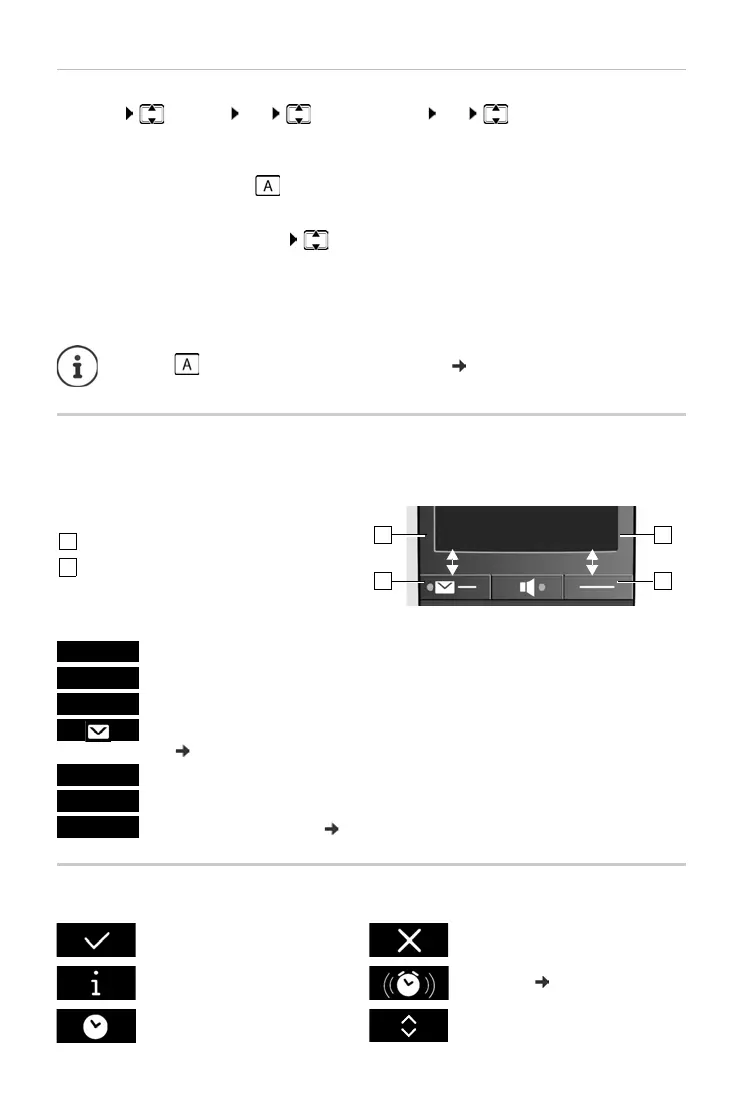
Display keys
The functions of the display keys change depending on the particular operating situation.
Example:
Examples:
Display icons
¤ A: <no entry> i.e., the key is not currently labelled.
¤ Delete Entry Delete current key labelling.
¤ Edit Entry Change phone number and/or name.
Only key : Assign key with emergency function page 27
Current display key function
Display keys
Open redial list.
Open main menu/menu for further functions.
Confirm selection or save entry.
Missed calls or messages on the answer machine/network mailbox
(page22).
Delete key: delete character by character/word by word from right to left.
Go back one menu level or cancel operation.
Mute the microphone ( page 19).
Action complete Action failed
Information Alarm call
( page 38)
Please wait ... Display up/Down



 To Next Page