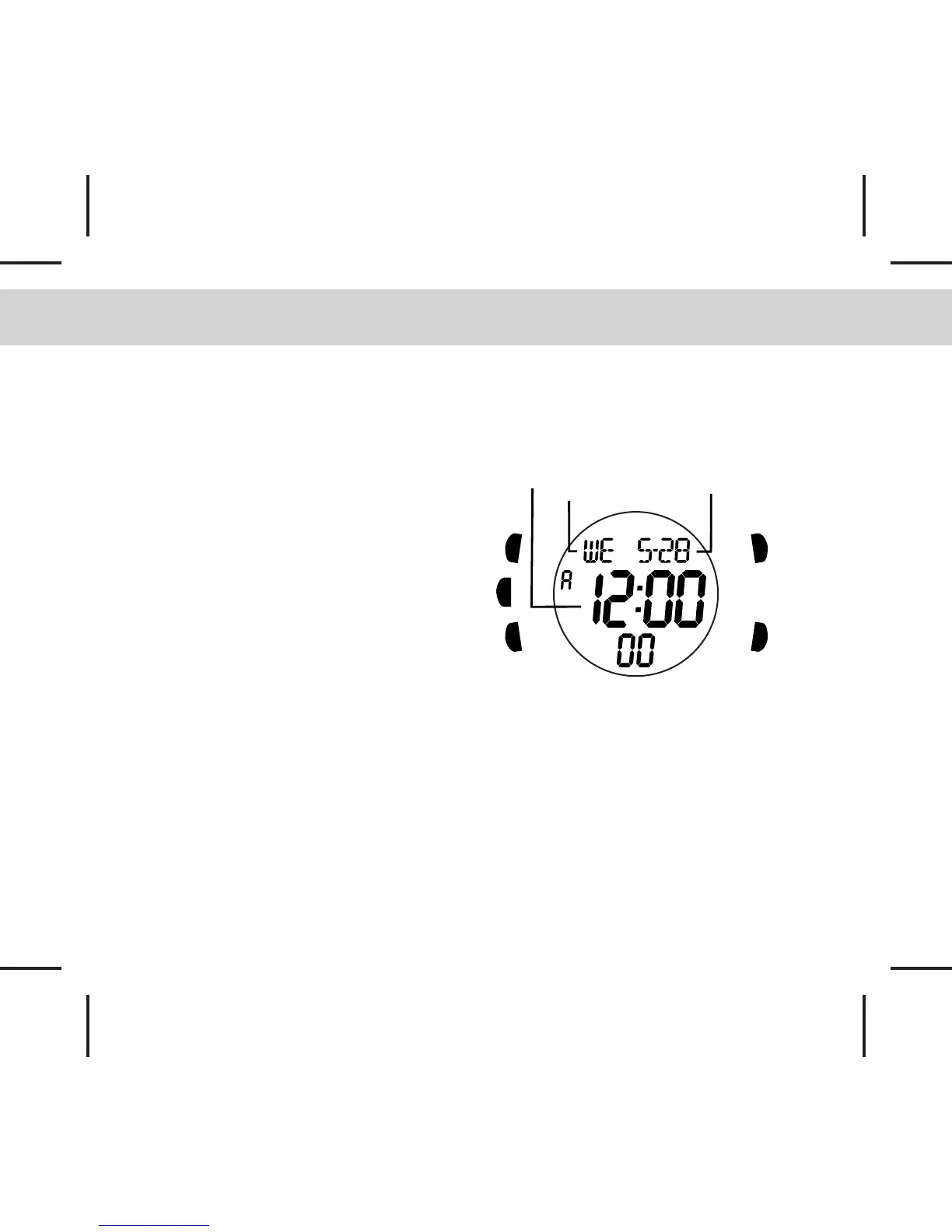
4.0 Real Time Mode
[S]
[L]
[M]
[S/L/S]
[S/R]
Day of Week
Real Time
Date
How to set the Real time
- To set the Real time, date and other
settings press and hold the [S] button for
about 2 seconds in Real Time Mode. (The
second digit will start flashing.)
The Setting Sequence
- When the second digit starts flashing,
press the [M] button to move the flashing
digits following the setting sequence of the
diagram in next page or press the [S/L/S]
or [S/R] buttons to reset the second digits
to zero.
- When the Minute, Hour, Year, Month, Day
or LCD level are flashing, press the [S/L/S]
or [S/R] buttons to adjust the value.
- When the Format is flashing, press the
[S/L/S] or [S/R] buttons to select the 12/24
Hr format or Date format.
- When the Chime/Keytone ON/OFF
options are flashing, press the [S/L/S] or
[S/R] buttons to toggle it ON/OFF.
- When the setting is completed, press the
[S] button once to exit the setting
sequence. The setting display will return
to Real Time Mode automatically if there is
NO key-stroke for about 1 minute.



 To Next Page