6.0 Timer Mode
[S]
HOLD [S]
[S]
[L]
[M]
[S/L/S]
[S/R]
Timer time
[M]
[M]
[M]
[M]
[M]
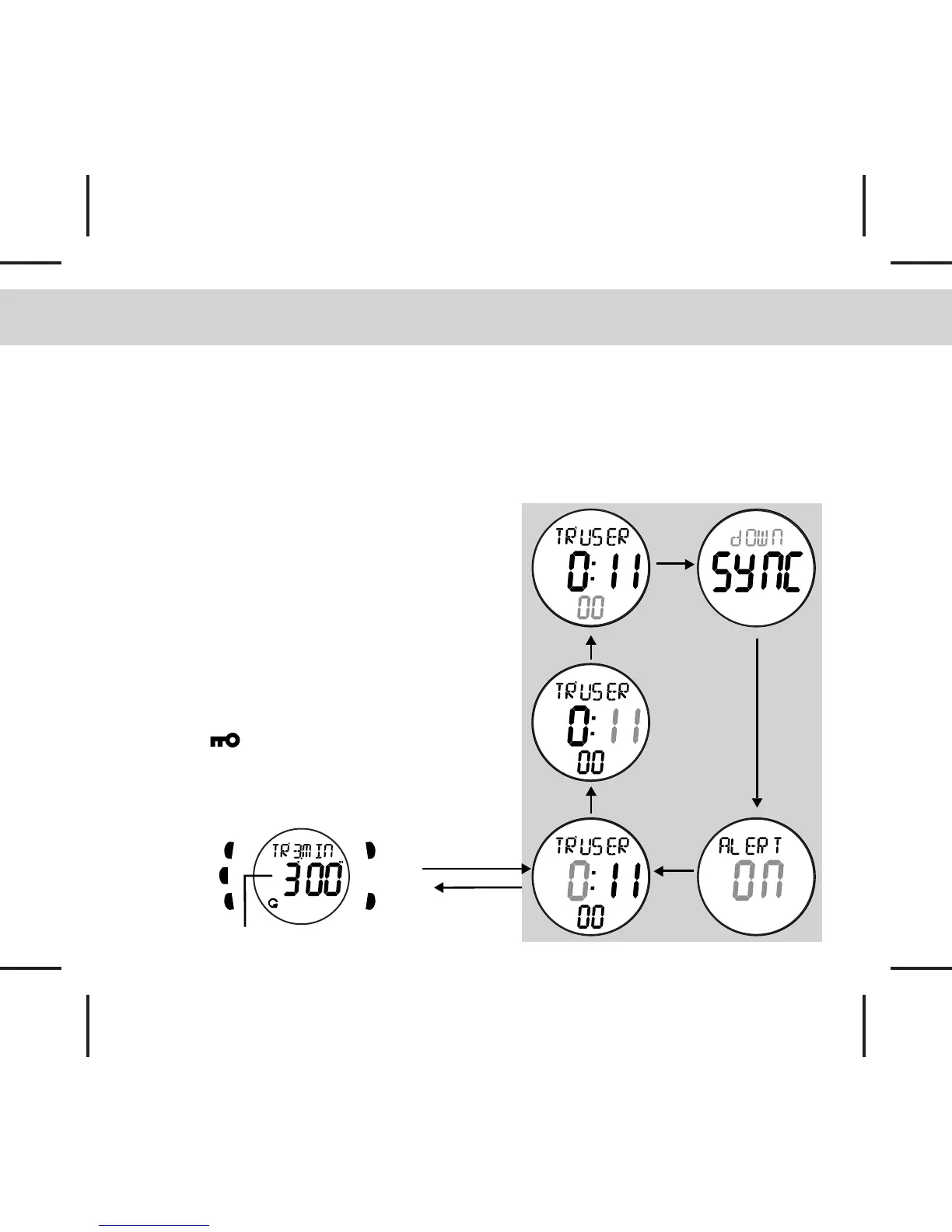
How to set the Timer
- In Timer Mode, press and hold [S] button for 2s, the hour digit will be flashing, press the [S/L/S]
or [S/R] buttons to adjust the time you want. Press the [M] button to scroll through the setting
items.
- When the Minute, Second digits are flashing, press the [S/L/S] or [S/R] buttons to adjust the
time.
- In SYNC setting, press the [S/L/S] or [S/R]
buttons can select between the SYNC Round
and SYNC Down. Please refer to Chapter 6.1
for more details.
- When the Alert option is flashing, press the
[S/L/S] or [S/R] buttons to toggle it ON/OFF.
Please refer to Chapter 6.1 for more details.
Key Lock Function (suspend buttons
operation during counting)
- Press and hold the [L] button to toggle the key
lock function ON/OFF, when key lock function
is ON, will appear on the top of the
display. The operation of the [S/L/S] and [S/R]
buttons will be suspended in order to prevent
key pressing by mistake.



 To Next Page