Create alarm actions
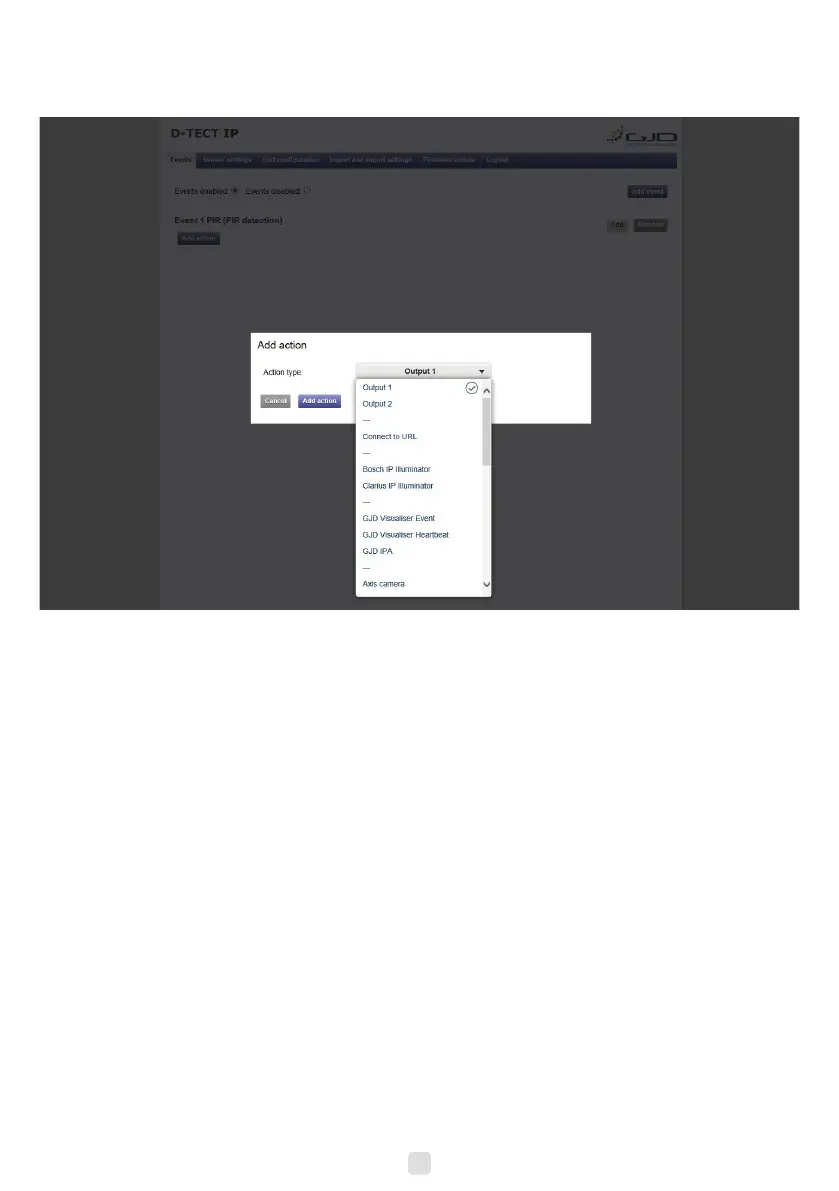
1. Press + Add action under the desired alarm. Input elds appear to the right.
2. Choose action type from the Event type dropdown menu.
Connect to URL Connect to URL is used to create any type of network alarm. This allows one URL
request at alarm enable and one URL request at alarm disable.
Output 1 This turns output 1 on when the detector is activated and turns it off when the alarm clears.
Output 2 This turns output 2 on when the detector is activated and turns it off when the alarm clears.
Partner list The products listed have a built-in wizard in the D-Tect IP that creates the specic URL request
needed for the application. This list is continuously expanding. Please refer to separate
documents regarding integration of these products.
3. Fill in required data elds for the selected Event type.
4. Press the Add action button to save the action.
5. Press Test next to the action for an alarm to test the action.
6. Repeat step 1-5 for each alarm.
10


 To Previous Page