ALARM SETTINGS
All alarm settings are made in the Events tab. The D-Tect IP works on the principle “Alarm - Action”. This means that
alarms are created based on all types of input signals. For each alarm it is possible to create one or more actions. The
actions can be a network alarm message or to trigger a relay.
Alarm inputs
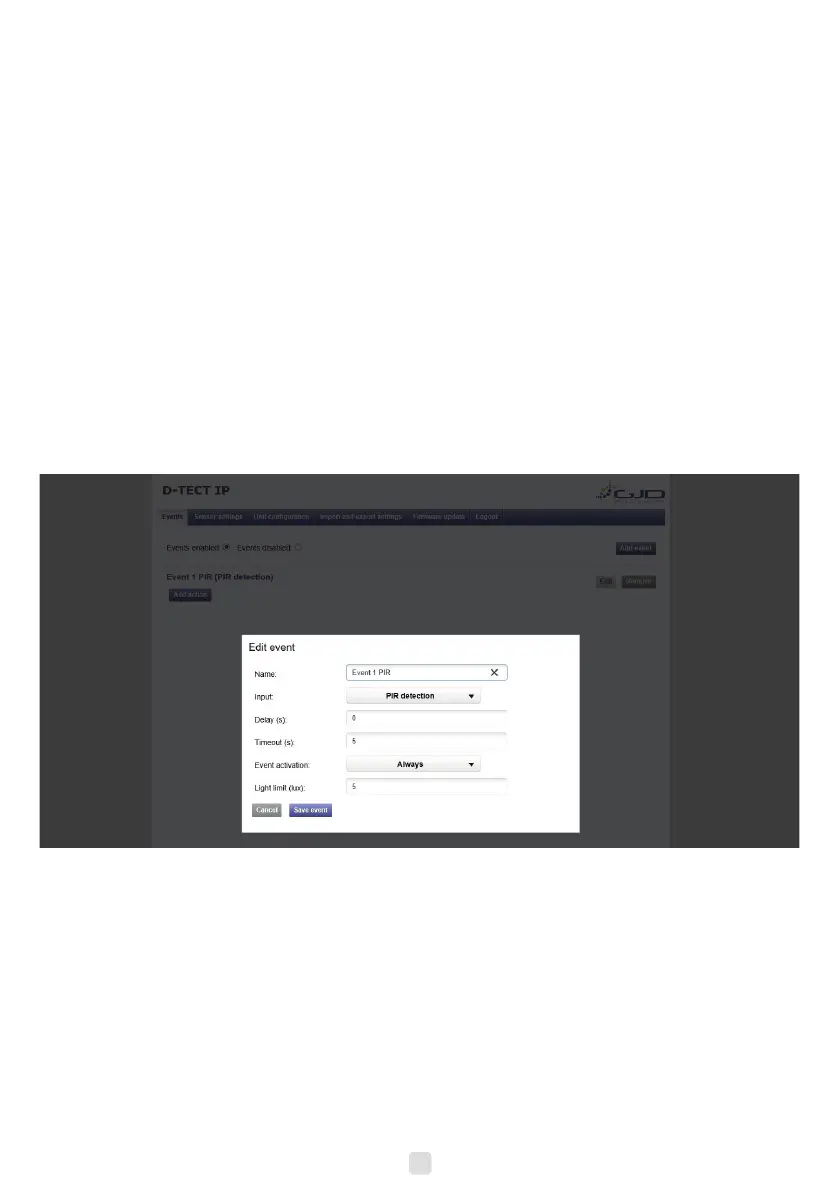
1. Go to the Events tab.
2. Press “Add Event button”
3. Enter a unique alarm name.
4. From the Input dropdown menu, choose the action to generate the alarm.
Delay Alarm delay species the time for which the alarm conditions must be continuously
fullled before the alarm is enabled. Default value is 0 seconds, maximum is 120
seconds.
Timeout Timeout species the time before the alarm is disabled after the alarm conditions are no
longer met. Default value is 0 seconds, maximum is 120 seconds.
Alarm activation Always – Always active
Above light limit – Will become active when LUX level is above the light limit setting.
Below light limit – Will become active when LUX level is below the light limit setting.
Light limit This is the light level (LUX) that the Above light limit and Below light limit reacts.
6. Press the Add Event button to save.
7. Repeat step 2 to 6 for all required alarm actions.
9


 To Next Page