25
#6 ñ HANDLING YOUR
GLIDECAM 2000 PRO
Before you operate and film things with your
2000 Pro, you will need to know how to
handle it. When handling your 2000 Pro you
will use one hand to hold onto the handle and
the other hand to gently guide the Camera in
the direction you wish to shoot. We call the
hand that holds the handle, the “Holding
Hand” and the hand that aims the Camera for
tilting and panning etc. the “Guiding hand”.
When holding the handle of your Glidecam
2000 Pro you will need to: 1) hold it firmly,
and 2) hold it either in the middle or at the
bottom of the handle. Which position you
choose will depend on the kind of shots you
are shooting. For normal shooting hold the
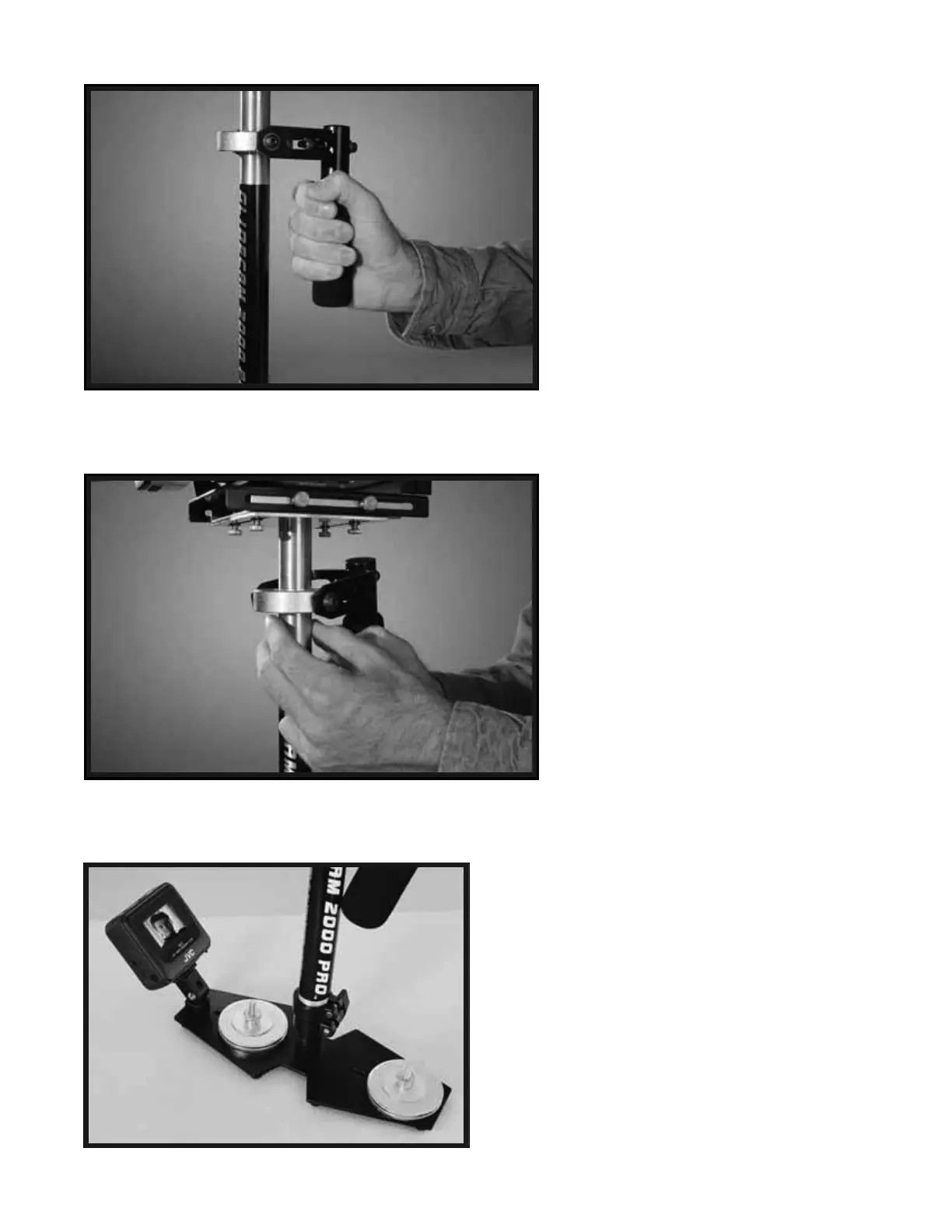
handle in the middle (see Photo # 50). For
shots that require aiming the Camera either
up of down or sideways, hold the handle
firmly at the bottom. This will allow the
“yoke” part of the gimbal to twist around
without hitting your hand or knuckles.
When you handle your Glidecam 2000 Pro
you will want to use your “Guiding Hand” to
gently hold onto either, the point just below
the yoke and bearing assembly, (see photo
#51) or an area down by the BASE
PLATFORM (see photo #57). These two
areas allow for easy control of the 2000 Pro
when in use. Which position you choose will
depend on the kind of shots you are shooting.
For normal shooting hold the 2000 Pro at the
point just below the yoke and bearing
assembly (see photo #51). This will allow
you to subtly aim the Camera without
disturbing the Camera’s upright position. It
is this position which will allow you the
smoothest shots when walking or running
with the unit during normal shooting.
NOTE: Make sure that your guiding hand and
holding hand do not touch either, the bearing
assembly, or the yoke during shooting, for doing
so can cause unstable shooting. For
unconventional shots, like ones that require
aiming the Camera either straight up or down, or
sideways hold onto the 2000 Pro on the lower
part of the post or down near the weight disks
(photo #57) This will allow your guiding hand to
have a greater degree of control over the 2000
Pro while shooting very erratic shots.
50
51
Photo # 50 shows you the correct way to hold the handle,
however remember that you should always use both hands
when using the 2000 Pro as in Photo # 51.
Notice how the “Guiding Hand” does not touch the main
bearing assembly or yoke which can be seen just slightly
above the fingers of the “Guiding Hand” in Photo # 51.
51A


 To Next Page