
 Need help?
Do you have a question about the Glidecam 2000 Pro and is the answer not in the manual?
Tools required for assembly, including standard and Phillips head screwdrivers.
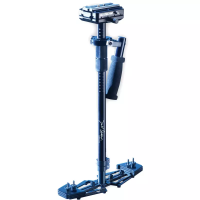
Description of the central post with its attached gimbal assembly.
Components that make up the head assembly of the Glidecam 2000 Pro.
Connecting the base platform to the telescoping post.
Close-up view of the threaded insert at the bottom of the telescoping post.
Finding the threaded insert on the bottom of your camera.
Placing and centering the head plate on the camera base.
Ensuring camera is attached, lens cap removed, battery installed, and clamp tightened.
Achieving a level camera and vertical central post without applied pressure.
Ensuring the camera and central post remain level and vertical during movement.
Methods for adjusting vertical balance using weight disks or telescoping post length.
Defining the roles of the 'Holding Hand' and 'Guiding Hand' for operation.
Recommended ways to hold the handle for different shooting styles.
Emphasizing the need for two hands for optimal control and stability.
Options for using built-in or external LCD monitors for viewing during operation.
Recommendation to use a wide angle lens converter for a professional look.
A training exercise for precise framing and steady camera movement.
Demonstration of how grabbing the central post defeats its purpose.
Warning against the handle touching the bottom plate to avoid jerky footage.
Information on using quick release plates for easy camera transfer.
Using a gasket to improve head plate stability if it rotates on the camera base.
Suggestions for pre-planning shots and using an assistant for professional results.
How to oil the main bearing and other bearings lightly with lubricating oil.
Using mild detergent for cleaning and storing the unit in a dry area.
Warnings about careful use in low light, avoiding hazards, and ensuring supervision.
Coverage for defects in materials and workmanship within 90 days of shipment.
What the warranty does not cover and limitations on incidental or consequential damages.
 General
| Brand | Glidecam |
|---|---|
| Model | 2000 Pro |
| Category | Professional Video Accessories |
| Language | English |

 To Next Page