EasyManua.ls Logo

Gliderol Glidermatic GRD - Setting Travel Limits

Default Icon
12 pages
Print Icon
To Next Page IconTo Next Page
To Previous Page IconTo Previous Page
Loading...
I nstallation
Instructions
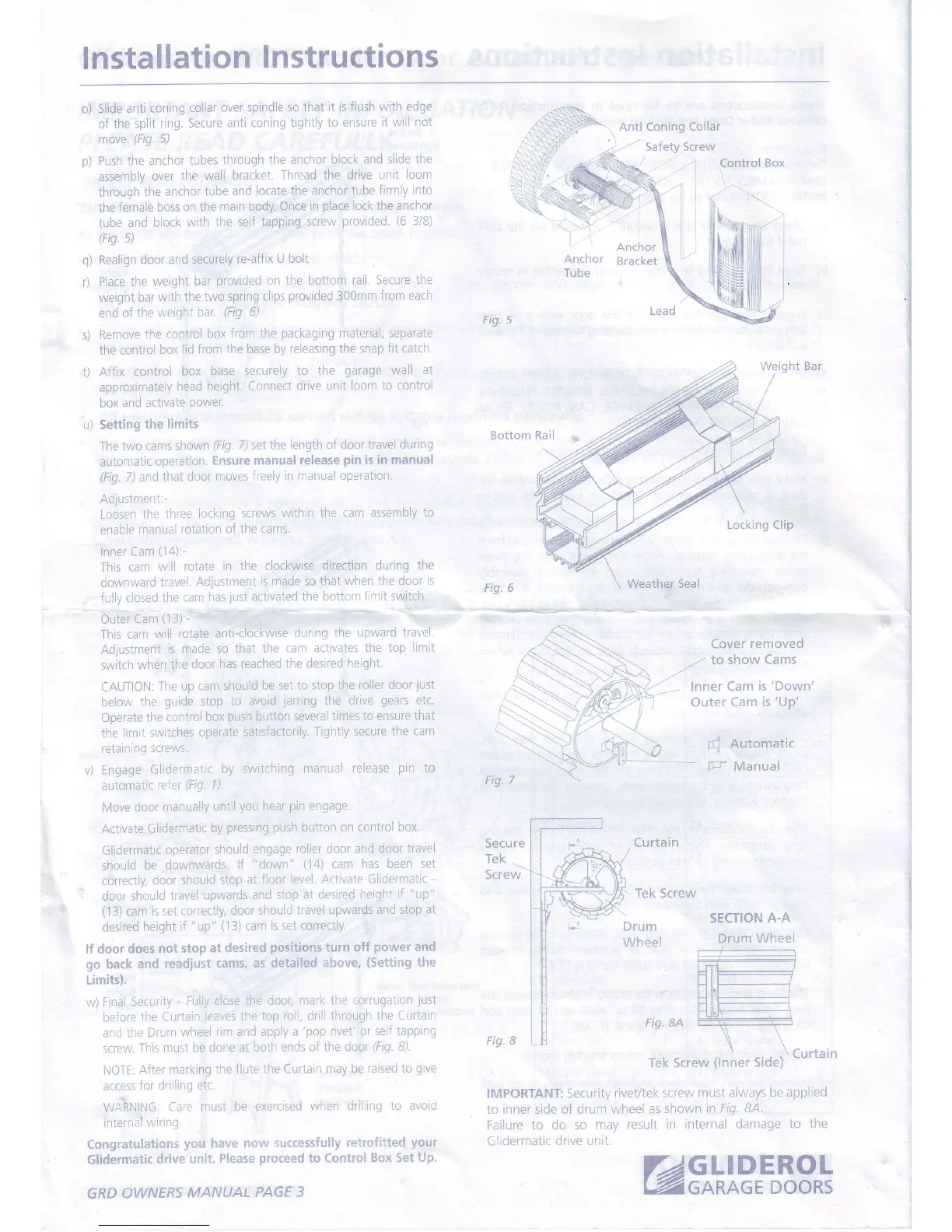
o) Slide
anti
coning
collar
over spindle so
that it is
flush with edge
of the split
ring. Secure
anti coning
tightly to ensure
it will
not
move.
(Fig.
5)
p)
Push the
anchor
tubes
through
the anchor
block and
slide the
assembly
over
the wall
bracket.
Thread the drive
unit
loom
through
the anchor
tube
and
locate the anchor tube
firmly
into
the
female
boss on the
main body.
Once in
place
lock the anchor
tube
and block
with
the self
tapping screw
provided.
(6
3/B)
(HO.
5)
q)
ne"atign
door and
securely
re-affix
U bolt
r)
Place the
weight
bar
provided
on the bottom
rail. Secure the
weight
bar
with the two
spring
clips
provided
300mm
from each
end
of
the weightbar.
(Fig.
6)
s)
Remove
the
control
box
from the
packaging
material, separate
the
control
box
lid from
the base by
releasing the snap
fit catch.
t) Affix
control
box base
securely
to the
garage
wall at
approximately
head
height.
Connect drive unit
loom to control
box
and activate
power.
u) Setting
the
limits
The
two cams
shown
(Fig.
7) selihe length of
door travel
during
automatic
operation.
Ensure
manual
release
pin
is in manual
(Fig.
7) and
that door
moves
freely in manual
operation.
Adlustment:-
Loosen
the
three
lockinq
screws
within the cam
assembly to
enable
manual
rotation
of the
cams.
Inner
Cam
(14):-
This
cam
will
rotate
in the clockwise
direction
during the
downward
travel.
Adjustment
is
made so that when
the door
is
fuliy closed
the
cam
has
just
activated
the bottom
limit switch.
Ourer
Cam
(13):-
This cam
will
rotate
anti-clockwise
during
the upward
travel.
Adjustment
is made
so that
the cam
activates
the top
limit
switch
when
the
door has
reached
the desired
height.
CATJTION:
The up
cam should
be set to stop the
roller door
just
below
the
guide
stop
to
avoid
jarring
the drive
gears
etc.
Operate
the control
box
push
button several times
to ensure that
the limit
switches
operate
satisfactorily.
Tightly secure the
cam
retainrng
screws.
v)
Engage
Glidermatic
by switching
manual release
pin
to
automatic
refer
(Fig.
l).
Move
door
manually
until
you
hear
pin
engage.
Activate
Glidermatic
by
pressing
push
button on control
box.
Glidermatic
operator
should
engage
roller door and
door travel
should
be
downwards.
lf
"down"
(14)
cam
has been set
correctly,
door
should
stop at
floor level.
Activate Glidermatic
-
door
should
travel
upwards
and stop
at desired
height if
"up"
(1
3)
cam
is set correctly,
door
should
travel upwards
and stop
at
desired
height
if
"up" (13)
cam
is set correctly.
lf door
does
not stop
at desired
positions
turn off
power
and
go
back
and
readjust
cams,
as detailed
above,
(Setting
the
Limits).
yi)
Final Security
-
Fully close
the
door, mark the
corruqation
just
befcre
the Curtain
lea'res
the top
roll, drill through
the Curtain
ancl the
Drum
wheel
rim and apply
a
'pop
rivet'
or seJf tapping
screur.
This
must be
done at
both ends of
the door
(F/EI.
B).
NOTE:
After
marking
the flute
the Curtain may
be
raised
to
give
access
Ior driilrnq
etc.
WAitNING.
Care
must
be exercised
when ciriiling
to avoid
internal
wiring.
ConEratulations
y{3u
have ncr-qr
successfully
relrofitted
your
Glidermatic
drive
unit.
Please
proceed
to Contrsl
Box Set
Up,
GRD
OWNERS
MANUAL
PAGE 3
Anti Coning
Collar
'
/-. -
),.t
5aTet} >crew
:''t
Control
Box
-;-\-
Anchor
I ube
Anchor
Bracket
Bottom
Fig. 6
Secure
Tek
Screw
Lead
Curtain
Tek Screw
Weight Bar
Cover
rernoved
.,-
to
show Cams
lnner Cam
is'Down'
Outer
Cam is'Up'
{
Automatic
F
Manual
Drum
Wheel
SECTION
A.A
Drum Wheel
Fi9. BA
Fig"
B
Tek Screw
(lnner
Side)
Curtain
IMPORTANT
Security
riveVtek screw
must
alrruays be applied
io inner side
of drum wheei
as shown
in Fig. 8A.
Failure to do
so niay
result in
internal ciamage
to
the
Gl;dermatrc
drive unil.
GLIDERO1
GARAGE
DOOR;
e

Other manuals for Gliderol Glidermatic GRD

Related product manuals