EasyManua.ls Logo

Gliderol Glidermatic GRD - Control Box Setup and Configuration

Default Icon
12 pages
Print Icon
To Next Page IconTo Next Page
To Previous Page IconTo Previous Page
Loading...
I nstal
lation
I
nstructions
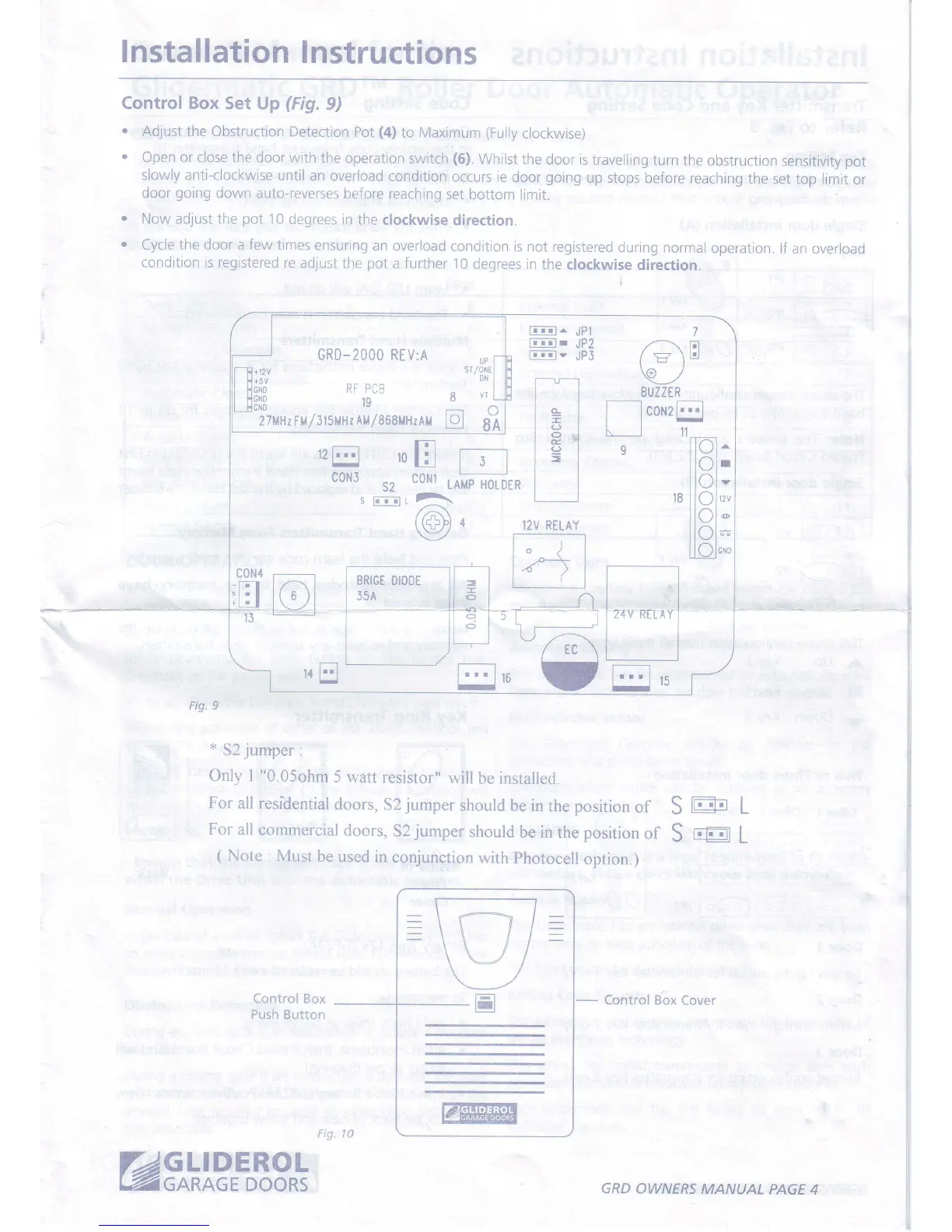
Controf Box
Set Up
(Fig.
9)
.
Adjust the Obstruction
Detection
Pot
(4)
to Maximum
(Fully
clockwise)
'
Open or close the
door with
the operation
switch
(6).
Whilst
the door is
travelling
turn
the obstruction
sensitivity
pot
slowly anti-clockwise
until
an overload
condition
occurs
ie door
going
up
stops before
reaching
the
set top limit
or
door
going
down auto-reverses
before reaching
set
bottom limit.
.
Now adjust the
pot
10 degrees
in the
clockwise
direction.
.
Cycle
the
door a few
times ensuring
an
overload
condition is
not registered
during normal
operation.
lf an
overroao
condition is registered
re
adjust
the
pot
a
further
10
degrees
in
the clockwise
direction.
i
r--l
121:1
'o
[N lt-_l
coNJ
s2
coNr
s1ffiffisj
12V
RELAY
GRO-2000 REV:A
UPI
/oNEl
^l
VTL
8A
3il3
re
27HHzr$
/
315MHr
AM/868MHzAM
E
tr
Fig. 9
*
52
jumper
:
Only I "0.05ohm
5
watt resistor"
will
be
installed.
For
all residential
doors,
52
jumper
should
be in
the
position
of
S
m
L
For
all commercial
doors,
52
jumper
should
be in
the
position
of
S
rffil
L
(
Note : Must
be
used in
conjunction
with Photocell
option
)
-
Control Box
Cover
@gklDERoL
GRD
OWNERS MANUAL
PAGE
4

Other manuals for Gliderol Glidermatic GRD

Related product manuals