EasyManua.ls Logo

Globalsat TR-151 - Understanding TR-151 LED Indicators

Globalsat TR-151
18 pages
Print Icon
To Next Page IconTo Next Page
To Previous Page IconTo Previous Page
Loading...
Page 7 of 18
3. Introduction and Features (Continued)
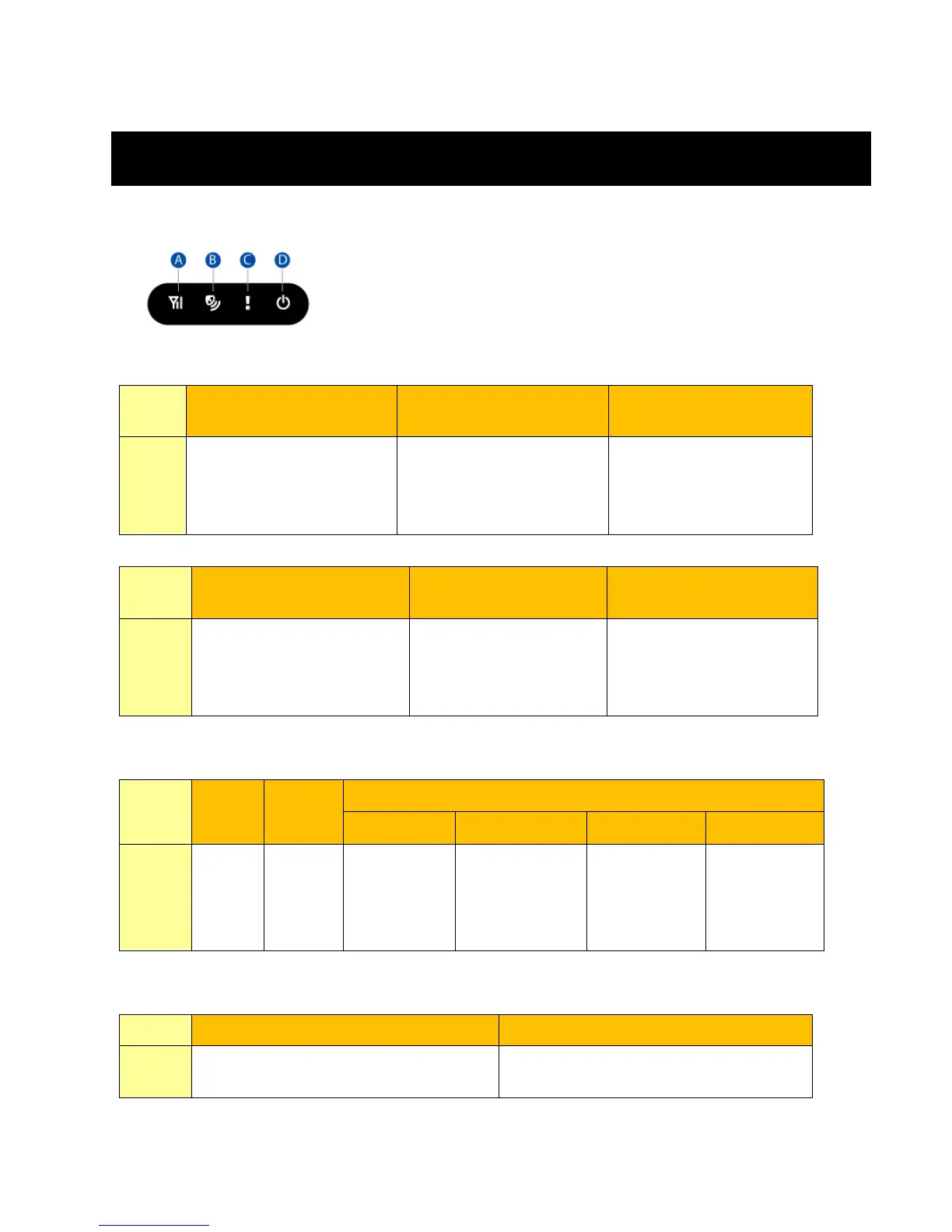
3.2 LED Indicators
GSM LED
Blink Quickly (Once
per second)
Blink Slowly (Once
every 3 seconds)
Off
No SIM card inserted
TR-151 is searching
GSM network
SIM card is registered
to GSM network.
TR-151 is sending data
to GSM network
TR-151 is in standby
mode
GPS LED
LED
Keeps On
Blink Slowly (Once
every 3 seconds)
Off
State
TR-151 has not received
a GPS fix
TR-151 is attempting to
attain a GPS fix
TR-151 has attained a
GPS fix
TR-151 is in standby
mode
Status LED
LED
Keeps
On
Off
Blink
1 time
2 times
3 times
5 times
State
Battery
Low
TR-151
is in
standby
mode
TR-151 is
being
turned
“ON”.
TR-151 is
being turned
“OFF”.
SOS button
is pressed
Error occurs
Power LED
LED
Orange
Off
State
TR-151 connected to charger or
USB to Mini-USB cable.
LED shuts down after battery charge
completion.

Other manuals for Globalsat TR-151

Related product manuals