0020094585_01-08/10-Glow-worm
- 8 -
HOWTOUSEYOURCLIMAPRO
2
RF
6.5 Override shortcuts
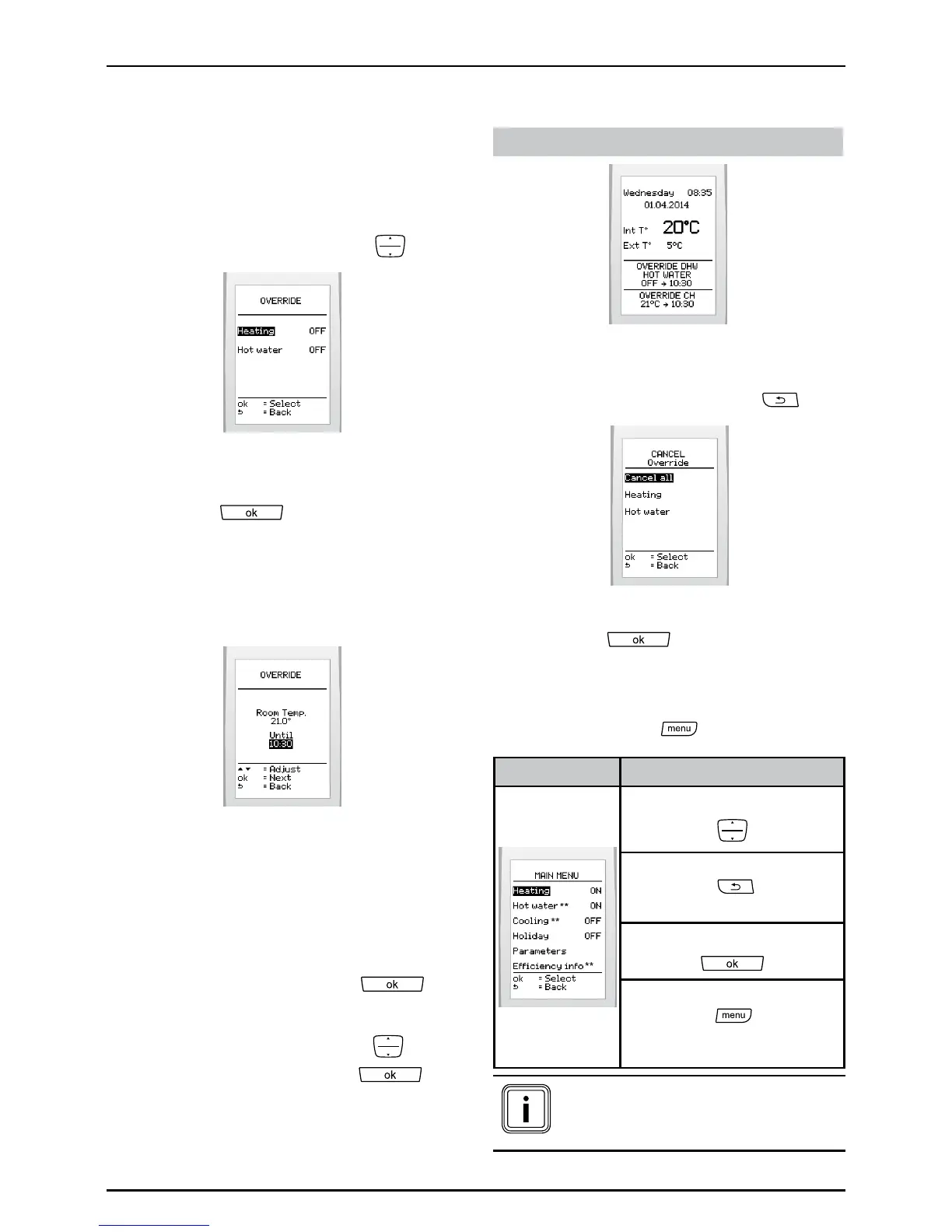
6.5.1 Override menu
Thismenuappearswhenmultiple
programsareenabled.
• Fromthemainscreen,press
.
• Selecttheprogramtowhichthe
temporarymodicationwillbeapplied
andpress .
6.5.2 Override
Thisfeatureallowsthetemporary
overridingofcurrentprograms.
• Settings:
- heatingtemperature,
- enableordisableforhotwaterand
cooling.
• Pressthebuttontoconrm
.
• Settheendtimeofthetemporary
modicationwiththebuttons
and
pressthebuttontoconrm
.
Displayonmainscreen:
If enabled
Tocancel:
• Fromthemainscreen,press
.
• Selecttheoverride(s)tobecancelled
andpress
toconrm.
6.6 Main menu
• Pressthebutton
:
Menu Browsing
Browsewithbuttons:
Pressthebutton:
toreturntothepreviousscreen.
Selectwiththebutton:
Pressthebutton:
toreturntomainscreen.(at
anytime)
(**) Menus available according
to the conguration of the
system


 To Next Page