0020094585_01-08/10-Glow-worm
- 9 -
HOWTOUSEYOURCLIMAPRO
2
RF
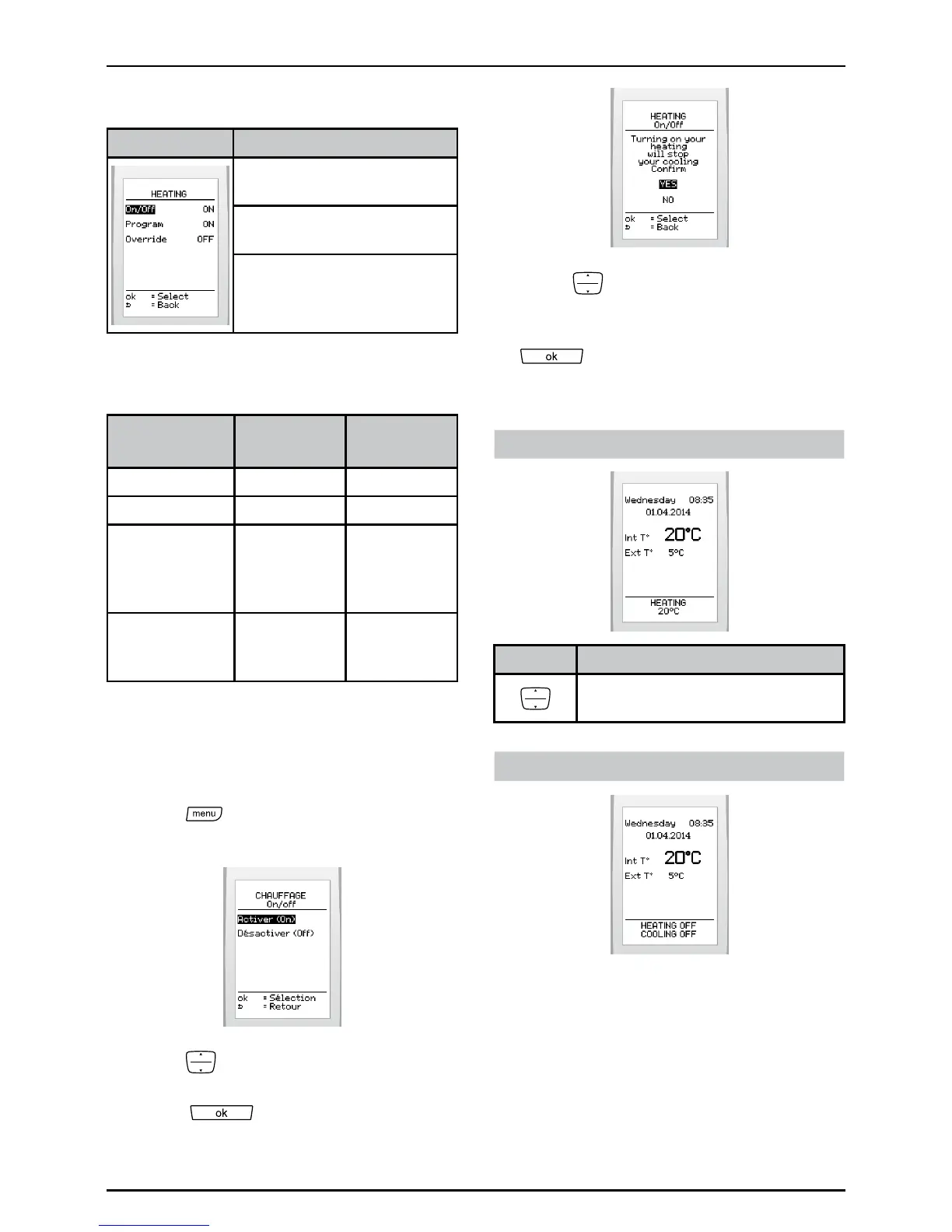
6.7 Heating
Menu This menu lets you:
Activateordeactivatethe
heating
Programthetimeintervals
fortheheating
Overridetheprogram(if
activated)
Theresultofcombiningtheheatingand
heatingprogrammefunctions:
Function
Heating
Heating
program
Result
OFF ON Noheating
OFF OFF Noheating
ON OFF
Heatingat
aconstant
room
temperature
ON ON
Heating
accordingto
program
ON:enable,OFF:disable
6.7.1 Activating or deactivating the
heating
• Press
>thenselect>Heating >
on / off onthescreen
• Press tohighlightyourchoice
(activateordeactivate)andpressthe
button
toconrm.
• Press toconrmtheactivationof
theheatinginsteadofcooling(ifthe
latterisenabled)andpressthebutton
toconrm.
Displayonmainscreen:
If enabled, it will be possible:
Buttons Description
Tosetaconstantroom
temperature.
If disabled



 To Next Page