0020094585_01-08/10-Glow-worm
- 21 -
HOWTOUSEYOURCLIMAPRO
2
RF
Reminder:theroomthermostat’santi-
freezingsystemcontrolsthestart-upofthe
heatingwhenthetemperatureoftheroom
inwhichthethermostatisinstalledfalls
below5°C,orifanoutdoorsensoristted,
theoutsidetemperaturefallsbelow3°C.
Thehotwateristurnedoff**.
(**) Display only if the hot
water function is activated.
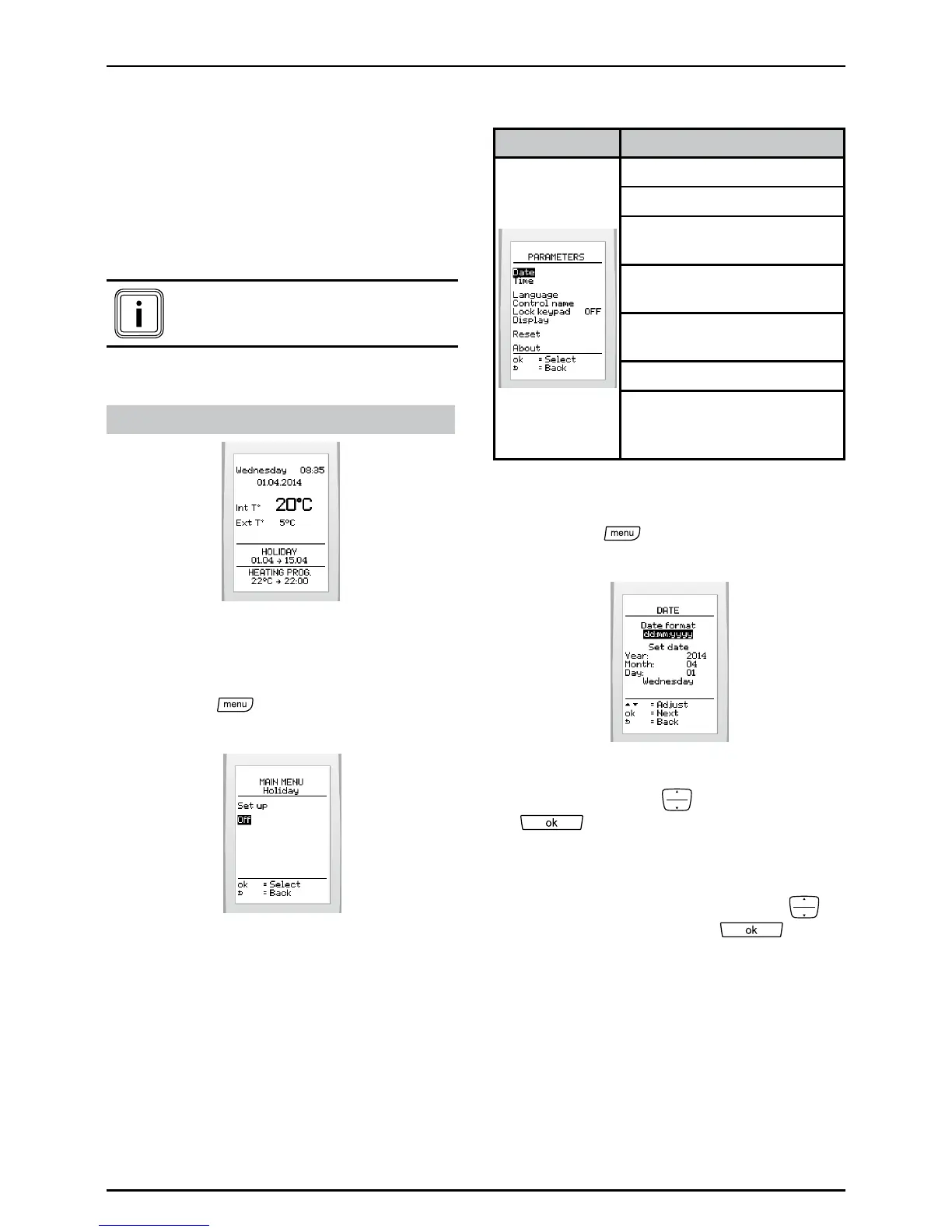
Displayonmainscreen:
If activated
6.10.2 Deactivating a period of
absence
• Pressthe
buttonandselect>
holiday >offonthescreen
6.11 Parameters
Menu This menu lets you:
Adjustthedateandtime
Choosethelanguage
Personalisethenameofthe
control
Turnthekeypadlockon
oroff
Adjustthebrightnessand
contrastofthescreen
Returntofactorysettings
Displayinformation:zone,
typeandsoftwareversion
fortheroomthermostat
6.11.1 Setting the current date
• Pressthe
buttonandselect>
parameters>dateonthescreen
• Setthedisplayformatofthecurrent
datebypressing
andpressing
.Thereisachoicebetween
thefactorysettingday/month/yearand
year/month/day.
• Setthecurrentdatebypressing
andpressingthebutton to
conrm.


 To Next Page