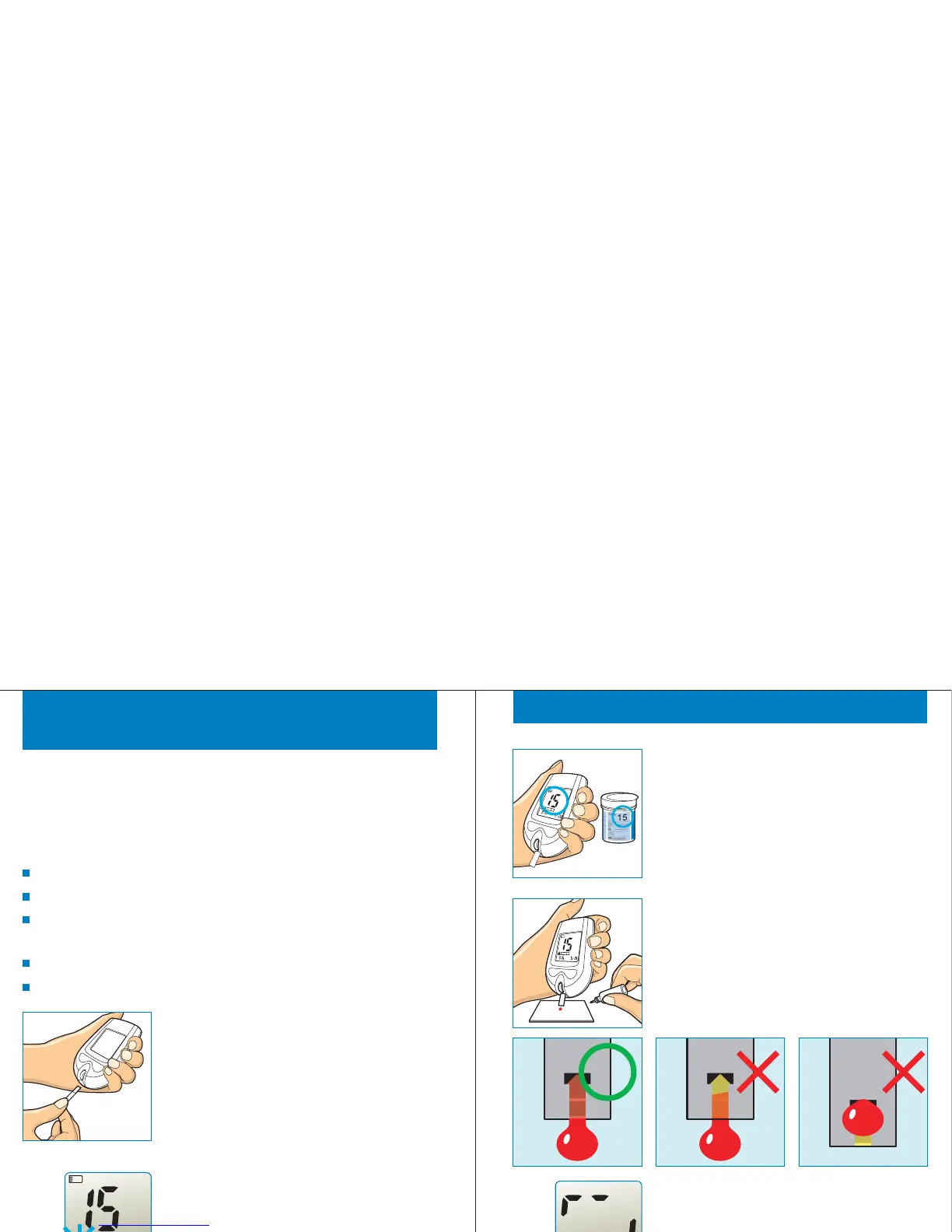
Control Solution Testing
Gmate™ Control Solution contains a known index of glucose and
is used for checking that the Gmate™WHeeL and test strips are
working properly or not. Control solution is optional.
Do a control solution test:
when doing practice the test process instead of using blood sample,
when you open a new test strips container,
when you suspect the Gmate™WHeeL or the test strips are not
working properly,
when you have unexpected blood glucose results repeatedly,
when the Gmate™WHeeL is damaged.
Insert the test strip while the electrode end
facing up into the test strip port until it
stops. The Gmate™WHeeL will turn on
automatically.
STEP 1
After time and date will be displayed for a
while, code number and strip symbol are
displayed. A strip symbol with filling blood
tells you the Gmate™WHeeL is ready to
test.
STEP 2
22
am
C
Make sure the displayed code number is
same as printed code of the test strip
container. If displayed code number is
different, please use another new strip.
STEP 3
Control Solution Testing
Shake the control solution vial and open
the cap. Gently touch test strip tip to
control solution drop and stay until beeps.
STEP 4
The Gmate™WHeeL shows counting
progress during 5 seconds.
STEP 5
23
am



 To Next Page