32
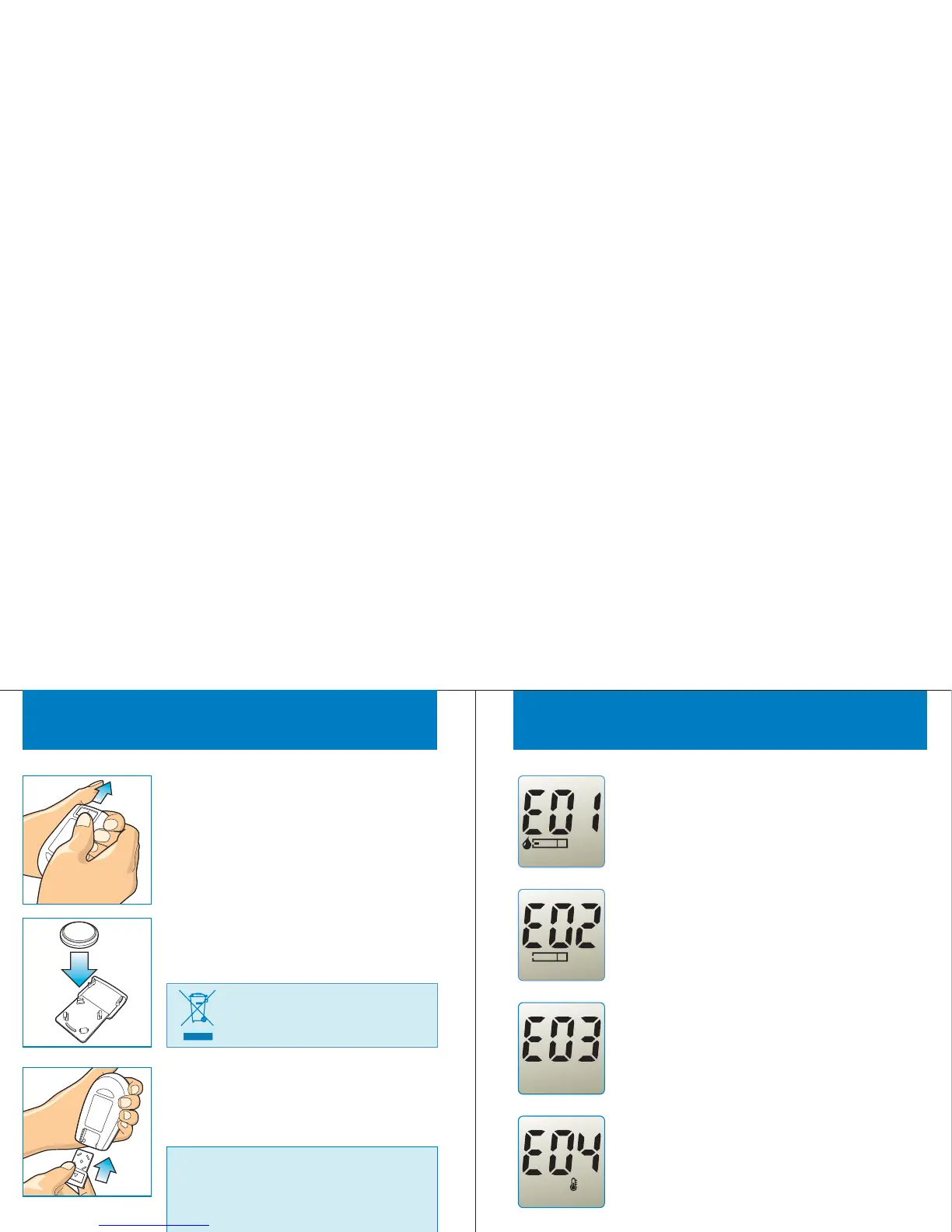
R eplacing the Bat tery
STEP 1
Prepare the 3V Lithium Button Cell
(CR2032) for replacement. Slide the
battery cover off to arrow direction.
STEP 2
Remove the old battery and place the new
one in the tray while the "+" side facing down.
Slide the battery cover back into place and
close firmly.
STEP 3
Important : If you do not replace the new
battery within one minute after taking the
old one out, you must setup again the
date and time. Replace the battery do
not affect to the meter’s memory and
user settings.
Caution : Dispose of battery
according to your local
environmental regulations.
33
Error Messages
Appears when working temperature is
BELOW or ABOVE system operation
range. The system operation range is
10 ~40°C(50 ~104°F). Re-test after the
working temperature reach to the above
range.
°C °F
Appear when inserting a used test strip.
Re-test with a new test strip.
This error message indicates the Gmate™
WHeeL has problem. Review the
instructions and re-test with a new test
strip. When this messages appears again,
contact the local distributor.
This error message indicates the test strip
may be inserted incorrectly or have a
problem. Repeat to remove and re-insert
the test strip or repeat the test with a new
test strip.



 To Next Page