R 03MAR22
PART No.
SHEET
ALL INFORMATION WITHIN ABOVE
BORDER TO BE PRINTED EXACTLY
AS SHOWN ON 8.5 x 11 WHITE 16
POUND
NON-BOND RECYCLABLE
PAPER.
PRINT ON BOTH SIDES,
EXCLUDING TEMPLATES. TO BE
UNITED IN ACCORDANCE
WITH
GMCCA SPECIFICATIONS.
Title GM Ultium EV Charging Station
User Manual
03MAR21 First Re l
14
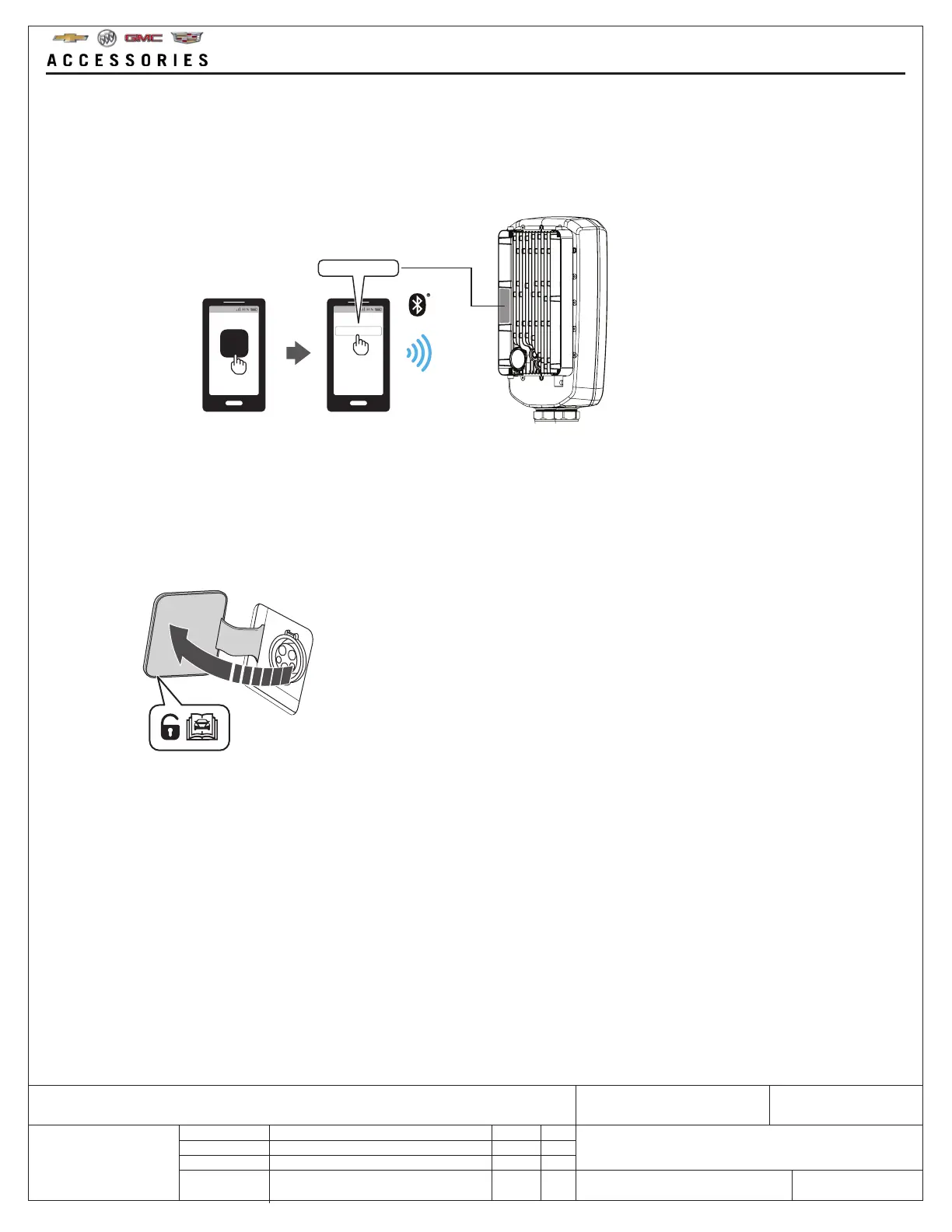
7. To charge, refer to the vehicle owners manual to find the charging point location and how to correctly connect the
GM Ultium EV Charging Station to the vehicle.
Before connecting the GM Ultium EV Charging Station to the vehicle, make sure the electric power/voltage is
suitable, according to the vehicle owners manual.
6. When connecting a smart mobile device to the GM Ultium EV Charging Station, insert the Bluetooth® pairing code.
The last six numbers of the Bluetooth® pairing code are found on the heatsink for the GM Ultium EV Charging
Station.
After pairing, all features of GM My Brand App can be used.
GM_EV_XXXXXX
GM_EV_XXXXXX
For ease of access, write down
the code on the line below.



 To Next Page