INSTALLATION
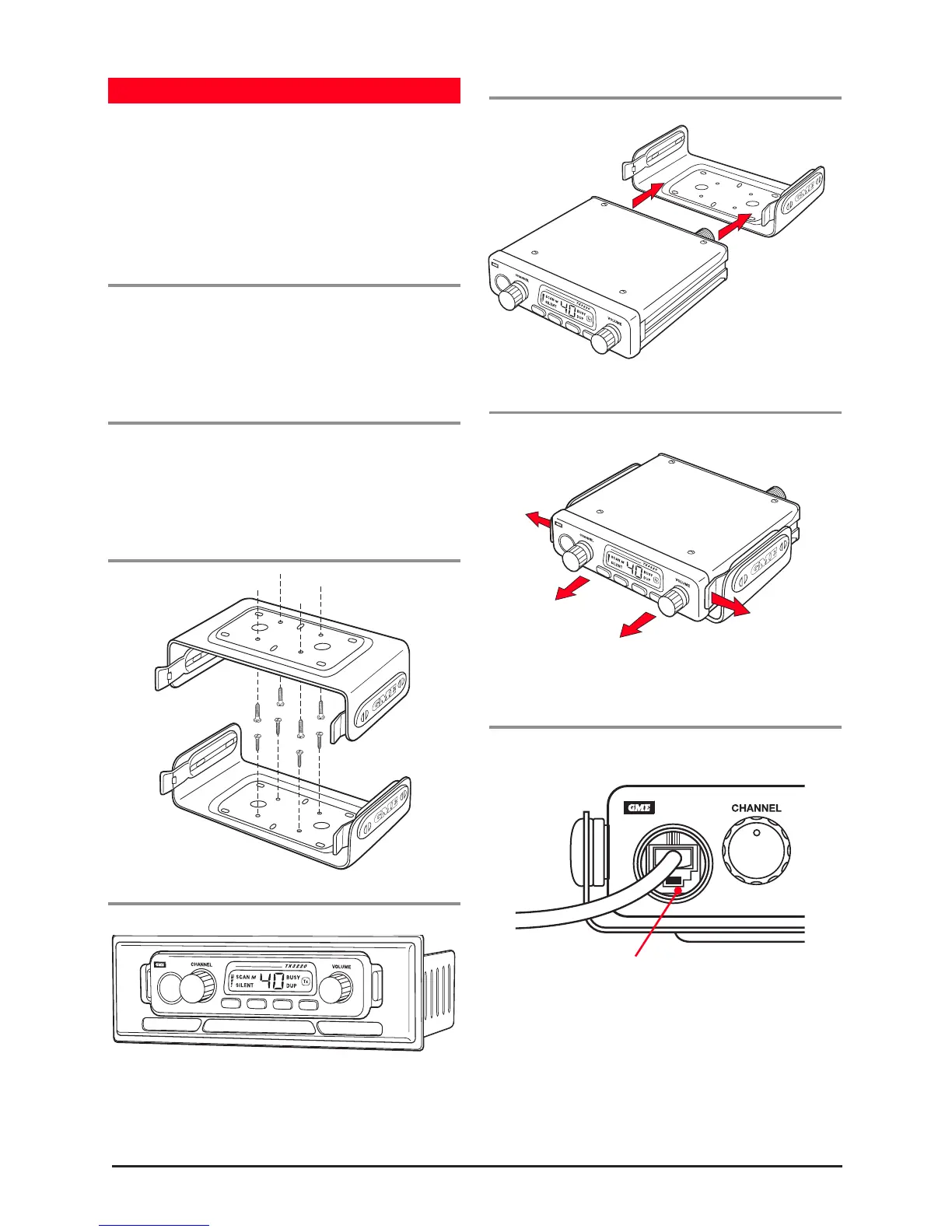
The TX3220 is supplied with a slim, slide-on mounting
cradle. The cradle can be screwed or bolted in any
convenient location in your vehicle (under or above the
dash, on the centre console, etc) using the mounting slots
provided in the base. For maximum sound output from the
internal speaker, we recommend the cradle be mounted
above the radio to minimise any obstruction of the speaker.
Console Mounting
MBD001 is available as an
optional accessory. The adapter includes mounting brackets
and a specially designed front panel escutcheon to suit most
vehicle installations. See your nearest GME retailer
for details.
When installing the cradle
Avoid mounting close to heaters or air conditioners. Screw
the mounting cradle to a firm surface and slide the TX3220
into the cradle from the front until it clicks into place.
Finally, connect the power lead and antenna cable to the
sockets provided at the rear of the radio.
Mounting the Cradle
Din Adapter MBD001
Fitting the Radio
Slide radio fully into cradle until it clicks into place.
Removing the Radio
Fitting the Microphone
The microphone uses a miniature 6 pin telephone style plug
and socket. To fit the microphone:
downwards, and press the plug into the socket until
it ‘clicks’.
2. Gently press the rubber strain relief into the hole
surrounding the socket so that the slot around the
strain relief fits neatly inside the lip of the hole.
Slide radio
from cradle
Gently
spread
tabs
Gently
spread
tabs



 To Next Page