Page 30
General Machine Products (KT), LLC
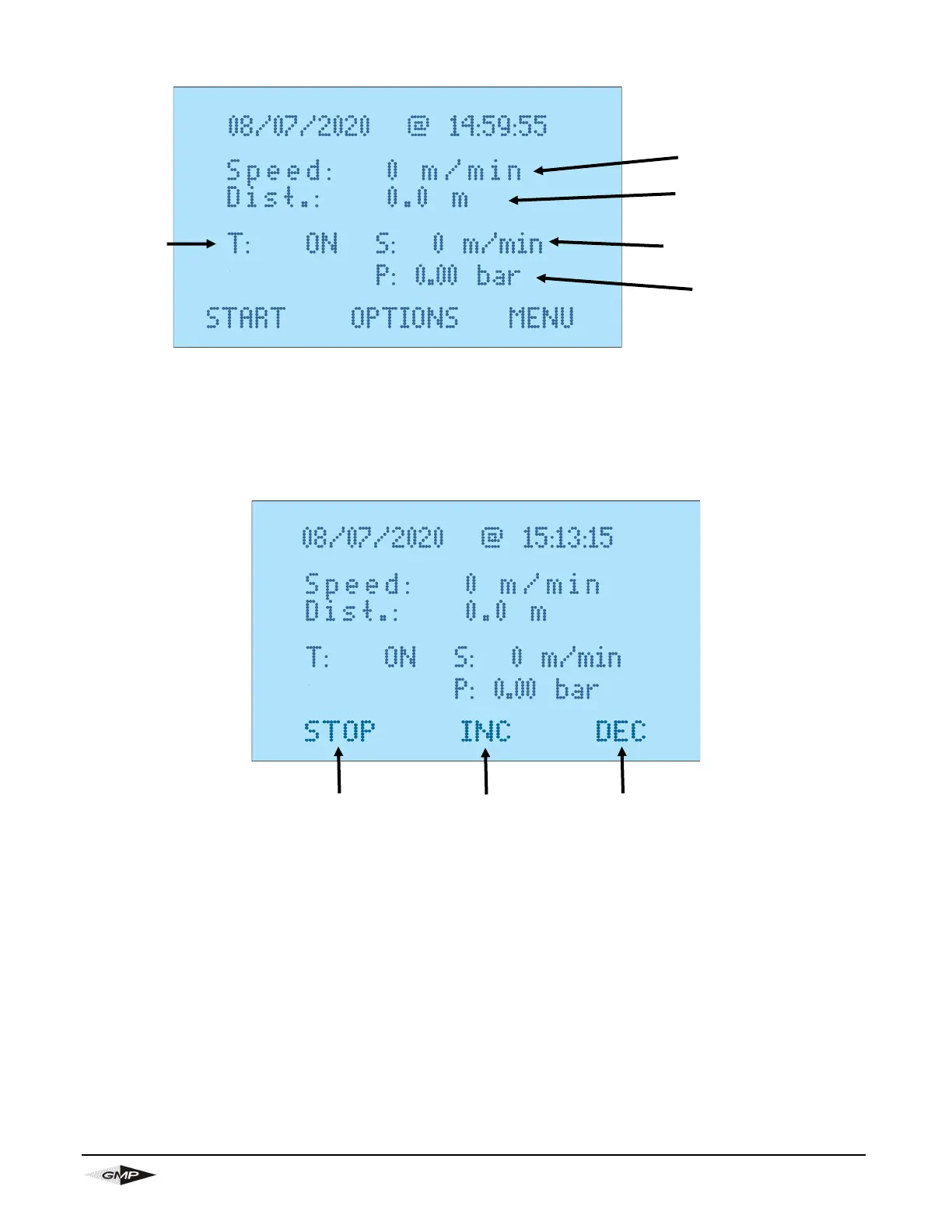
13.2 PRE-INSTALLATION SCREEN
This screen is accessed by pressing either “Resume Active Job” or “Start New Job” from the main screen,
it will also be shown if the installation is stopped and not finished.
In this screen you can set the maximum torque and speed, this is via the potentiometers the remote.
13.3 INSTALLATION SCREEN
The screen is shown when the machine is installing the cable, i.e. when the Start button is pressed on the
Pre-installation screen.
You can press “STOP” to stop the install where you will then be asked if you want to finish job. If you press
“Yes” the installation data will be saved and you will be taken to the main menu. If you press “No” you will
go to the pre-installation screen where you can resume the install.
If you have the electrical pressure control valve (optional) connected you can adjust the pressure in the air
box by pressing “INC” to increase and “DEC” to decrease the air pressure.
All other information is the same as the pre-installation screen. You can adjust the Torque and speed dur-
ing an install in the same way as when on the pre-installation screen. Care needs to be taken to not dam-
age the cable when doing this.
Stop
Install
Increase Air
Pressure
Decrease Air
Pressure
Maximum
Set Torque
Job
Distance
Installation
Speed
Air
Pressure
Maximum Set
Speed


 To Next Page