Page 20 Page 21
The appThe app
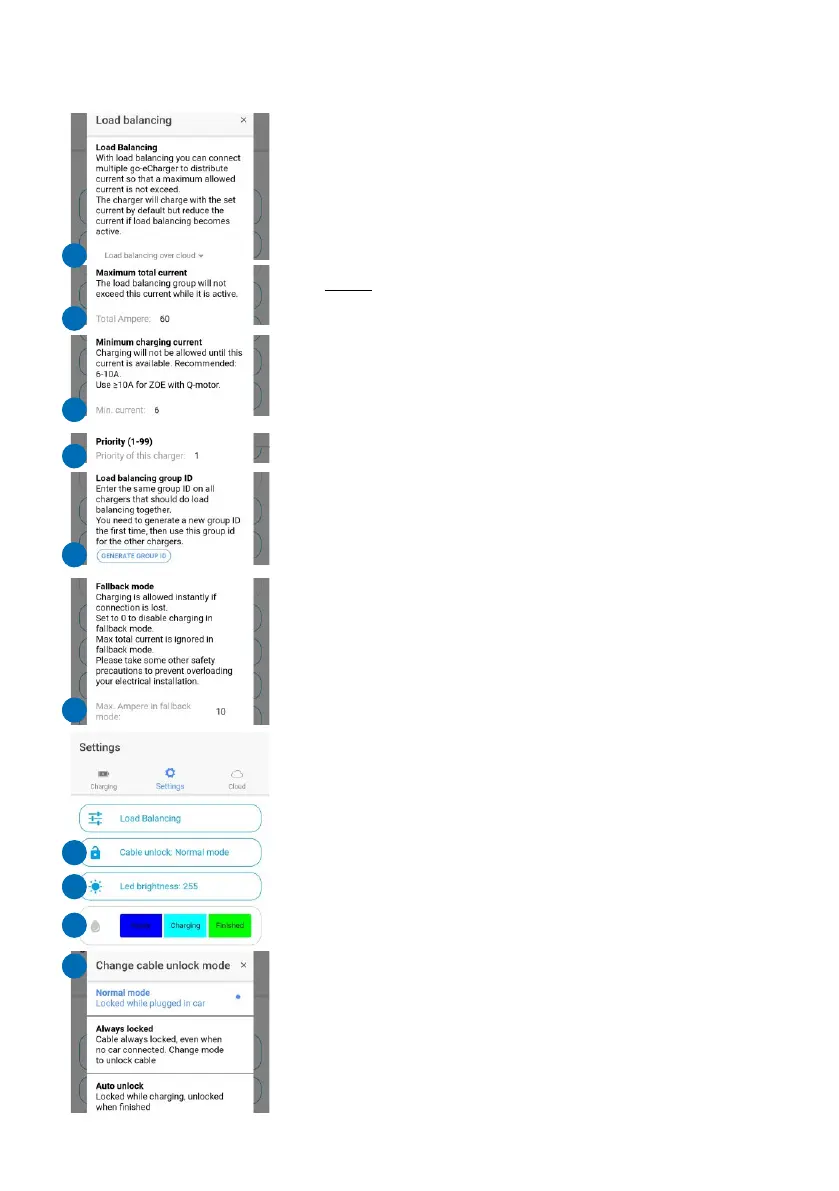
is required for this. Combine several go-eChargers
to a group, which are supplied by the same power
line so that it is not overloaded, by using load
balancing. This is how you do it: Define the maximum
permissible total current for the charger group (21)
and define the minimum charging current for several
chargers that are charging simultaneously (22).
Note: A minimum charging current of 6 A is always
required for a car to start charging at all. With a
current protection of e.g. 32 A, a maximum of five
vehicles can be charged at the same time.
In addition, priorities can be defined (23). For the first
charger of the load balancing group, you have to
generate a "load balancing group ID" (24). Then
enter this ID for all other chargers of the group. You
also have to enter all the other load balancing
settings again for the other chargers of the group.
If the cloud connection is temporarily interrupted, the
go-eChargers will continue charging in Fallback
mode (25). In this mode, the charging current for all
chargers is reduced to a predefined value.
Cable unlock (26)
In the submenu "Cable unlock" (29) you determine
whether the cable should remain locked in the
charging unit after the end of the charging process
until it is released on the vehicle side (default setting)
or permanently. Alternatively, you can also have it
unlocked automatically.
LED brightness (27)
In the menu item "LED brightness" (27), you control
the luminosity of the LEDs via a slider (30). The value
255 is the maximum brightness. You can also
determine whether the LEDs should be switched off
in standby mode.
LED colour (28)
You can use this menu item (28) to individually adjust
the LED colours for the charging states "Ready",
"Charging" and "Finished". Tap on the charging
mode whose colour you want to change. Then select
a point in the colour spectrum in the submenu (31) or
enter RGB values manually. Do not forget to save to
utilise the selected colour. You can also select
predefined colours by tapping on "Apply".
Ground check (32)
Attention: This function should only be used if the
power supply has no grounding (IT mains). If you are
not sure, you should leave the setting at "Ground
check enable"! The so-called Norway mode (earth
detection is deactivated) is visualised by 4 red LEDs
on the go-eCharger (3, 6, 9, 12 o'clock).
The go-eCharger has a safety function which checks
that the power connection used is sufficiently
earthed and prevents charging if there is insufficient
grounding.
In some regions, e.g. Norway, isolating transformers
are used (IT mains). In order to charge also in such
regions with the go-eCharger, the function "Ground
check" can be deactivated. When operating in the
usual European mains with earthing, switching off
the „Ground check" in case of insufficient earthing
can lead to danger!
21
24
21
25
20
21
22
23
21
26
21
27
21
28
21
29
31
30
32
WARNING
ATTENTION


 To Next Page