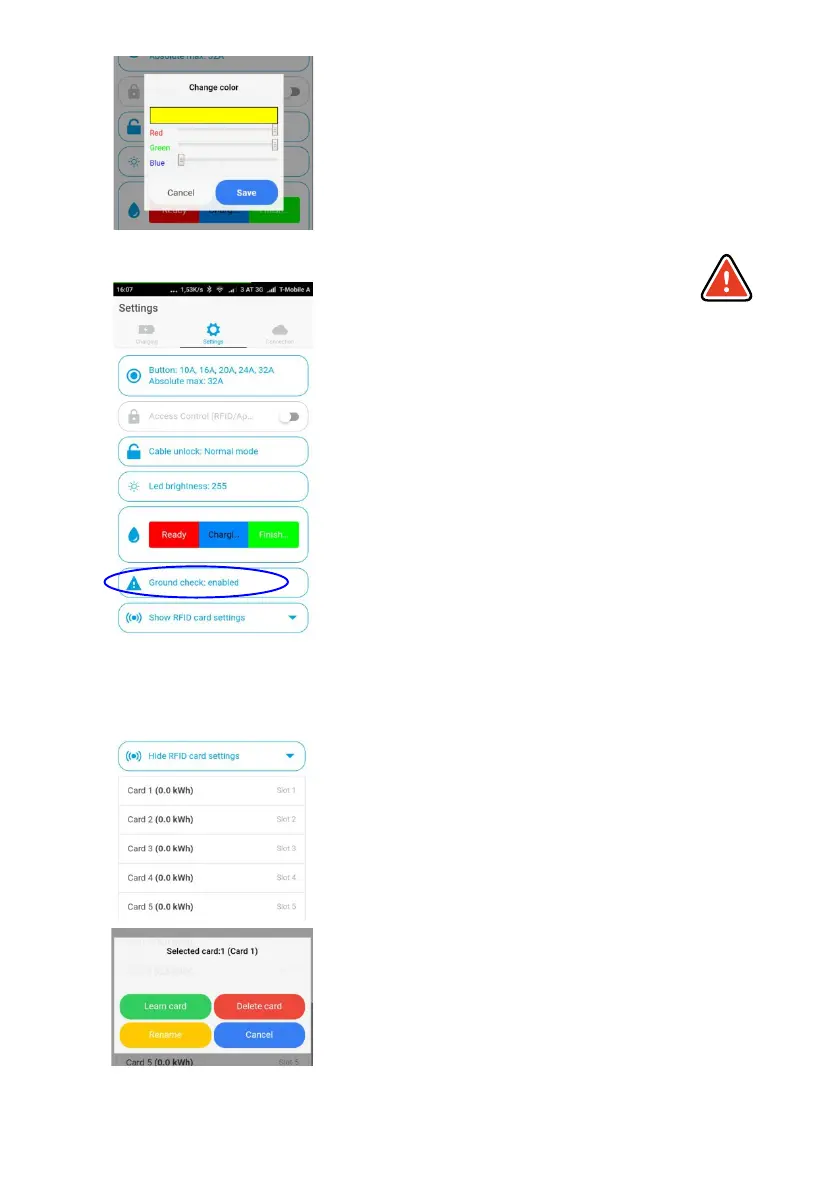
LED Brightness
Controls the brightness of the LEDs through a slider.
LED Color
Here the LED colours for "Ready","Charging" and
"Finish" can be individually adjusted.
Ground check enable / disable
Attention: This function should only be used if the
power supply has no grounding (IT mains). If you are
not sure, you should leave the setting at "Ground
check enable"! The so-called Norway mode (earth
detection is deactivated) is visualised by 4 red LEDs
on the go-eCharger (3, 6, 9, 12 o'clock).
The go-eCharger has a safety function which checks
that the power connection used is sufficiently
earthed and prevents charging if there is insufficient
grounding.
In some regions, e.g. Norway, isolating transformers
are used (IT mains). In order to charge also in such
regions with the go-eCharger, the function "Ground
check" can be deactivated. When operating in the
usual European mains with earthing, switching off
the „Ground check" in case of insufficient earthing
can lead to danger!
Show RFID card settings
Under this menu item you can manage RFID-
enabled cards or chips.
For each card, the charged kWh is stored and the
cards can be named.
Learn card
To do this, place any RFID card (but never put the go-
eCharger reset card) on the go-eCharger's RFID
card reader and press "Start". When the card has
been taught-in, the LED ring flashes briefly. Now the
Page 18
card can be used for the go-eCharger.
Delete cards
You can delete trained cards.
With the card, all data in the memory space of the
charging box is deleted.
The app allows you to manage multiple go-
eChargers. See "Show RFID Settings" for more
details.
Page 19
WARNING
ATTENTION
WARNING
ATTENTION



 To Next Page