EasyManua.ls Logo

Godox AD300Pro - Wireless Communication Setup; Wireless ID Settings

Godox AD300Pro
137 pages
Print Icon
To Next Page IconTo Next Page
To Previous Page IconTo Previous Page
Loading...
20
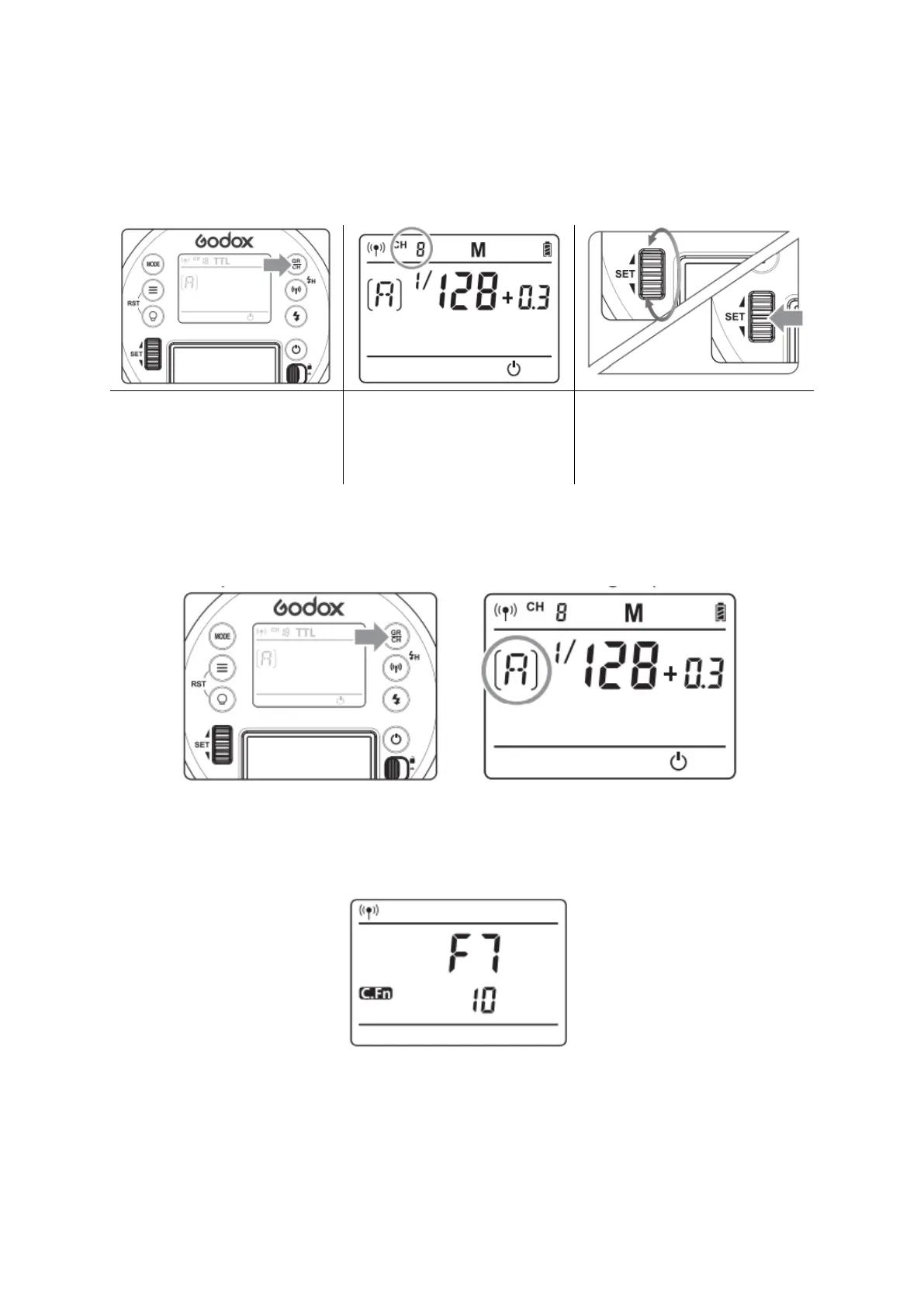
Setting the Communication Channel
If there are other wireless flash systems nearby, you can change the channel IDs to
prevent signal interference. The channel IDs of the master unit and the Slave unit(s)
must be set to the same.
Long press the <GR/CH>
Button for 2 seconds, so
that the icon will be
displayed on the VA panel.
Turn the Select Dial to
choose a channel ID from
1 to 32.
Press the <SET> button to
confirm.
Setting the Communication Group
Short press the <GR/CH> button to choose group ID from A to E.
Wireless ID Settings
Press the MENU button to enter C.Fn to choose OFF or any figure from 01-99.
Note: This can only be used when the master unit possesses the wireless ID function.

Other manuals for Godox AD300Pro

Related product manuals