CH GRA32
DIM
CH GRA32
DIM
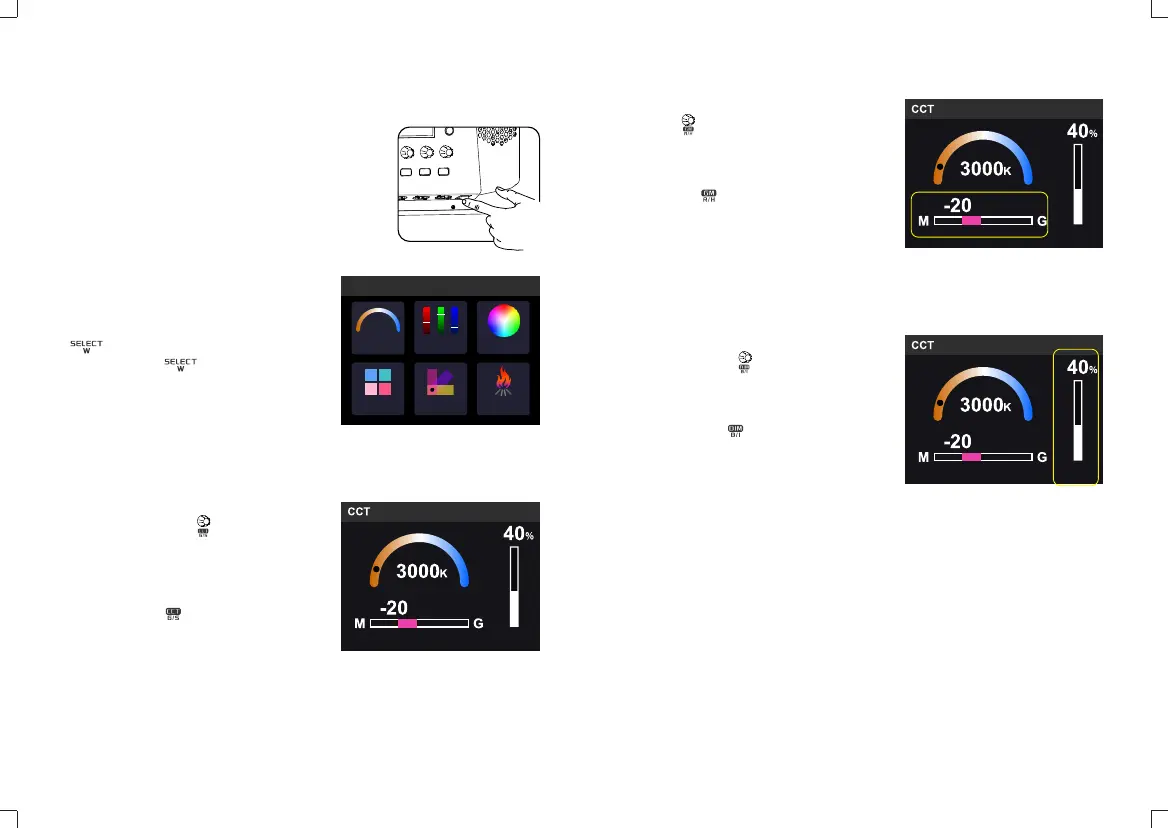
Press MODE button and enter Mode
selection interface choose CCT mode,
RGB mode, HSI mode, R-GEL and L-GEL
mode and FX light effects modes. Turn the
select dial to switch different modes
and short press select dial to enter
the adjustable interface.
2.1.1 Color Temperature: enter CCT
interface and turn the select dial to
adjust color temperature from 2500K to
8500K. Turn the select dial leftwards to
decrease the value while rightwards to
increase.
Short press the select dial to choose
color temperature from 7 levels in recycle:
2500K/3300K/4200K/5600K/6500K/7500K/
8500K.
Adjust the value in each level: adjust 100
values in normal operation while 1000
values in quick operation.
Operation
• Power switch:
Turn on/off the power switch to power on or
off the LED light.
• MODE button:
Note: the LED light will auto enter MODE
interface when being turned on.
2.1 CCT Mode
CCT
RGB
HSI
CH GRA32
R-GEL
L-GEL FX
MODE
2.1.2 Hue adjustment: in CCT interface,
turn the select dial to adjust hue value
from -50 to 0 to 50. Turn GM select dial to
the left to increase magenta, and turn GM
select dial to the right to increase green.
Short press select dial to quickly set
the hue value to 0.
Adjust the value in each level: adjust 1
value in normal operation while 5 values in
quick operation. 1000 values in quick
operation.
2.1.3 Brightness adjustment: in CCT
interface, turn the select dial to adjust
brightness from 0% to 100%. Turn the
select dial leftwards to decrease the value
while rightwards to increase.
Short press the select dial to turn off
the brightness and press it again to
recover the former brightness value.
Adjust the value in each level: adjust 1
value in normal operation while 10 values
in quick operation.
CH GRA32
DIM
- 25 - - 26 -


 To Next Page