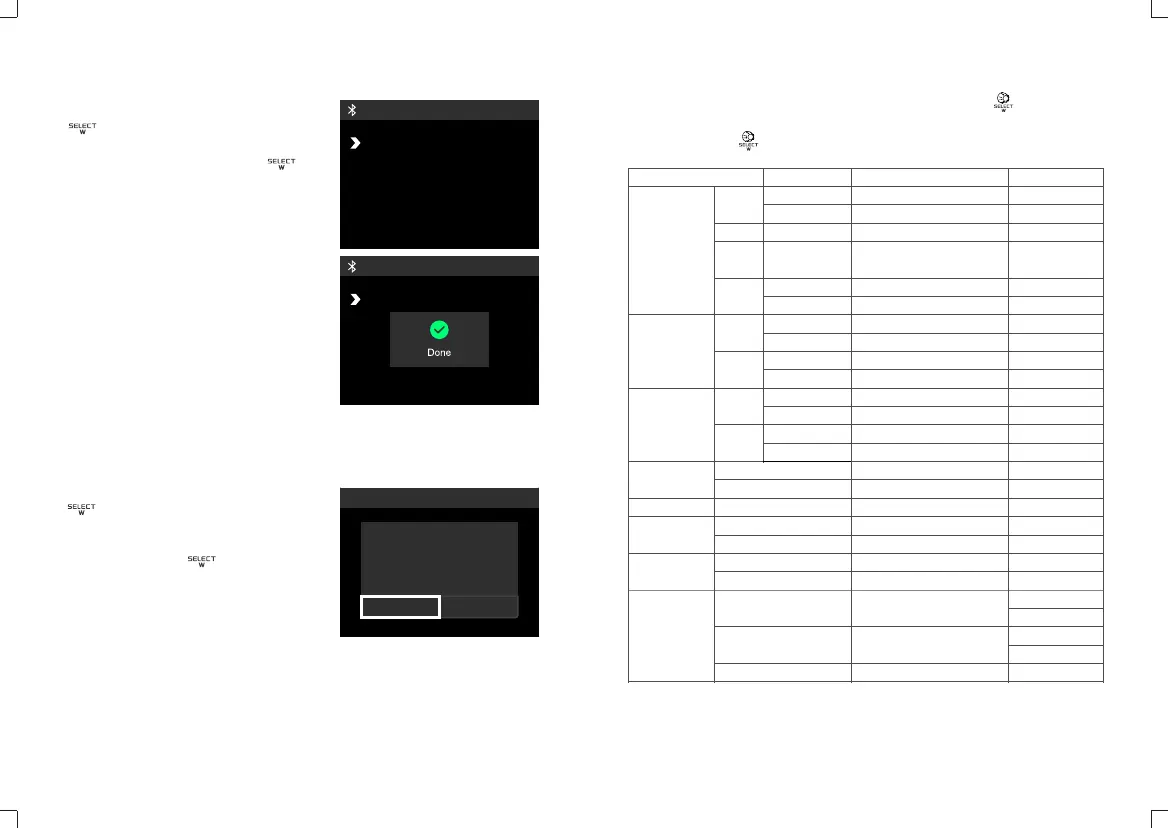
BLUETOOTHON
RESETNO
MAC0004
BLUETOOTHON
RESETNO
MAC0004
In the MENU interface, turn the select dial
to select Bluetooth, and then press
the dial briefly to enter the Bluetooth
interface. Then turn the select dial
to select "Bluetooth" or "reset", short press
the dial to select reset, finally turn the
select dial to select “yes", and the "Done"
dialog box will be displayed.
6. Bluetooth Reset
In MENU interface, rotate the select dial
to select to restore factory setting,
and then press the dial to enter the
recovery factory setting interface. Then
rotate the select dial to select " yes",
and the display will display the "Done"
dialog box and load it into the initial startup
interface automatically.
7. Reset
Custom Function Selection
Wireless
Channel
Group
ID
Bluetooth
Reset
Mode
Address
Choose any figure from 1 to 32
Choose any letter or figure from
A,B,C,D,E,F and 0 to 9
Off
Choose any figure from 1 to 99
Start resetting
FOLLOW mode
LEAD mode
Choose any figure from 001 to 512
Off
Silent Mode
Three gears are adjustable
Chinese
English
Scree will enter sleep if there is
no operation after 15 minutes
Scree will enter sleep if there is
no operation after 30 minutes
By default
Needed to be set in
FOLLOW mode
Custom Setting Function
1. Press MENU button to enter the menu interface and turn the select dial to
choose the custom function icon.
2. Short press the select dial once and turn it to choose custom functions.
3. Press MENU button to back to the main interface.
Setting Setting & Description
Restrictions in Usage
Off
On
1~32
A,B,C,D,E,F/0~9
OFF
01~99
Off
On
No
Yes
FOLLOW
LEAD
001~512
OFF
Off
On
1~3
Simplified Chinese
ENGLISH
No
Yes
15 min.
30 min.
Never
Wireless
Bluetooth
DMX
Fan Setting
Screen Brightness
Language
Restore
Factory Setting
Screen Sleep
It can be selected only
in follow mode
When off is selected, it is
not controlled by the console
RESET
是
否
Yes
No
Factory data reset
- 35 - - 36 -


 To Next Page