No.
1
2
3
4
5
6
7
8
9
10
11
12
13
14
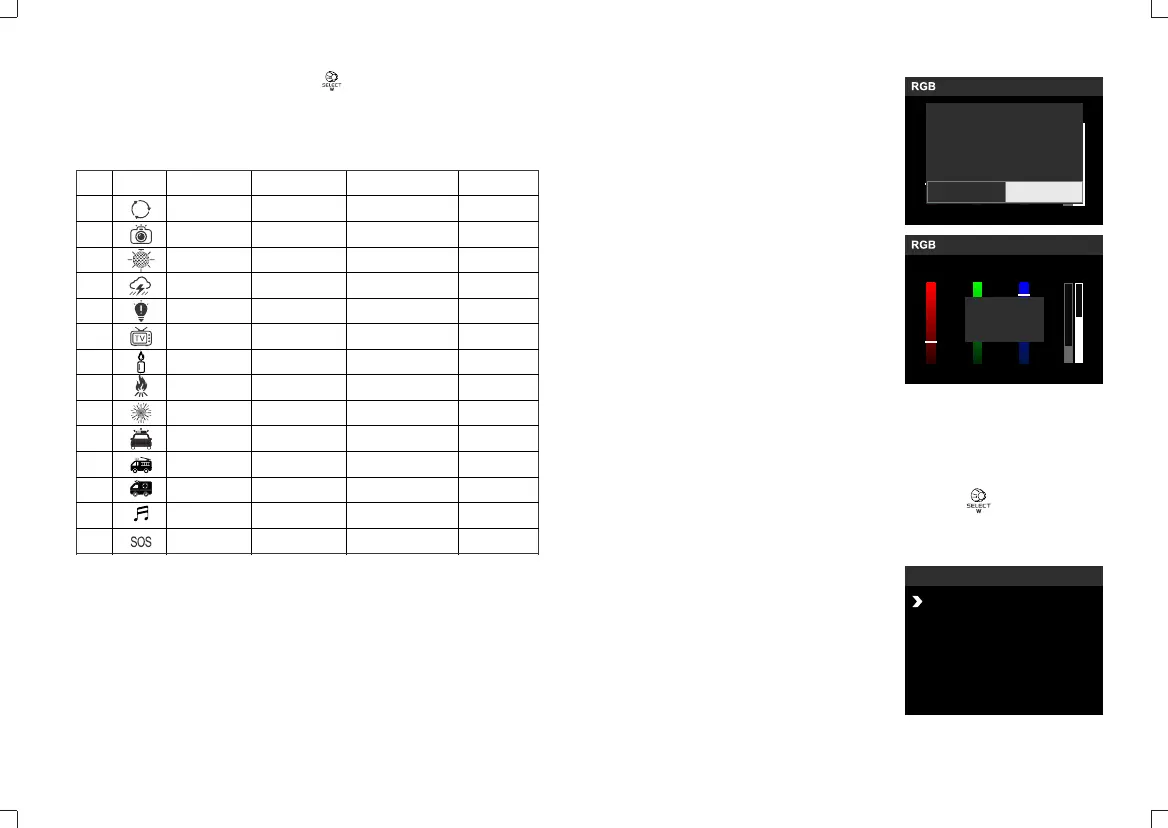
Scene
RGB cycle
Flash
Laser
Lightning
Broken bulb
TV
Candle
Fire
Firework
Police car
Fire truck
Ambulance
Music
SOS
Display
2.5.2 After selecting the category, press the select dial to choose the modes
from I, II and III, which will be displayed in recycle.
Choose light effects from 14 categories which are divided into 39 kinds
according to different requirements.
Display I
Slow speed
Flash
Birthday party
Discontinuous
Discontinuous
Slow speed
Discontinuous
Firewood
Brief
Strong flash
Strong flash
Strong flash
Mode 1
Display II
Medium speed
Press conference
KTV
Frequent
Frequent
Medium speed
Frequent
Campfire
Continuous
Frequent flash
Frequent flash
Frequent flash
Mode 2
Display III
Quick speed
Paparazzi
Disco
Sustainable
Sustainable
Quick speed
Sustainable
Fire hazard
Show
Quick flash
Quick flash
Quick flash
Press the MENU button to enter MENU interface. Turn the select dial to
choose control mode from wireless, Bluetooth and DMX. After setting all the
modes, press the MODE button or BACK button to back to the MENU interface.
CH GRA32
R
123
G
B
W/I
34 34
34
Overwrite Preset 1 Settings
No Yes
Preset button 1, 2, 3 and 4: long press the
button for 3 seconds to save the current
mode set parameter or recover the preset
values. Short press the button to change
the preset parameters quickly.
2.6 Preset Function
Control Mode Selection
Bluetooth Control/2.4G Wireless Control/DMX Control
FX
MENU
CH GRA32
Wireless
Bluetooth
DMX
FAN
CH GRA32
R
123
G
B
W/I
34 34
34
Saved
- 29 - - 30 -


 To Next Page