The flash output is adjustable from 1/128 to 1/1 full power in 0.1
and 1 step increment.
1. Choose M and press the < > menu button to back to the
main interface.
2. In M mode’s main interface, turn the select dial to set the flash
output value.
To obtain a correct flash exposure, use a hand-held flash meter to
determine the required flash output.
• Light Control Flash (PHOTOC)
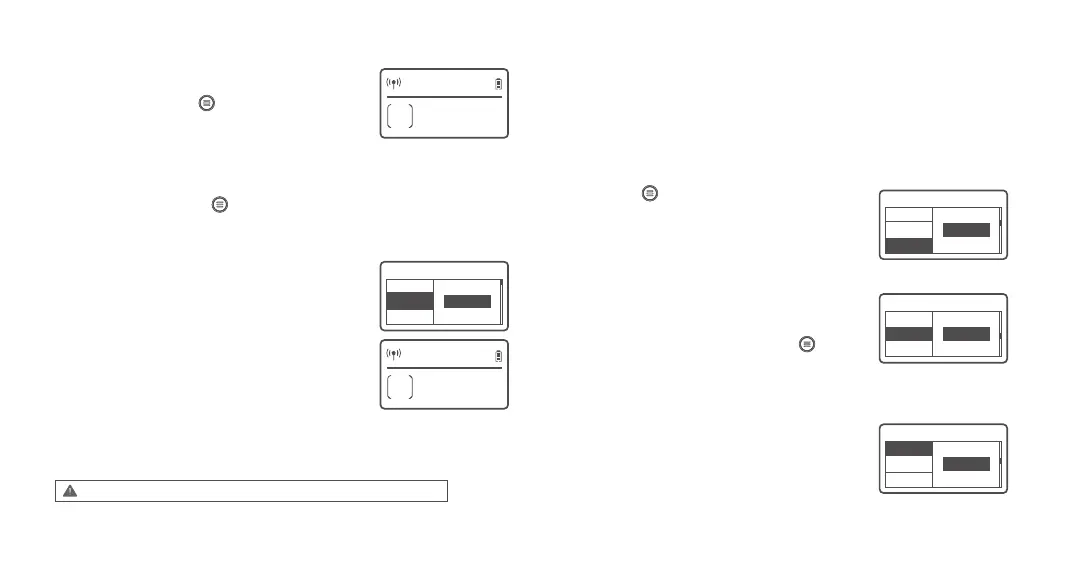
In M manual mode, press the < > menu button to enter C.Fn
and turn the select dial to choose PHOTOC. Then, press the SET
button and turn the select dial to choose S1 or S2 function.
Press the < > menu button to enter C.Fn custom
setting. Turn the select dial to choose wireless WL, press
the SET button, and turn the select dial to choose ON or
OFF. OFF means the wireless function is turned off while
ON means turned on.
MF12 flash only supports S1/S2 light control flash in M manual flash mode.
32
CH
M
E
32 + 0.9
1/
C.Fn Ver 0.5
WL
MODE
S1PHOTOC
32
CH
M
E
32 + 0.9
1/
S1
C.Fn Ver 0.5
PHOTOC
MODE
ON
WL
C.Fn Ver 0.5
GR
32
ID
CH
C.Fn Ver 0.5
E
ID
CH
GR
• M Manual Flash Mode
• S1 Secondary Optic Triggering
• S2 Secondary Optic Triggering with Anti-preflash
Choose S1 light control synchronous flash, flash MF12 can be
used as auxiliary Light, create a variety of lighting effects,
suitable for manual flash environment. It will trigger the flash
synchronously with the first flash of the main flash. The effect is
the same as using the wireless flash guide, and the response is
sensitive.
Select S2 light control to prevent pre flash, flash MF12 can be
used as auxiliary light, suitable for TTL automatic flash shooting
environment. With high-energy anti pre flash function, when
using the camera with a pre flash function, S2 light control pre
flash function is used to achieve synchronous shooting. At the
same time, it will trigger the flash synchronously with the second
flash of the main flash with TTL function, that is, the second light
control flash.
Wireless Radio Transmission
With built-in Godox 2.4G wireless X system, this MF12 can be used in combination with
Godox X1, XPro and X2 trigger. As a auxiliary unit, MF12 can be compatible with Canon,
Nikon ,Sony, Panasonic, Olympus/Fuji system and switched automatically. Nikon camera
(using X1T-N), Canon camera (using X1T-C) and Sony camera (using X1T-S) can share
one or more MF12’s TTL functions.
• Wireless (WL) Setting
• Channel (CH) Setting
• Group (GR) Setting
If there are other wireless flash systems nearby, you can
change the channels to prevent signal interference. The
channel (CH) of the transmitter unit and the receiver
unit(s) must be set to the same. Press the < > menu
button to enter C.Fn menu. Turn the select dial to choose
CH. Press the SET button and turn the select dial to
choose channel from 01- 32. Then, short press the SET
button to exit from CH setting.
Enter C.Fn menu and turn the select dial to choose GR.
Press the SET button and turn the select dial to choose
group from A/B/C/D/E. Then, short press the SET button
to exit from GR setting.
- 27 - - 28 -


 To Next Page