- → 0 → +
AF AF-assist beam
ON ON
C.Fn-08
OFF OFF
Sv APOT
Slave auto power off
timer
60min 60min
C.Fn-10
30min 30min
BEEP Beeper
ON ON
C.Fn-20
OFF OFF
LIGHT Backlighting time
12sec Off in 12 sec.
C.Fn-22 OFF Always off
ON Always lighting
LCD LCD contrast ratio 0~9 10 levels
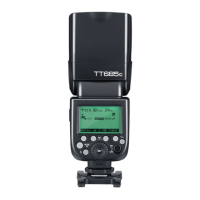
1. Press < Zm/C.Fn > Backlight/Custom Setting Button for 2 seconds or longer until C.Fn
menu is displayed. The “Ver x.x” in the top-right corner refers to the software version.
2. Select the Custom Function No.
* Turn the Select Dial to select the Custom Function No.
3. Change the Setting.
* Press<SET> button and the Setting No. blinks.
* Turn the Select Dial to set the desired number. Pressing <SET> button will confirm the
settings.
* After you set the Custom Function and press <MODE> button, the camera will be ready to
shoot.
4. In the C.Fn states, long press the “Clear”button for 2 seconds until “OK”is displayed on the
panel, which means the values in C.Fn can be reset.


 To Next Page