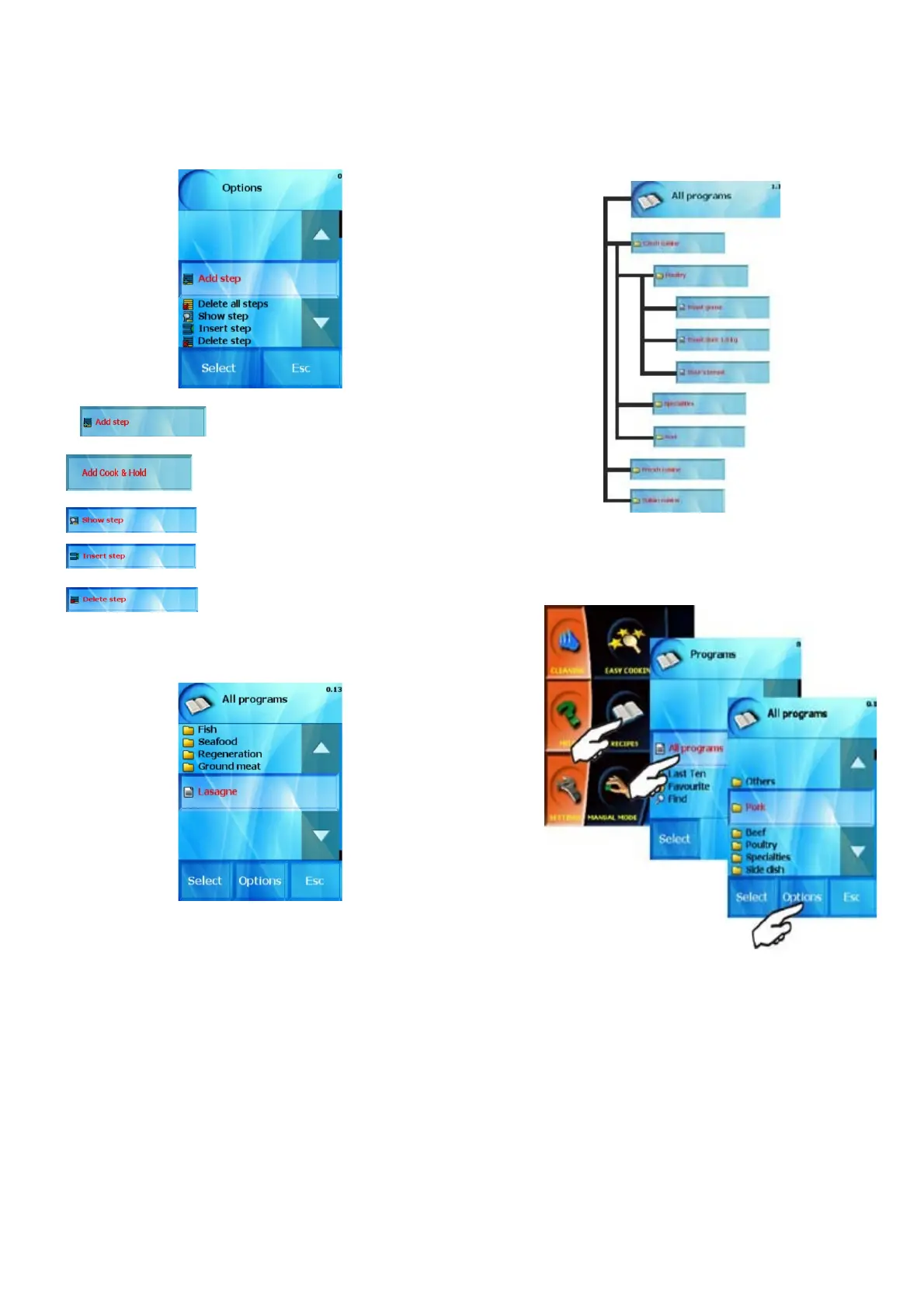
using this option you can add a
new step to the program after
the previously created steps-
– Add Cook&Hold function as a last
step. Default parameters is possible
to set in the „Settings“
section
show currently selected step and you
can edit it
using this command you create a new
step, which will be entered before the
selected step.
- delete the selected step and adds new
number to the remaining steps
The program we created by using the procedure described above
will be listed in the initial offer “All programs” as individual program,
in groups of programs.
This program is possible to edit and move to another category
through the „Options“ option.
2.2 Creating your own groups of programs
To make it easier to work with the programs it is possible to
organize created programs in groups, according to the type of
processed food, processing technology, etc. We can also create our
own group organization and structure so that the orientation and
selection of programs is easy and less complicated.
Example structure:
You can also use pre-entered groups, or either rename or delete a
group you will no longer use by using “Options“ button.
The access to the section of group organization is selected as shown
below
Choose “Add catagory”
20
OPERATION MANUAL FOR GOLDSTEIN VISION COOKING CENTRES


 To Next Page