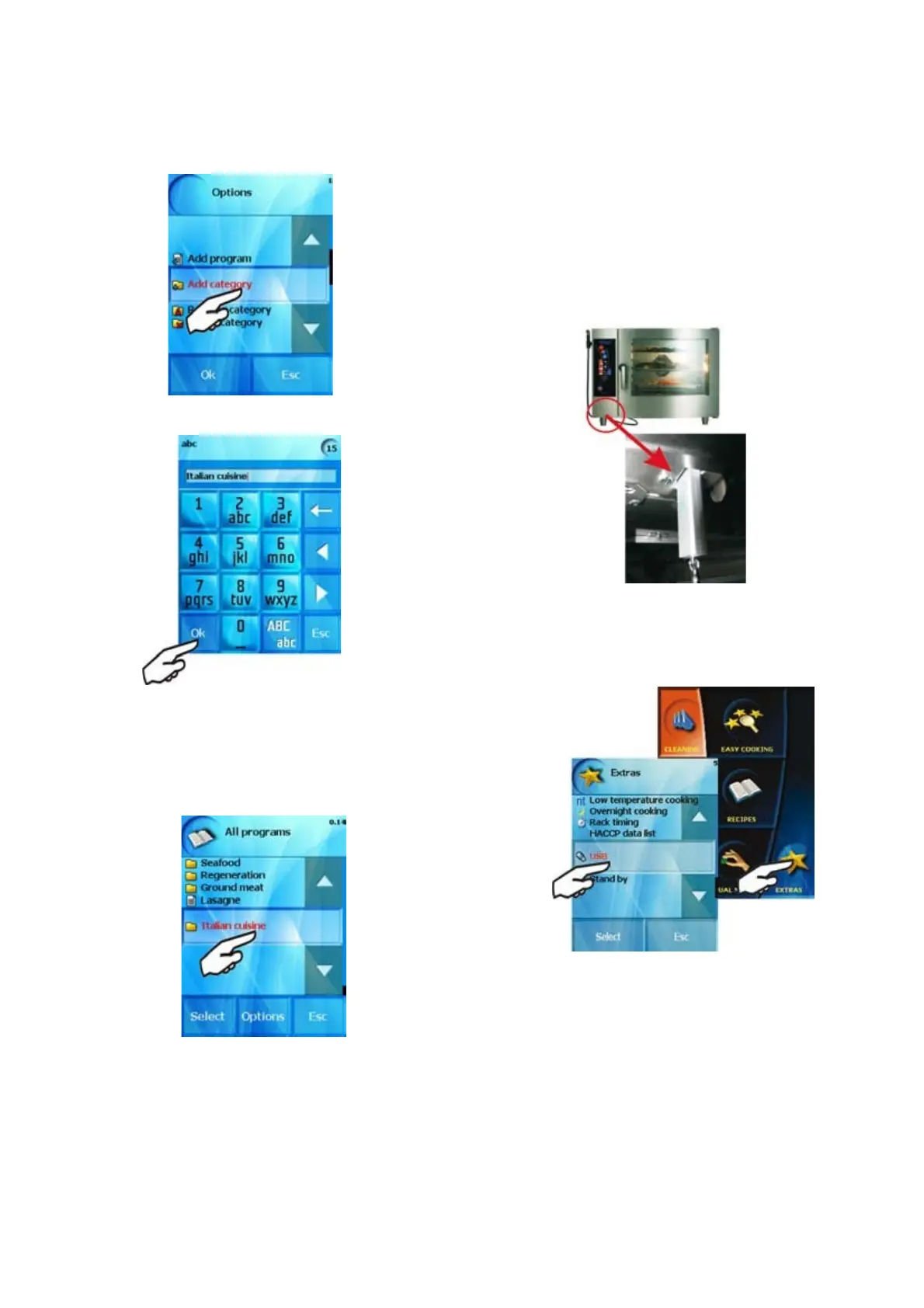
The combi-steam oven will offer the option of entering the category
name
You can enter the category name by using the same procedure as
entering the program name.
After pressing “Select” the newly created group will be placed at
the end of the list of groups.
We can add programs into the new subgroup according to our own
needs, add new subgroups or delete, rename programs etc. according
to the actual offer. The process is the same like as in „Creating of
your own recipes“ chapter
2.3 Loading of programs via USB flash stick
You can use your USB flash stick when working with „Recipes“
section. You can choose recipes or categories and copy these to your
USB or to your combi steamer. Therefore you can have the same
recipes or categories in all your combi ovens.
2.3.1 Loading of programs „Combi oven to USB“
a) Connect your USB flash stick to the combi steamer.
b) The connection is signalized by sound. Enter „EXTRAS“ menu
and press the USB button which is active (highlighted).
In case of no sound and the USB button is not active {grey} try
connect the USB once again.
21
OPERATION MANUAL FOR GOLDSTEIN VISION COOKING CENTRES


 To Next Page