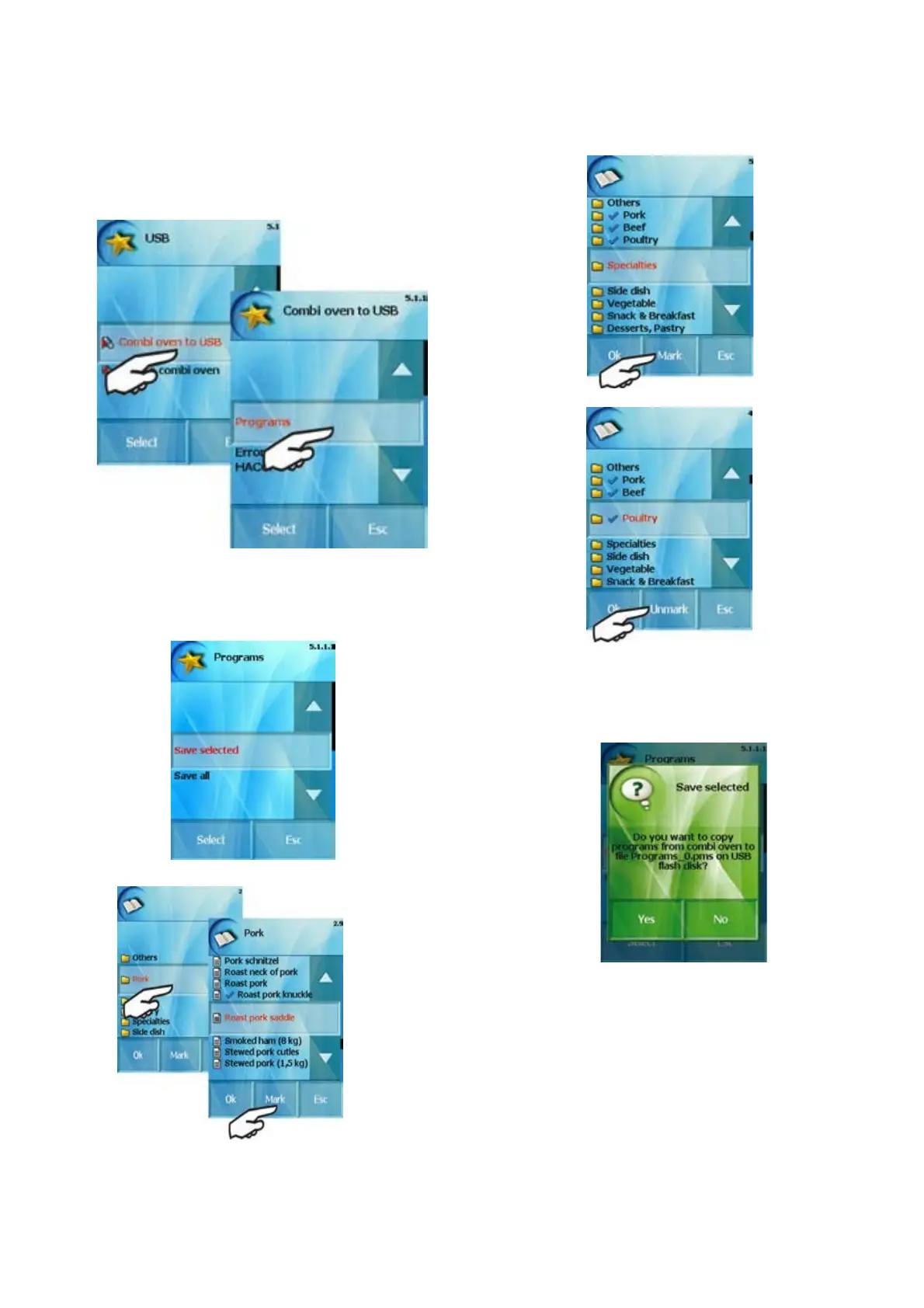
c) The screen of choices „Combi oven to USB“ or „USB to
Combi oven“ appears. Choose „Combi oven to USB“ and
then the „Programs“ button.
d) Then you can choose „Save selected“ or Save all“.
„Save All“ – all programs of „All programs“ section will
be completely saved on USB. „Save selected“ – you
can choose and save on USB either
marked programs'
or marked catagories.Both choices could be made by Mark“
button
You can unmark programs as well by using 'Unmark'button
As soon as you choose the programs or categories which you
want to copy on your USB confirm it by clicking „OK“.
e) The green screen apears as the last step. If you want confirm,
press „Yes“, if not, press „No“.
The programs or categories are saved on your USB as
Programs_0.pms
When you load these programs (catagories) back into the
steamer they are saved here under the original name in the
“ALL PROGRAMS” section.
22
OPERATION MANUAL FOR GOLDSTEIN VISION COOKING CENTRES


 To Next Page