6
ART 7W/G2+ MONITOR
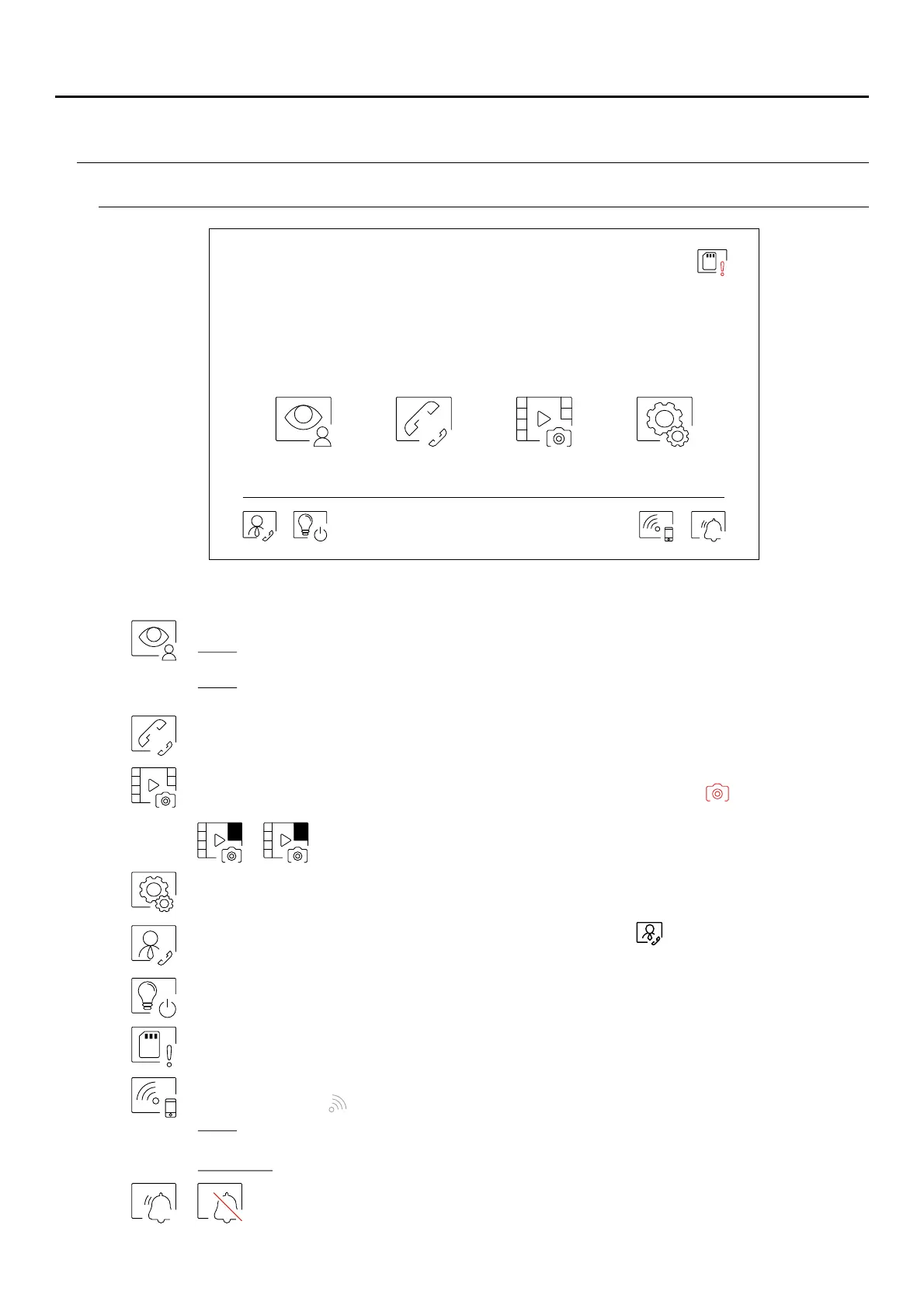
Main menu
09:27PM
07-04-2020 Tues
Door panel Intercom Recordings Settings
If the device is in standby (screen off), touch any part of the screen to activate it and bring up the main menu. The
device will return to standby mode after 20 seconds without activity.
Display the image from the door panels and cameras connected to the system.
Note: ART 7W/G2+ monitor 'V.01 + No. 6539 and V.02' or later: This enables the door panel camera
to be changed, the audio of the corresponding door panel to be activated and the door to be opened.
Nota: Monitor ART 7W/G2+ "V.0 ó :5 later The icon can be set to disable or enable in the main menu,
the icon will change colour (grey off, white on). See pages .20-22
Access the menu for intercom with other monitors in the system.
Display the list of images recorded in the device memory. If there are new or unseen images, the
number will be displayed in the top right of the icon and notification will illuminate. If theled
number is greater than 9, three points will be displayed.
Change the system settings.
Indicates that the inserted MicroSD card must be formatted from the monitor. Press to access the
storage functions menu and format the card.
Press to activate or deactivate Wi-Fi transmission. The icon will change colour (white on, grey off) and
notification icon will illuminate depending on the status.
Note:ART 7W/G2+ monitor 'V.01 + No. 6539 and V.02' or later:
Press for 3 seconds to activate/deactivate Wi-Fi transmission.
Important: Only the master monitor can activate Wi-Fi transmission.
Press for 3 seconds to activate or 1 second to deactivate the 'Do not disturb' function (the
monitor does not sound when a call is received). The notification( “HZ” p g 5)see note a e
icon will illuminate depending on the status.
2 ...
Important: New main menu with ART 7W G2+ monitor with V.04 and later.
ART MONITOR7W/G2+
If there is a monitor configured as "guard" in the building, the icon will appear on the apartment’s
monitors. Press to make a call to the guard monitor, (see page 19).
Press to " " + &staircase light activation (SAR-G2 SAR-12/24 modules required).



 To Next Page