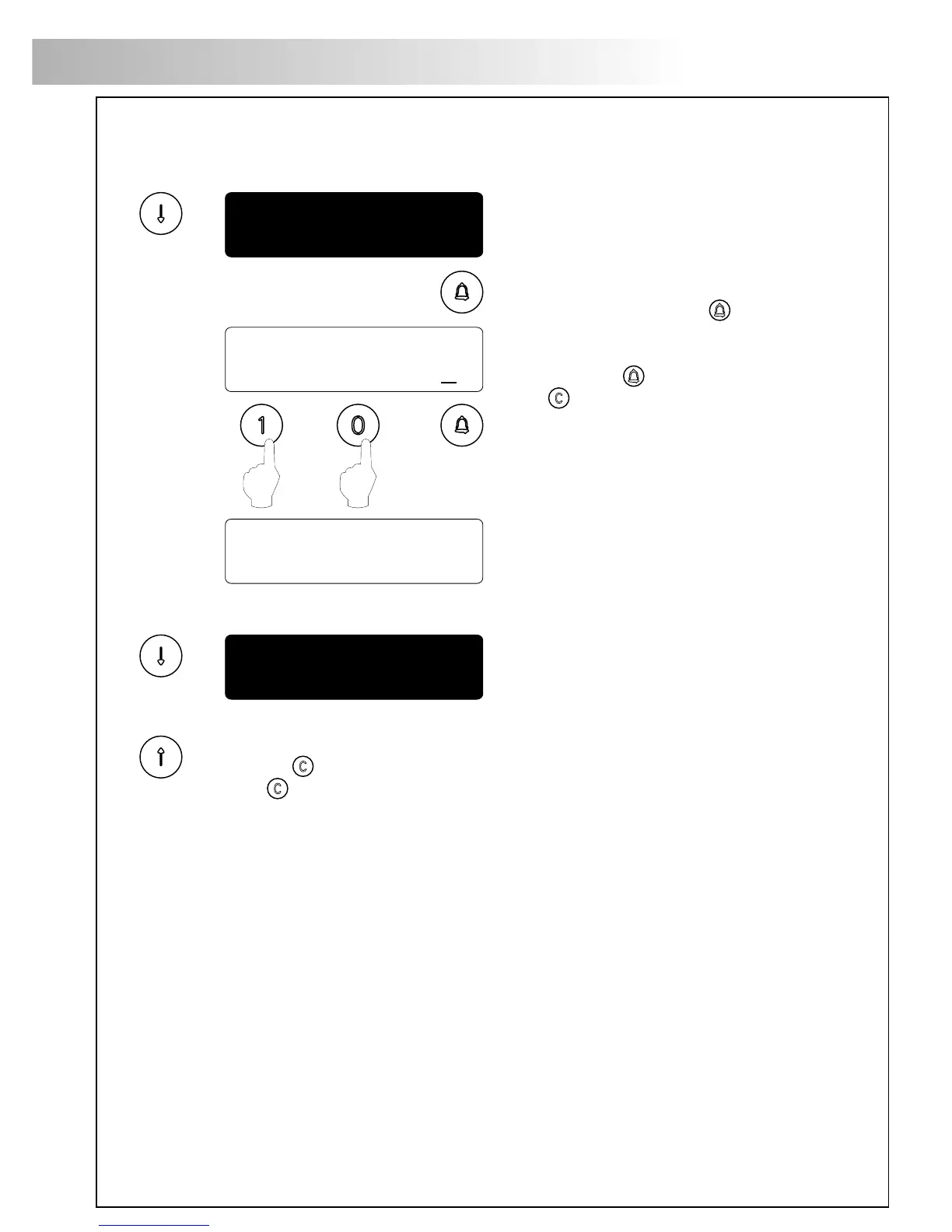
:03
door open time
modify value
:03
:10
door open time
Displays the door panel software version.
version 5.00
Coming from previous page
Allows to set the lock release activation time.
Modify this value when the panel is placed
far from the door. The value is shown in
seconds and the factory default value is
3 seconds.
To change this value press : the display
will show the message modify value.
Key in the new activation time and confirm
by pressing .
If is pressed the former value
will be restored.
The lock release will not be activated if a null
value is introduced. To avoid lock release
overheating do not introduce a high value.
onfiguration menu.
C
End of the configuration menu. Use "UP" arrow key to move to the previous options.
Press to exit from the configuration menu and return to the main menu.
If is pressed twice the panel will exit from the programming menu.
87
DOORPANEL PROGRAMMING
Continue
1st access code
:2222
yes
access control
*
ccess control menu.
A
access control
:2222
modify value
:4013
1st access code
2nd access code
3rd access code
:3333
:4444
Coming from previous page
To enter into access control menu, follow
the steps described on page 83
and press when the display shows the
message access cONtrOl.
Allows to enable or disable the access control
feature (lock release activation by entering
a PIN code).
Press to change this value.
The system has three different codes to activate
the lock release.
To change the first code press : the display
will show the message modify value.
Key in the new code and confirm by pressing
.
If is pressed the former value
will be restored.
Always use a four digits code.
To change the second code proceed as
described on the previous menu.
To change the third code proceed as
described on the previous menu.
This code allows the lock release activation
during a programmable time period,
as described on the next menu.
88
DOORPANEL PROGRAMMING
Continue








 To Next Page